ℹ️ Introduction
The INT Dashboard helps Integrated Neighbourhood Teams (INTs) identify and prioritise patients for targeted proactive care or case management, and monitor their progress through these pathways. By the end of this article, you will understand how to identify patients, record care activity and use clinical reports to review areas for improvement.
Background
INTs bring together health, social care and community services to provide more joined-up care for people in their local area. While Primary Care Networks (PCNs) are largely based around GP practices, INTs aim to strengthen collaboration between a wider range of organisations, including GP practices, community health services, NHS trusts, hospitals, local authorities and voluntary, community and social enterprise (VCSE) organisations.
The aim is to make care easier to access, closer to home and better coordinated around people's needs. INTs can support this through targeted proactive care, which focuses on specific interventions for identified patient groups, and case management, which brings professionals together to support people with complex needs or who may be at risk of deterioration or hospital admission.
How Ardens Can Help
The INT Dashboard brings together reports, case finders and clinical indicators to support teams in identifying patients and deciding where to focus their resources.
It includes eight core clinical areas:
Cancer
Cardiovascular, Renal and Metabolic (CVRM)
Frailty and End of Life (EoL)
Mental Health
Obesity
Prescribing
Respiratory Medicine
Vaccinations
These areas help teams identify patients who may have undiagnosed conditions, need further optimisation or are overdue a review. Patients can then be considered for targeted proactive care or case management where appropriate.
The dashboard also tracks patients as they move through the pathways, from referral and assessment through to ongoing care and the end of the pathway.
Standardised clinical templates for EMIS Web, SystmOne and Medicus help teams record activity consistently, making it easier to review outcomes, compare performance across INTs and explore health inequalities, including across Core20PLUS5 groups.
📍Access the Dashboard
Login to Ardens Manager
Select Contracts from the left-hand panel
Select INT Dashboard - National
🏢Workflow
1️⃣Identify
Patients who may benefit from targeted proactive care (TPC) or case management (CM) can be identified opportunistically when they present for care or proactively or using the risk stratification reports on Ardens Manager on the All page of the INT Dashboard.
For example, the ?For INT as asthma and high risk, or ?For INT as high qAdmissions risk.

To further refine and target a cohort:
Open the Filter
Enter your criteria
Select Apply to update the report

Use this information alongside your team's knowledge of local needs and available resources when deciding which patients to prioritise.
ℹ️ Access the Search and Filter support article for guidance on breaking down reports.
To view the patients
Select the PATIENTS tab
Select View to open the Patient View. This will show more details about the patient and any outstanding work
Select Open in to launch the clinical record and take the appropriate action
ℹ️ Access the following support articles for more guidance on working with patients in Ardens Manager:
When a patient is considered suitable for referral, record the appropriate activity using the Integrated Neighbourhood Team template:
Targeted proactive care planned – for targeted proactive care.
Referral for case management – for case management.
Recording the referral allows the patient's progress to be tracked through the INT pathway. The next step is to assess the patient's needs and suitability for the pathway.
EMIS Web
To open a template:
Access a patient record
Select the Consultation tab or click Add > Consultation
Select Run Template on the EMIS ribbon
Within the Template Picker screen, search for the Integrated Neighbourhood Team template
Double-click or select the template and click OK to launch
Tick the box to indicate the pathway for referral and add additional notes as appropriate

SystmOne
To open a template:
Open a patient record
Press F12 on your keyboard and search for Integrated Neighbourhood Team
Click and hold, then drag to the left to save as a favourite

Double click to open
Tick the box to indicate the pathway for referral and add additional notes as appropriate

2️⃣Assess
Once patients have been identified or referred, the INT team can use the pathway reports to find those awaiting assessment. The needs assessment helps the team understand the patient's circumstances, decide whether the pathway is appropriate and determine what support may be required.
Use the relevant report to identify patients awaiting assessment:
For TPC needs assessment as planned – for patients planned for targeted proactive care.
For comprehensive needs assessment as CM Referral – for patients referred for case management.
To review the patients within a report:
Select View to open the report breakdown.
Explore the available breakdowns, such as demographics and risk factors, to understand the cohort.

Record the appropriate needs assessment using the relevant clinical template:
Targeted proactive care needs assessment – for targeted proactive care.
Comprehensive proactive care needs assessment – for case management.
The assessment should help the team determine whether the patient is suitable for the pathway and what intervention or coordinated support may be needed. The outcome can then inform the next step in the patient's care.
EMIS
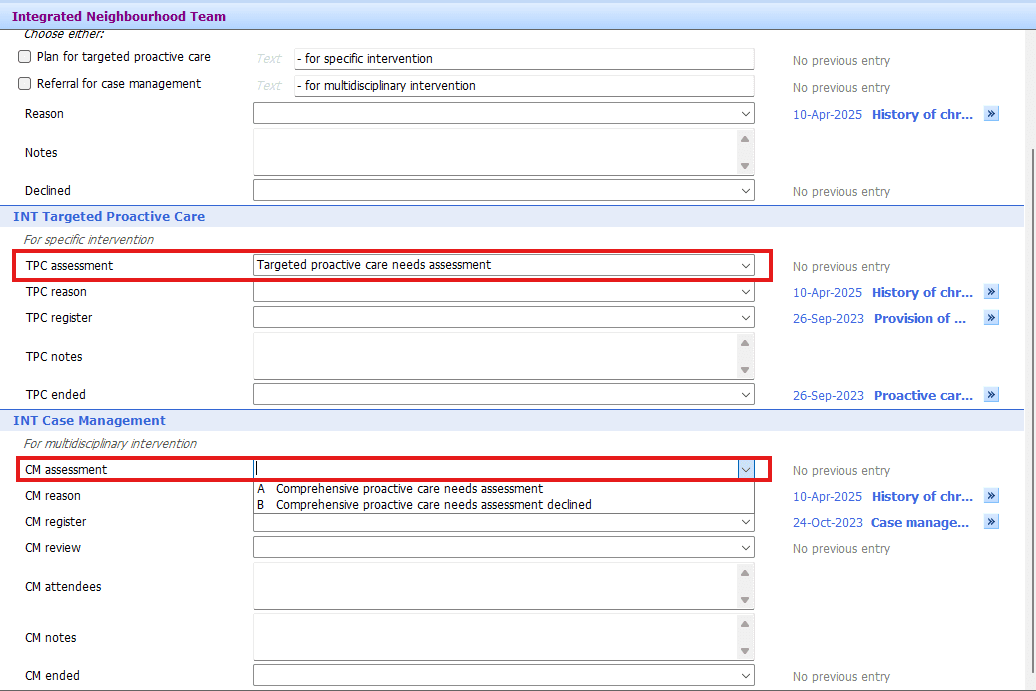
SystmOne

3️⃣Register
To add a patient to a TPC or CM register, record the following codes from the template:
Provision of proactive care – to register a patient for targeted proactive care.
Case management started – to register a patient for case management.
This allows the dashboard to reflect the patient's progress from assessment into ongoing care.
EMIS

SystmOne

4️⃣Review
Once patients have been put onto the TPC or CM register, the INT team can review their progress and record ongoing care. The activity used depends on whether the patient is receiving targeted proactive care or case management.
To record the relevant review:
Targeted proactive care: use Provision of proactive care to record the relevant activity
Case management: use Case management review to record reviews
The two pathways have different approaches. Targeted proactive care focuses on a specific intervention or treatment, while case management supports people with complex needs through coordinated, often multidisciplinary, input.
Use the dashboard alongside your team's usual clinical processes to review patients, identify where further action may be needed and ensure relevant activity is recorded.
When the proactive care input or case management ends, record the appropriate activity using the relevant clinical template:
Proactive care ended – for targeted proactive care.
Case management ended – for case management.
Recording the end of the pathway allows the dashboard to reflect that the patient is no longer receiving that ongoing input, rather than continuing to appear within the pathway's active care activity.
EMIS

SystmOne

5️⃣Monitor
The INT Dashboard can also help teams monitor population needs, identify gaps in care and evaluate where further support may be beneficial. You can use the eight core clinical areas to explore patients who may need intervention, including those who have not already been referred for targeted proactive care or case management.
The eight core clinical area pages help teams identify patients who may need further intervention, even if they have not already been referred for proactive care or case management.
Use the relevant reports and indicators to explore areas such as:
Patients who have not yet received a review
Patients whose care may not be optimised
Patients who may need further investigation or follow-up.
Gaps in performance against clinical indicators.
Select View on a relevant report to explore the patients or breakdowns contributing to the results.

Use the available breakdowns to understand where needs are concentrated and help focus resources on the patients most likely to benefit.
For example, within the Frailty and End of Life area, a team could explore patients who are overdue a review and use available risk information, such as QAdmission (Predicted) risk to narrow a large cohort to a more manageable priority group.
Risk factors, demographics, maps and other available breakdowns can help teams understand their population and decide where to focus further investigation or support.
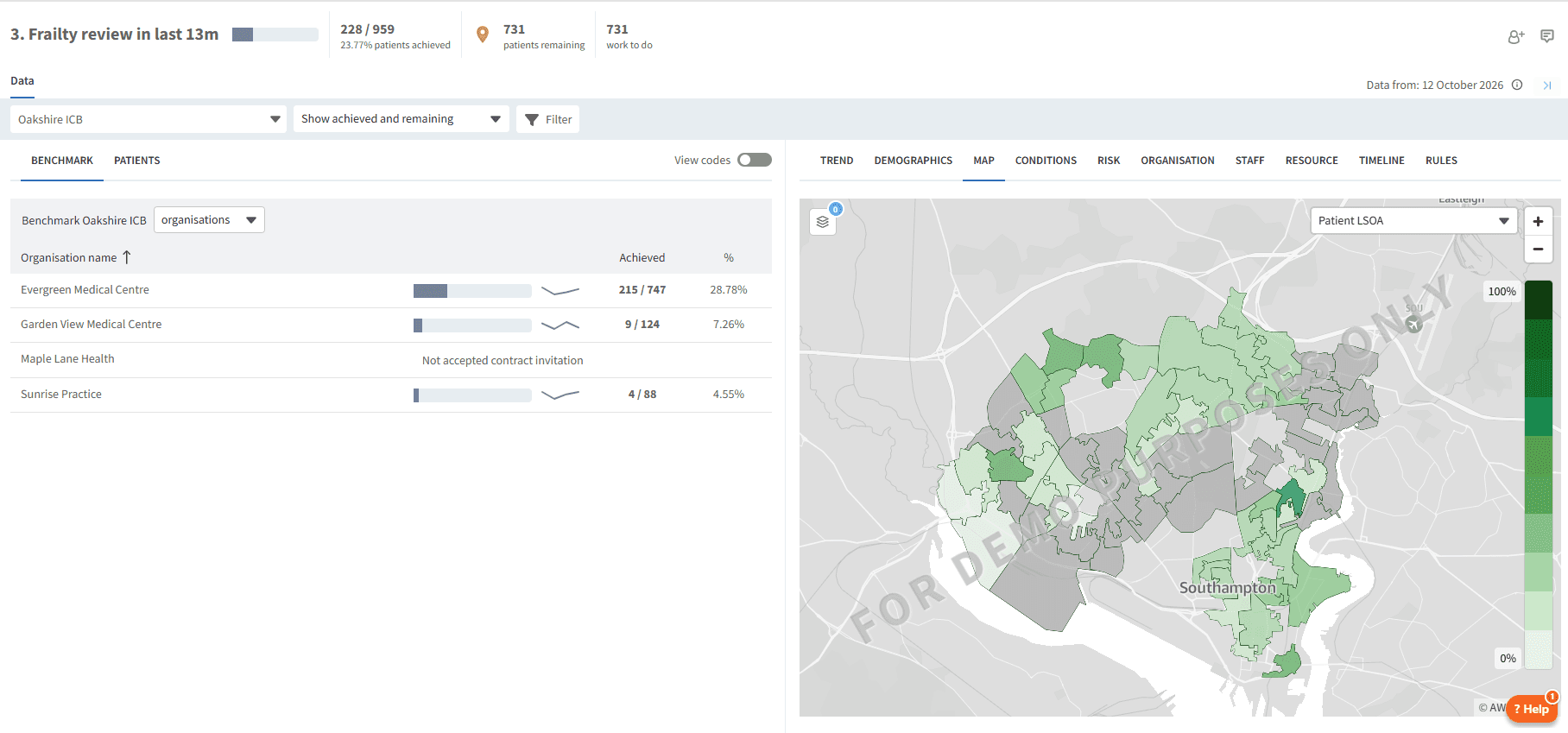
The most useful breakdown will depend on the clinical area and the question you are trying to answer. Access the Breakdown Report support article for guidance on the various breakdown functions.
Use the clinical indicators and pathway reports to review activity, identify gaps and evaluate progress over time.
Teams can use these findings to inform priorities, consider whether interventions are having the intended effect and identify areas that may need further attention.
Where available, exploring inequalities, including Core20PLUS5 groups, and comparing performance across INTs can help teams understand differences in need and outcomes.
ℹ️ Access the Benchmark Organisation support article for guidance on comparing performance across organisations.
❓FAQs
What is the difference between targeted proactive care and case management?
Targeted proactive care focuses on a specific intervention or treatment. Case management supports people with more complex needs through coordinated input from a multidisciplinary team.
Can I see individual patients in a report?
Patient-level information depends on your access and permissions. If you are linked to a practice and have access to patient-level data, you may be able to select the Patient tab to view the patient list.
Can the dashboard help identify health inequalities?
Yes. Ardens Manager can be used to explore differences across population groups, including Core20PLUS5, to help teams identify potential gaps and improvement opportunities.
Does the INT Dashboard replace existing GP contracts or QOF?
The webinar slides state that the proposed INT arrangements do not change core GP contracts (GMS/PMS/APMS), QOF or the NCD DES.
Why might a patient not appear in the expected report?
The dashboard relies on appropriate clinical coding and recorded activity. Check the patient's clinical record and confirm that the relevant diagnosis, referral, assessment or pathway activity has been recorded correctly.
🏫 Additional Support
Book training for your GP Practice, PCN or ICB
Contact our Support Team for support in real time
Complete the Getting Started with Ardens Manager academy module