
We’re updating our Knowledge Base
We’re currently transitioning Ardens Clinical support articles to this new Knowledge Base. Content will be added progressively, so you may find limited articles available at this stage.
In the meantime, you can access our full support resources on our existing sites:
We’ll continue to expand this site, so please check back regularly.
ℹ️ Introduction
This article explains how the Ardens resources can support your practice in delivering adult vaccinations activity and related catch/up routine pathways that practices may need to review alongside childhood resources. By the end of this article, you will understand how to identify eligible patients, manage invitations, record vaccination activity, and monitor uptake.
Background
Adult vaccination programmes help protect eligible patients against vaccine-preventable diseases and form an important part of preventative healthcare.
This article covers the Ardens resources available to support:
Pneumococcal
Human papillomavirus (HPV)
Measles, Mumps and Rubella (MMR/MMRV)
Pneumococcal | Age 65 years and over, clinical risk groups and patients requiring five-yearly boosters |
HPV | Age 14 - 24 years eligible for catch-up vaccination |
MMR / MMRV | Age 4 years and over. This includes older children and adults who may require vaccination because they did not complete the routine childhood schedule. |
For the latest national guidance on vaccine eligibility and schedules, refer to NHS vaccination guidance, the UKHSA Green Book and JCVI recommendations.
⚠️Please note: Dedicated articles are available for COVID-19, Seasonal Influenza, Shingles and RSV vaccinations.
How Ardens Can Help
Ardens resources support practices in planning, notifying, delivering, and evaluating vaccination uptake. It includes:
Identifying eligible patients
Organising invitations and recalls
Recording vaccination activity
Monitoring uptake and payment activity
Available resources include:
Clinical templates
Searches and reports
Patient status alerts
Invitation and recall resources
How to Access

📅 Plan
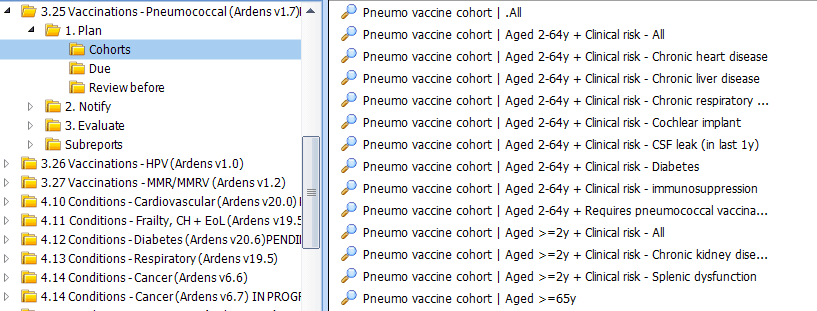
Before sending out any invites, we recommend reviewing the following reports. These will help you to identify your eligible patients and ensure your invite lists are accurate and clinically appropriate.
Cohort
Use these reports to estimate vaccine demand and plan stock orders. They are not intended for sending invitations. These results include all patients in each eligible group, regardless of whether they have already been vaccinated or have declined a vaccination.
Due
These reports identify patients who currently require vaccination. Patients are automatically removed once the vaccination is recorded or another appropriate outcome.
Review before
The Review before reports identify patients whose records should be checked before an invitation is sent. These reports help ensure vaccination remains clinically appropriate.
Where vaccination is no longer indicated, record the appropriate outcome to exclude the patient from future invitation reports.
⚠️Please note: this is currently only available for Pneumococcal reports. Some pneumococcal patients may still need an individual record review before invitation, particularly where eligibility depends on clinical risk coding or whether a five-yearly booster is still appropriate.


✉️Notify
These resources help GP practices manage vaccinations by identifying eligible patients and supporting invitation and follow-up activity.
Invites
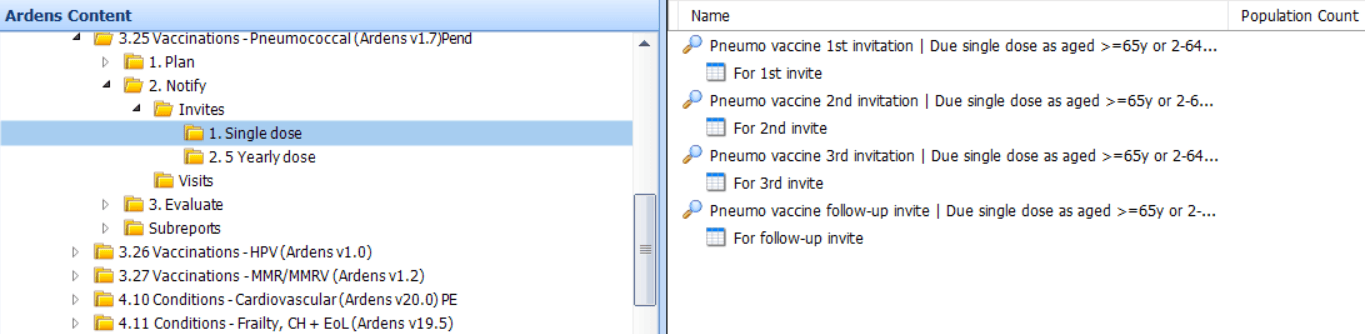
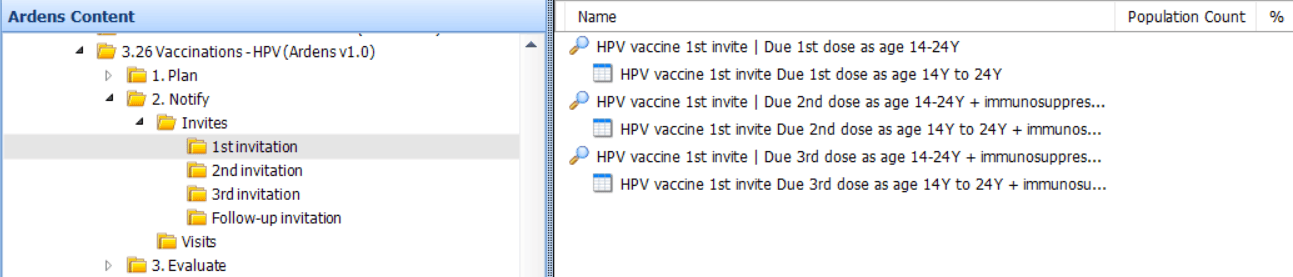
Reports are available for first, second and third invitations and patients automatically progress through the invitation flow as the appropriate invitation codes are recorded.
Pneumococcal
Separate invitation pathways are available for patients due a single vaccination and those due a five-yearly dose because of an eligible clinical risk factor.
HPV
Separate invitation pathways are available for patients due their first dose and immunosuppressed patients who require additional doses.
MMR
Separate pathways according to the outstanding dose.
⚠️ Please note: The Routine MMR reports include older children and adults who remain eligible because they have not completed the routine childhood MMR vaccination schedule. Where a patient appears in more than one MMR pathway, check which suite matches their current age and vaccination stage before inviting, as overlap is expected in the catch-up period.. Recording the appropriate vaccination will automatically update the patient's status across all relevant reporting suites.
The Follow-up invitation reports identify patients who remain due for vaccination after receiving three previous invitations. They support practices in periodically re-inviting eligible patients who have not received a recent invitation.
Invitation Flow
Recording the appropriate invitation code moves the patient through the invitation flow. Patients will not appear in the next invitation report until two weeks after the previous invitation has been recorded, helping to ensure there is an appropriate interval between invitations.
Visits
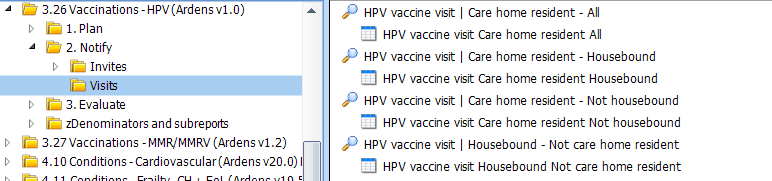
Separate visit reports are provided for housebound and care home residents so practices can use the list of patients to support administration outside of the practice.
Invite Codes
View invitation codes
Pneumococcal invitation codes
First pneumococcal vaccination invitation letter sent – 200811000000103
Pneumococcal vaccination invitation letter sent – 415118009
Pneumococcal vaccination invitation SMS (short message service) text message sent – 950331000000105
Pneumococcal vaccination verbal invitation – 340801000000104
Second pneumococcal vaccination invitation letter sent – 200821000000109
Third pneumococcal vaccination invitation letter sent – 200841000000102
HPV invitation codes
Human papillomavirus vaccination invitation – 838561000000103
Human papillomavirus vaccination invitation first letter – 838571000000105
Human papillomavirus vaccination invitation second letter – 838581000000107
Human papillomavirus vaccination invitation third letter – 838591000000109
MMR invitation codes
12–13 month immunisation invitation first letter – 867971000000108
12–13 month immunisation invitation second letter – 868011000000101
12–13 month immunisation invitation third letter – 868031000000109
Measles mumps and rubella booster vaccination invitation first letter – 927251000000109
Measles mumps and rubella booster vaccination invitation second letter – 927231000000102
Measles mumps and rubella booster vaccination invitation third letter – 927211000000105
Measles mumps rubella catch-up vaccination invitation – 838601000000103
Measles, mumps and rubella vaccination invitation – 774621000000102
Measles, mumps and rubella vaccination invitation short message service text message sent – 775181000000106
Pre-school booster immunisation invitation first letter – 868111000000100
Pre-school booster immunisation invitation second letter – 868131000000108
Pre-school booster immunisation invitation third letter – 868161000000103
Second MMR (measles mumps rubella) immunisation first telephone invitation – 913111000000102
Second MMR (measles mumps rubella) immunisation invitation first letter – 868051000000102
Second MMR (measles mumps rubella) immunisation invitation second letter – 868071000000106
Second MMR (measles mumps rubella) immunisation invitation third letter – 868091000000105
Second MMR (measles mumps rubella) immunisation second telephone invitation – 913131000000105
Second MMR (measles mumps rubella) immunisation third telephone invitation – 9131510000001
Pneumococcal
HPV
MMR / MMRV
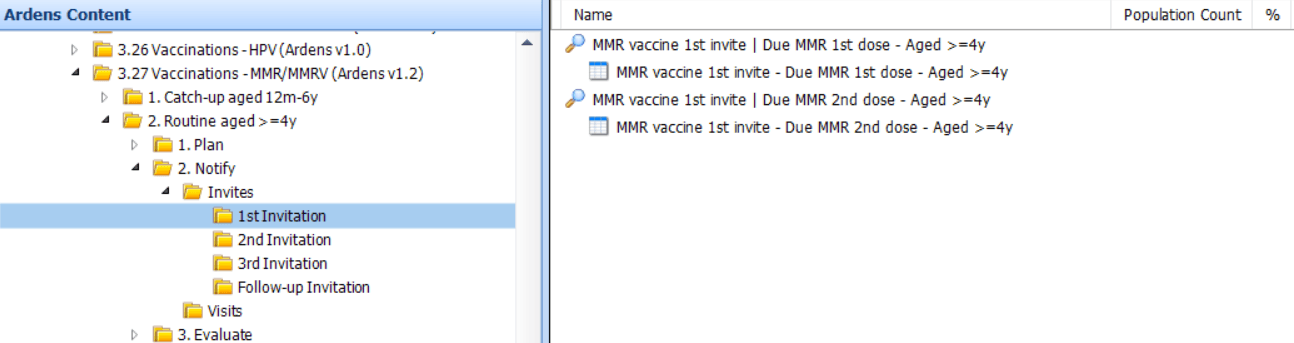
The reports display details such as the patients' contact details, contact preference and any reasonable adjustments. It can also be exported as a CSV file for further filtering and to send batch messages to third-party platforms. Access this support article for additional information on how to do this.
Visits
💉Deliver
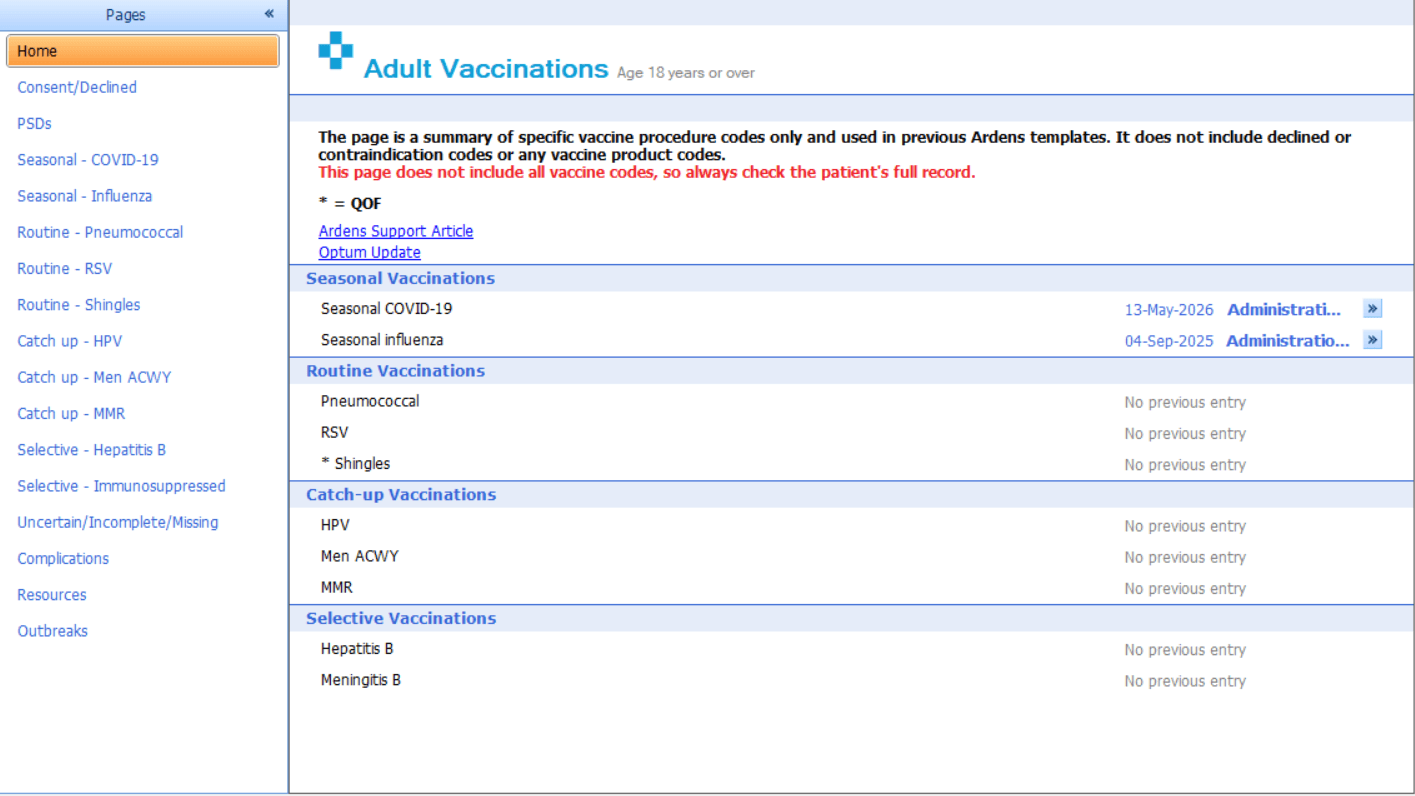
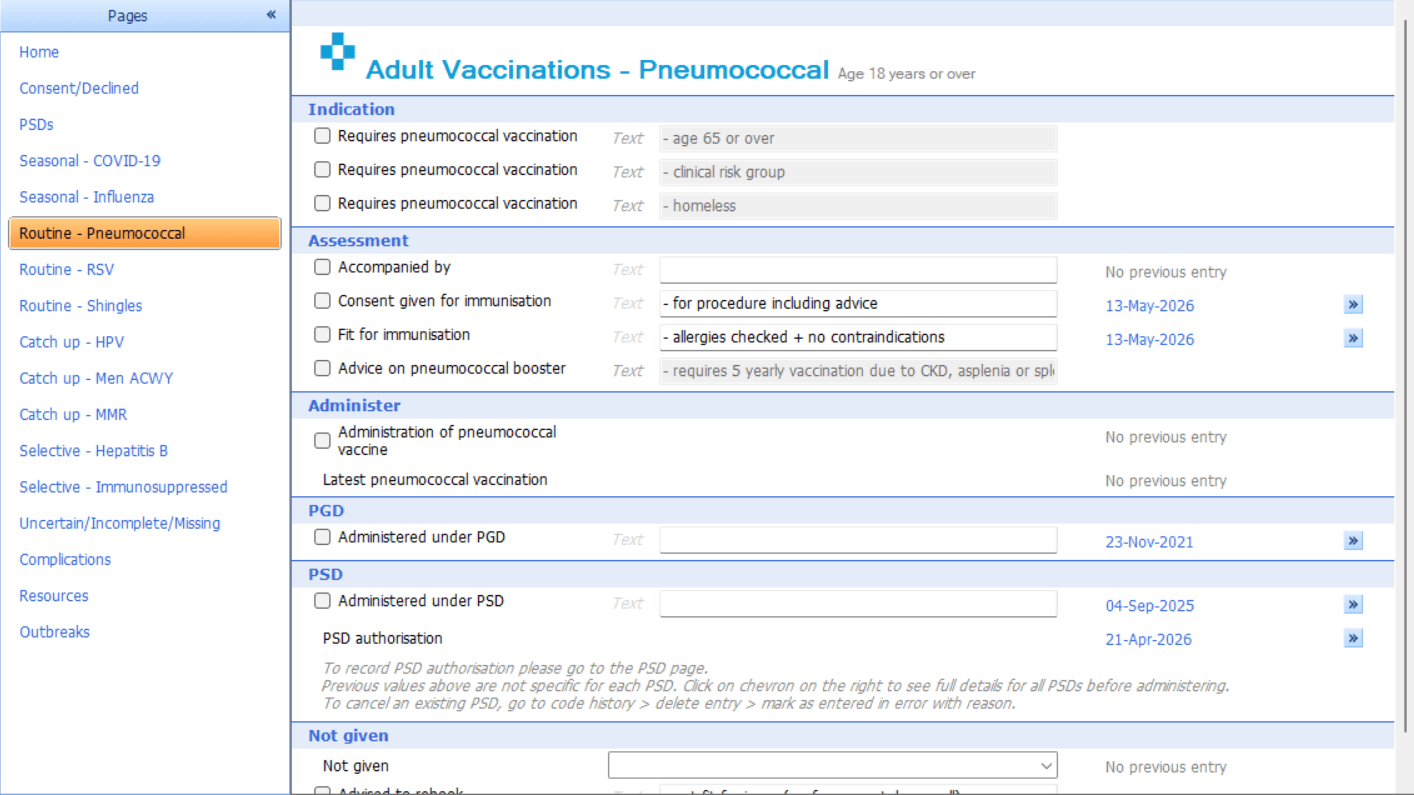
To support vaccine delivery and ensure accurate coding, a template is available to enable consistent and efficient documentation.
Alert (SystmOne Only)
To alert practice staff to eligibility. If the patient is eligible they will have a green syringe icon under their demographics box, clicking on this will take you to the relevant tab within the Adult Vaccinations template for your patient.
⚠️ Please note: If you have multiple vaccine alerts, remember to check which alerts are visible at your practice by going to Setup > Data Output > Patient Status Alerts > Availability > System Wide' and remove the tick from the Enabled column.
Template
Enables the recording of the vaccination, along with consent, contraindication and declines. Recording the vaccination or outcome through the Ardens template helps ensure the correct vaccine and outcome codes are captured, so the patient is removed from the relevant Due, Invite and Review reports where appropriate.
📈Evaluate
These resources help practices manage and monitor the vaccination programmes by tracking vaccination uptake and providing dashboards that enable more effective analysis and targeting of patient groups.
Activity
The Activity reports are available for HPV, MMR and pneumococcal vaccination and include:
Vaccinations administered within the last 12 months.
Vaccinations administered during the previous month.
First, second and third invitations sent within the last 12 months.
For MMR, vaccination activity is split by first and second doses.
These reports can be used to review recent vaccination and invitation activity and monitor programme delivery over time.
Review
The Review reports identify vaccination records that may require checking or correcting. The reports available and the records they identify vary between vaccination programmes and clinical systems.
Uptake
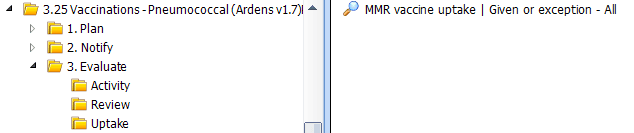
The Uptake reports identify patients within the relevant vaccination cohort who have either had the indicated vaccination or have an appropriate exception recorded.
Insights
For Ardens Manager subscribers, the Vaccinations dashboard provides a clear visual overview of:
Eligible patients
Invitations sent
Uptake rates
You can also filter by demographics, conditions, risk and geographical location to help prioritise and target specific patient populations.

Activity

Review

The Pneumococcal Review report identifies patients with a duplicate pneumococcal vaccination recorded within the previous month.
Practices should review these records and correct any duplicate entries where appropriate.
Uptake
❓FAQs
Why is a patient still appearing in a Due or invitation report after we have already vaccinated them?
This usually means the vaccination or outcome has not been recorded in a way that the reporting suite can recognise. Check that the vaccination has been added correctly to the patient record and, where appropriate, recorded using the Ardens Adult Vaccinations template. Once the correct vaccination or outcome is recorded, the patient should be removed from the relevant Due, Invite or Review reports.
Why is a patient appearing in a pneumococcal report when the practice thinks they are not eligible?
Some pneumococcal reports include patients based on age, clinical risk factors, or possible eligibility for a five-yearly booster. In some cases, a patient may need an individual record review before invitation is sent. Use the Review before reports where available and check the patient’s coding and current clinical status before contacting them.
Can patients appear in more than one MMR reporting suite?
Yes. Some patients may appear in more than one MMR reporting suite because there is overlap between the routine childhood pathway, catch-up resources and adult/routine recall resources. Recording the correct vaccination or invitation outcome will update the patient’s status across the relevant reports.
Why does the article say to use the template when I can record directly in the patient record?
The Ardens template helps practices record the vaccination, consent, contraindications and declines using the expected coding structure. This supports more accurate reporting and reduces the risk of patients continuing to appear in invitation, due or review reports because of incomplete or inconsistent coding.
🏫Additional Support
To further your understanding of the Ardens resources:
Book training for your GP Practice, PCN or ICB
Contact our Support Team for support in real time