
We’re updating our Knowledge Base
We’re currently transitioning Ardens Clinical support articles to this new Knowledge Base. Content will be added progressively, so you may find limited articles available at this stage.
In the meantime, you can access our full support resources on our existing sites:
We’ll continue to expand this site, so please check back regularly.
⚠️ Please Note (EMIS Practices only): Please see our recent update on COVID-19 vaccination protocols and view our Edit Vaccination Protocols support article for latest guidance.
ℹ️ Introduction
This article explains how Ardens resources can support your practice in planning, delivering, and monitoring the COVID vaccination programme in line with NHS England guidance. By the end of this article, you will understand how to access and use the available reports and tools throughout the vaccination programme workflow.
Background
The NHS England guidance for the 2026-27 COVID Autumn season outlines the following vaccination schedule:
The following groups are eligible:
From 1st October 2026 |
|
How Ardens Can Help
Ardens resources support practices in planning, notifying, delivering, and evaluating vaccination uptake. It includes:
Identify eligible patients
Organise invitations and follow-up activity
Manage housebound and care home visits
Record vaccination activity
Monitor uptake and programme performance
⚠️ Please note:
Ardens searches use SNOMED codes, while the Green Book uses clinical definitions
Not all eligibility criteria translate directly into coded data
Business rules for payment may differ from clinical eligibility
Clinical judgement should guide decisions in ambiguous cases
🗓️ Plan
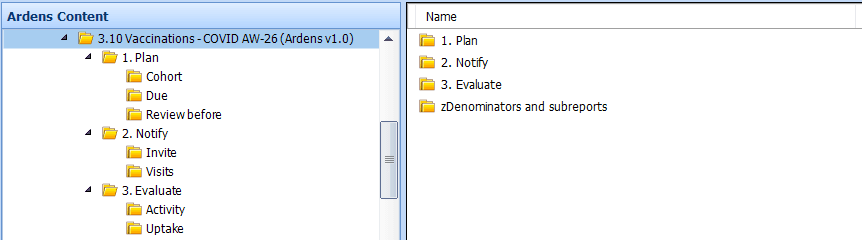
Before sending out any invites, we recommend reviewing the following reports. These will help you to identify your eligible patients and ensure your invite lists are accurate and clinically appropriate.
Cohorts
Use these searches to estimate vaccine demand and plan stock orders. They are not intended for sending invitations. These results include all patients in each eligible group, regardless of whether they have already been vaccinated or have declined a vaccination.
Due
These reports focus specifically on patients who are still outstanding for vaccination and have not declined vaccination. There is a search to identify all patients due, with additional searches broken down by cohort.
⚠️ Please note:
Patients will not appear in these reports until 3 months have passed since they became due following their previous vaccination.
Patients may appear in more than one cohort if they are overdue for multiple vaccinations.
These reports do not exclude patients who have already been invited. Using them to send invitations may therefore result in duplicate communications.
Review before
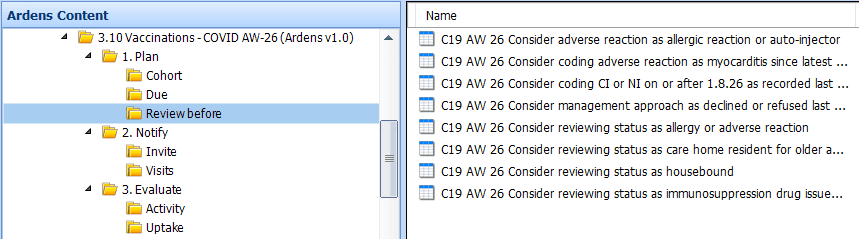
The Review Before reports help identify records requiring validation prior to invitation activity.
Consider coding adverse reaction as allergic reaction or issued auto-injector: Highlights any patients coded with a history of an anaphylaxis or anaphylactoid reaction, or who have had an adrenaline auto-injector issued. Consider coding an adverse reaction.
Consider coding contraindication: Identifies patients with a previous contraindication code recorded. Code for this season if appropriate.


✉️ Notify
Invites
Invite reports include all eligible patients (excluding those patients living in a care home or who are housebound). These are broken down by 1st, 2nd and 3rd invites.
Invite Codes
After inviting a patient, ensure the appropriate invitation SNOMED code is added to their record. This ensures they move to the correct 2nd or 3rd invite list. Always verify codes before use. A full list is available in our invite code guide.
View Codes
SARS-CoV-2 (severe acute respiratory syndrome coronavirus 2) vaccination telephone invitation
→ 1402931000000100SARS-CoV-2 (severe acute respiratory syndrome coronavirus 2) vaccination first telephone invitation
→ 1402941000000109SARS-CoV-2 (severe acute respiratory syndrome coronavirus 2) vaccination second telephone invitation
→ 1402951000000107
SARS-CoV-2 (severe acute respiratory syndrome coronavirus 2) vaccination third telephone invitation
→ 1402961000000105
SARS-CoV-2 (severe acute respiratory syndrome coronavirus 2) vaccination invitation email
→ 1403101000000104
SARS-CoV-2 (severe acute respiratory syndrome coronavirus 2) vaccination invitation first email
→ 1403111000000102
SARS-CoV-2 (severe acute respiratory syndrome coronavirus 2) vaccination invitation second email
→ 1403121000000108
SARS-CoV-2 (severe acute respiratory syndrome coronavirus 2) vaccination invitation third email
→ 1403131000000105
SARS-CoV-2 (severe acute respiratory syndrome coronavirus 2) vaccination invitation letter
→ 1402921000000102
SARS-CoV-2 (severe acute respiratory syndrome coronavirus 2) vaccination invitation first letter
→ 1403071000000108
SARS-CoV-2 (severe acute respiratory syndrome coronavirus 2) vaccination invitation second letter
→ 1403081000000105
SARS-CoV-2 (severe acute respiratory syndrome coronavirus 2) vaccination invitation third letter
→ 1403091000000107
SARS-CoV-2 (severe acute respiratory syndrome coronavirus 2) vaccination invitation SMS text message sent
→ 1240781000000106
SARS-CoV-2 (severe acute respiratory syndrome coronavirus 2) vaccination invitation short message service text message
→ 1403031000000106
SARS-CoV-2 (severe acute respiratory syndrome coronavirus 2) vaccination invitation first short message service text message
→ 1403041000000102
SARS-CoV-2 (severe acute respiratory syndrome coronavirus 2) vaccination invitation second short message service text message
→ 1403051000000104
SARS-CoV-2 (severe acute respiratory syndrome coronavirus 2) vaccination invitation third short message service text message
→ 1403061000000101
⚠️ Please note:
Always check the code each time when adding to the patient record. Ardens are not responsible or liable for the codes above and any incorrect code being batch added to the patient records.
There is a 2-week timeframe between the 1st invite and the 2nd invite.
Patients only move into the correct 2nd or 3rd invite report when the specific invitation code for that stage is added. If a different invitation code is used, patients may remain in the same invite list.
If patients are still appearing in an invite report after invitations have been sent, first check that the correct invitation code for that stage was added to the patient record.
Visits
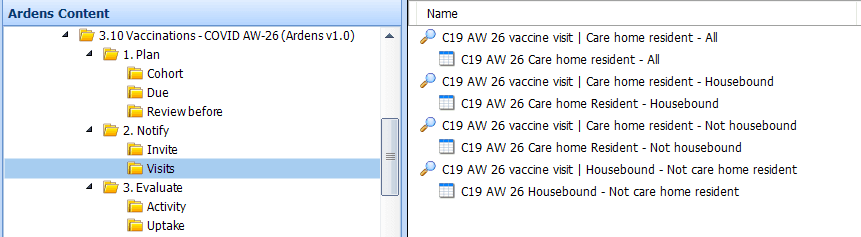
Separate visit reports are provided for housebound and care home residents so practices can use the list of patients to support administration outside of the practice.
Invites
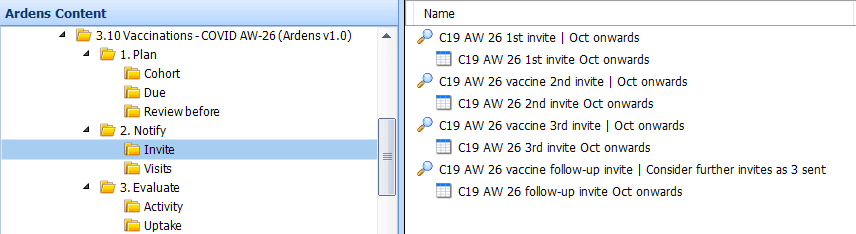
Once the reports have been run, view the results to see details of the patients, including any reasonable adjustments and preferred contact methods. The report can be exported to use with third-party messaging platforms. Access this support article on how to export.
Visits
💉 Deliver
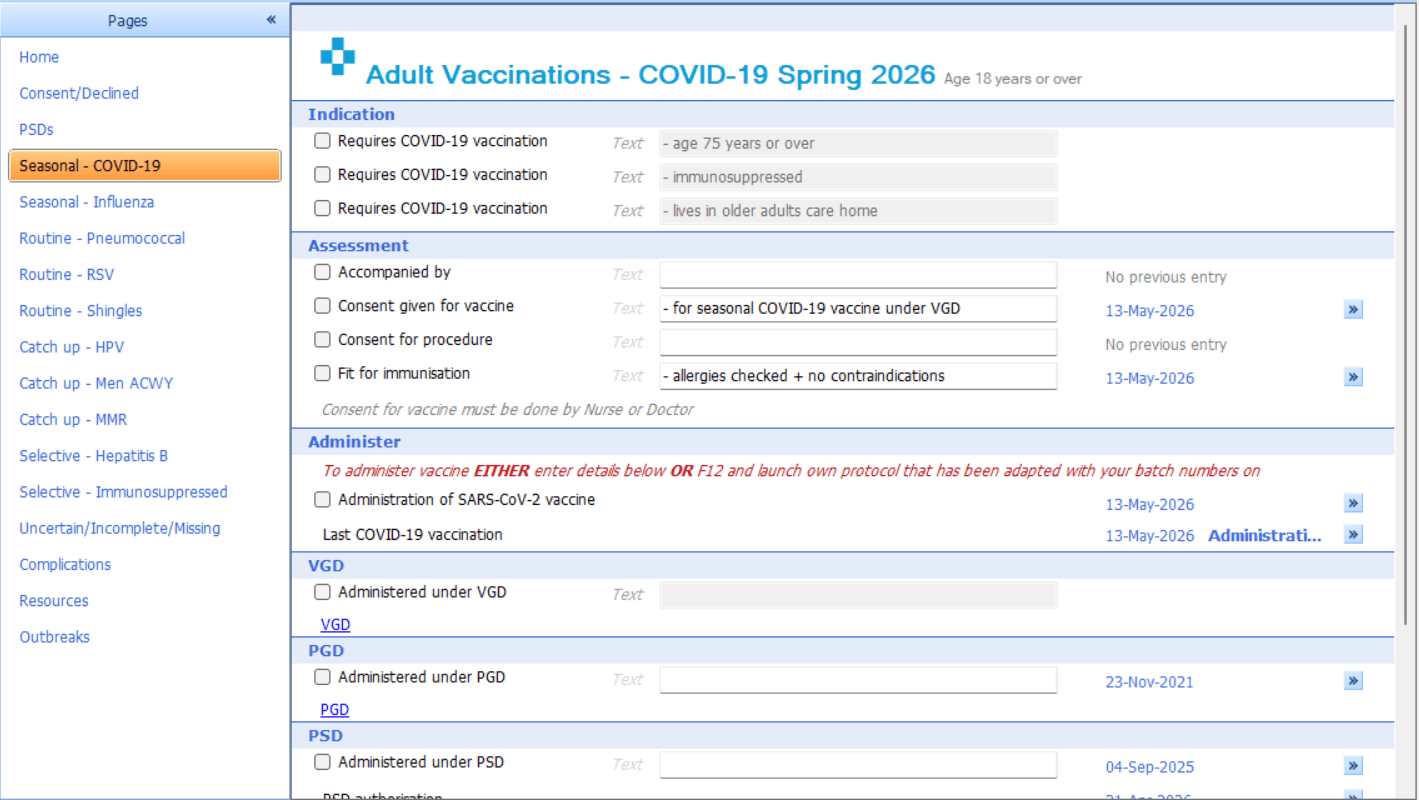
To support vaccine delivery and ensure accurate coding, a template and protocol are available to enable consistent, efficient documentation.
Template
Enables the recording of the COVID-19 vaccination, along with consent, contraindication and declines.
⚠️Please note: Housebound and care home patients are managed through the Visits reports. If vaccinations are entered after the visit rather than at the point of care, use the template to record the vaccination details clearly.
Protocol
Allows easy access to record that a vaccine has been given, along with consent, contraindication and declines.
Before the COVID-19 protocols can be used, they must first be edited with the practices vaccination details. For step-by-step guidance, please refer to this support article.
⚠️Check with your practice which protocols you need to add to your F12, this may include multiple protocols for each vaccine type, and/or care home, housebound patients.
To add to your F12 key (this must be added for each individual user):
Open a patient record and press F12.
Right-click on an available letter or number, then select Add
Search for and select the saved COVID-19 protocols
Record vaccination given in practice:
Press F12 and select the required protocol
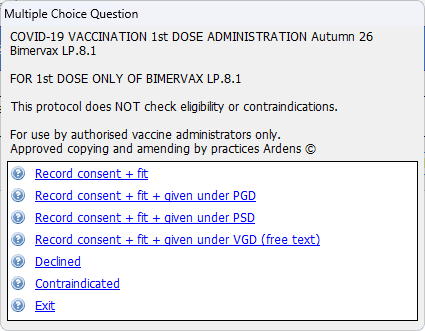
A multiple-choice prompt will appear. Follow the on-screen prompts to enter the appropriate vaccine information into the patient record.


📈 Evaluate
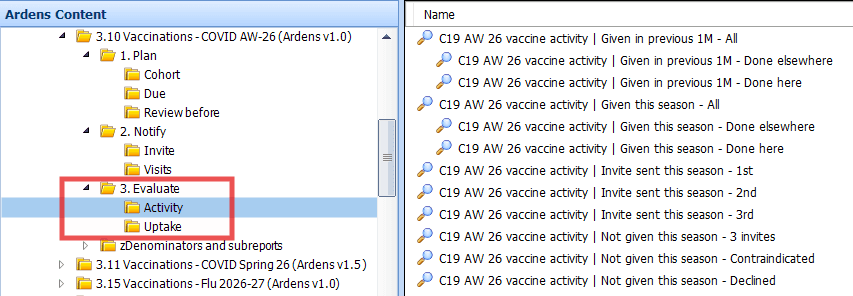
These resources help practices manage and monitor the COVID vaccination programme by tracking vaccination uptake and providing dashboards that enable more effective analysis and targeting of patient groups.
Activity
Activity - Highlights the total number of invitations sent and vaccinations given, broken down by the last month or the season, as well as given here or elsewhere.
Uptake - Monitors vaccine uptake for all cohorts and those not administered due to no response, contraindications and declines.
Insights
For Ardens Manager subscribers, the Vaccinations dashboard provides a clear visual overview of:
Eligible cohorts
Number of invitations sent
Vaccination uptake rates
You can also filter and analyse data by:
Clinical risk groups
Low uptake groups
This helps you prioritise and target specific patient populations more effectively.

❓FAQs
Reports
Why are patients still showing in the 1st invite report after we’ve contacted them?
Patients only move into the 2nd or 3rd invite reports when the correct invitation code for that stage is added to the patient record. If a different invitation code is used, they may remain in the same invite list.
Can I use the Due reports to send invitations?
No, the Due reports are designed to show patients who are still outstanding for vaccination, but they do not exclude patients who may already have been invited. For invitation activity, use the dedicated Invite reports.
Why does a patient appear in more than one COVID report or cohort?
Some patients meet more than one eligibility criterion, so they may appear in multiple cohort or due reports. This is expected and helps practices identify all relevant groups, but it is worth checking for duplication before sending communications.
Where should I manage care home and housebound patients?
Care home residents and housebound patients are managed through the Visits reports rather than the standard Invite reports. If vaccinations are recorded after the visit rather than at the point of care, use the recording template to enter the details clearly.
Protocol
How do we edit the protocols to include our practice batch number and expiry date details?
Access this support article for details on how to edit the COVID-19 protocols.
What has changed to the way we record COVID-19 vaccinations?
NHS England recently announced additional requirements for recording COVID-19 vaccinations. Enlivio Health have reflected these changes in the EMIS MKB238 update. Access the Enlivio website for further information.
Do we need to record the medication product separate to the required qualifiers?
From our understanding, there is no requirement to also record the medication product separately as all this information is now recorded as qualifier data against the vaccine administration code. The Ardens COVID-19 protocols should therefore be sufficient to record everything you need in a couple of clicks.
What about patients living in a care home or who are housebound?
The protocols provided are configured for patients receiving their first COVID-19 vaccination dose of the season at the practice, with the qualifiers set up to reflect this.
For patients living in a care home, practices should make a copy of the relevant protocol and update the Location and ODS code to reflect the care home setting.
For housebound patients, practices should make a copy of the relevant protocol and update the Location qualifier to reflect that the vaccination is being delivered to a housebound patient.
What if we want to use the protocol for a second dose?
If you want to use the protocol to record a patient’s second COVID-19 vaccination dose, make a copy of the relevant protocol and update the Vaccination Sequence qualifier to 2.
What date should we enter when recording a Spikevax vaccination?
For Spikevax, there are two dates on the vial, a manufacturer's 'expiry date' and a 'use-by date'. Some ICBs have confirmed that the 'use-by date' should be recorded, not the 'expiry date'. Please however follow local policy for this.
Can you batch add the COVID-19 protocol?
Due to clinical safety considerations, we do not recommend batch adding the COVID-19 protocol. Batch adding the protocol applies the same qualifiers (e.g., vaccine site, dose, etc.) to all patients, which may not be clinically appropriate for each individual patient.
🏫Additional Support
To further your understanding of the Ardens resources:
Book training for your GP Practice, PCN or ICB
Contact our Support Team for support in real time