
We’re updating our Knowledge Base
We’re currently transitioning Ardens Clinical support articles to this new Knowledge Base. Content will be added progressively, so you may find limited articles available at this stage.
In the meantime, you can access our full support resources on our existing sites:
We’ll continue to expand this site, so please check back regularly.
ℹ️ Introduction
This article explains how the Ardens resources can support practices in delivering combined Seasonal Influenza and COVID-19 clinics. By the end of this article, you will understand how to identify eligible patients, manage invitations, organise visits, and monitor vaccination uptake.
Background
NHS England supports aligning seasonal influenza and COVID-19 schedules to enable co-administration where clinically appropriate.
How Ardens Can Help
Ardens resources support practices throughout the vaccination programme by helping to:
Identify eligible patients
Organise invitations and follow-up activity
Manage care home and housebound visits
Record vaccination activity
Monitor uptake and invitation status
Dedicated resources are available for:
⚠️ Please note:
Ardens searches use SNOMED codes, while the Green Book uses clinical definitions
Not all eligibility criteria translate directly into coded data
Business rules for payment may differ from clinical eligibility
Clinical judgement should guide decisions in ambiguous cases

📅Plan
Before sending out any invites, we recommend reviewing the following reports. These will help you to identify your eligible patients and ensure your invite lists are accurate and clinically appropriate.
Cohorts
Use this report to estimate vaccine demand and plan stock orders. It is not intended for sending invitations. The results include all eligible patients, regardless of whether they have already been vaccinated or have declined a vaccination.
Due
This report focuses specifically on patients who are still outstanding for vaccination and have not declined.


✉️ Notify
These resources help GP practices efficiently manage the vaccination programmes by identifying eligible patients, organising invitations and follow-ups - including special arrangements for care home and housebound patients.
For practices running combined flu and COVID clinics, we recommend using the reports in the following order:
Run the joint Flu + COVID invite reports first to identify patients who are eligible for both vaccinations and can be invited to a combined clinic.
Then run the individual flu and COVID invite reports to identify patients who are still due for only one vaccination. Use these individual reports to follow up patients who now need flu only or COVID only, rather than inviting them again through the combined route.
EMIS: once the joint invite codes have been added, rerunning the searches will update the reports straight away.
SystmOne: users may need to allow the data to refresh before expecting the flu-only / COVID-only reports to change.
Invites
These reports identify eligible patients who can be invited for vaccination. The reports are split by cohort and vaccine, with patients then grouped by September and October uptake and further broken down into 1st, 2nd, and 3rd invites.
Patients are excluded from the invitation reports if they have one of the following:
Administration of the vaccinations
Contraindication
Decline
Care home or housebound patient (managed separately)
⚠️ Please note:
Patients will only appear in one invite list at a time (1st, 2nd, or 3rd), not across multiple lists.
Both the flu and COVID invite codes must be added to move through the invite flow. If only a flu invite code is added and the COVID invite code is missing, the patient will not move through the combined invite flow as expected.
Patients move through the invitation reports using the appropriate invite codes, with a two-week interval between the first and second invitations and again between the second and third invitations.
Visits
Separate visit reports are provided for housebound and care home residents so practices can use the list of patients to support administration outside of the practice.
Invite
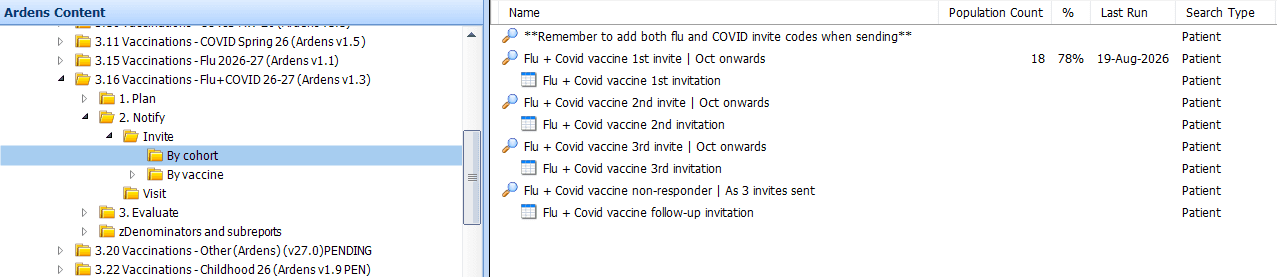
Once the reports have been run, view the results to see details of the patients, including any reasonable adjustments and preferred contact methods. The report can be exported to use with third-party messaging platforms. Access this support article on how to export.
⚠️Please note: for practices requiring a breakdown by contact method (email, SMS, phone), refer to the invite reports, we recommend exporting the report and sorting by contact method.
Visit

📈 Evaluate
These resources help practices manage and monitor the vaccinations by tracking vaccination uptake, identifying patients who are still due for vaccination, and providing an overview of patients with recorded contraindications or declined vaccination codes.
Review After
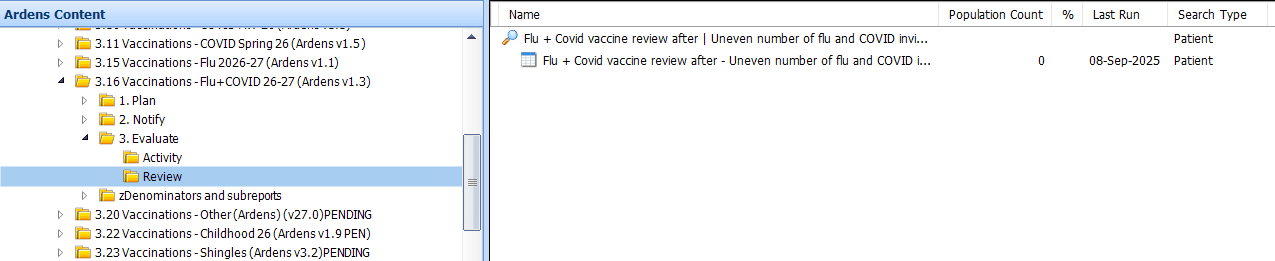
To help ensure accurate payment and data integrity, a data quality report is available. The report captures patients who have not had the same number of COVID and Flu invites. This can then be used as a 'catch-all' search to make sure patients have been invited for both vaccinations
Insights
For Ardens Manager subscribers, the Vaccinations dashboard provides a clear visual overview of:
Eligible cohorts
Number of invitations sent
Vaccination uptake rates
You can also filter and analyse data by:
Clinical risk groups
Low uptake groups
This helps you prioritise and target specific patient populations more effectively

❓FAQs
Do I need to run the joint Flu + COVID reports before the individual Flu-only or COVID-only reports?
Yes. For practices running combined clinics, run the joint Flu + COVID invite reports first so patients eligible for both vaccinations are invited through the combined route. Then run the individual Flu-only or COVID-only reports to pick up patients who are still due for just one vaccination.
Do I need to wait before running the Flu-only or COVID-only invite reports after using the joint reports?
In EMIS, once the relevant invite codes have been added, rerunning the searches will update the reports straight away. Where age affects vaccine choice, use the relative run date for the planned clinic date so the correct age-based search is used. For SystmOne practices, users may need to allow the data to refresh before expecting the flu-only / COVID-only reports to change.
Do I need to add both the Flu and COVID invite codes?
Yes. To move a patient through the combined invite flow, both the Flu and COVID invite codes need to be recorded. If only one code is added, the patient will not move through the reports as expected.
🏫Additional Support
To further your understanding of the Ardens resources:
Book training for your GP Practice, PCN or ICB
Contact our Support Team for support in real time
Access the Seasonal Influenza support article
Access the COVID-19 support article