
ℹ️ Introduction
This article explains how to use the National NHS services available within the Ardens Manager Patient View. By the end of this article, you will understand what information each service provides, how to access it, and any access requirements or restrictions that may apply.
Background
Ardens Manager integrates with a number of national NHS services, allowing authorised users to access key patient information alongside the patient's Ardens Manager record.
The services are available directly within Patient View, helping users access relevant national information without needing to switch between clinical systems.
How Ardens Can Help
The national NHS services currently available within Ardens Manager include:
Personal Demographics Service (PDS): View nationally held patient demographic information
GP Connect: Securely view information from the patient's GP record
Patient Flags: View nationally recorded Reasonable Adjustment Digital Flags
Each service provides different information and may have specific access requirements.
⚠️ Before using national NHS services in Patient View, make sure:
patient-level data has been enabled for your user account,
you are logging in with your NHS Smartcard,
and your Smartcard/RBAC permissions allow access to the relevant service.
If patient-level data has not been enabled yet, a System Administrator will need to switch this on first. Access the Enable Patient View support article for further information
📍Access Patient View
The national NHS services are available when viewing an individual patient in Patient View.
To access:
Log in to Ardens Manager
Navigate to the required dashboard and locate the relevant report
Click View to open the Single Report page
Select the PATIENTS tab to display the patients included in the report
Locate the required patient
Select View next to the patient's NHS number to open Patient View
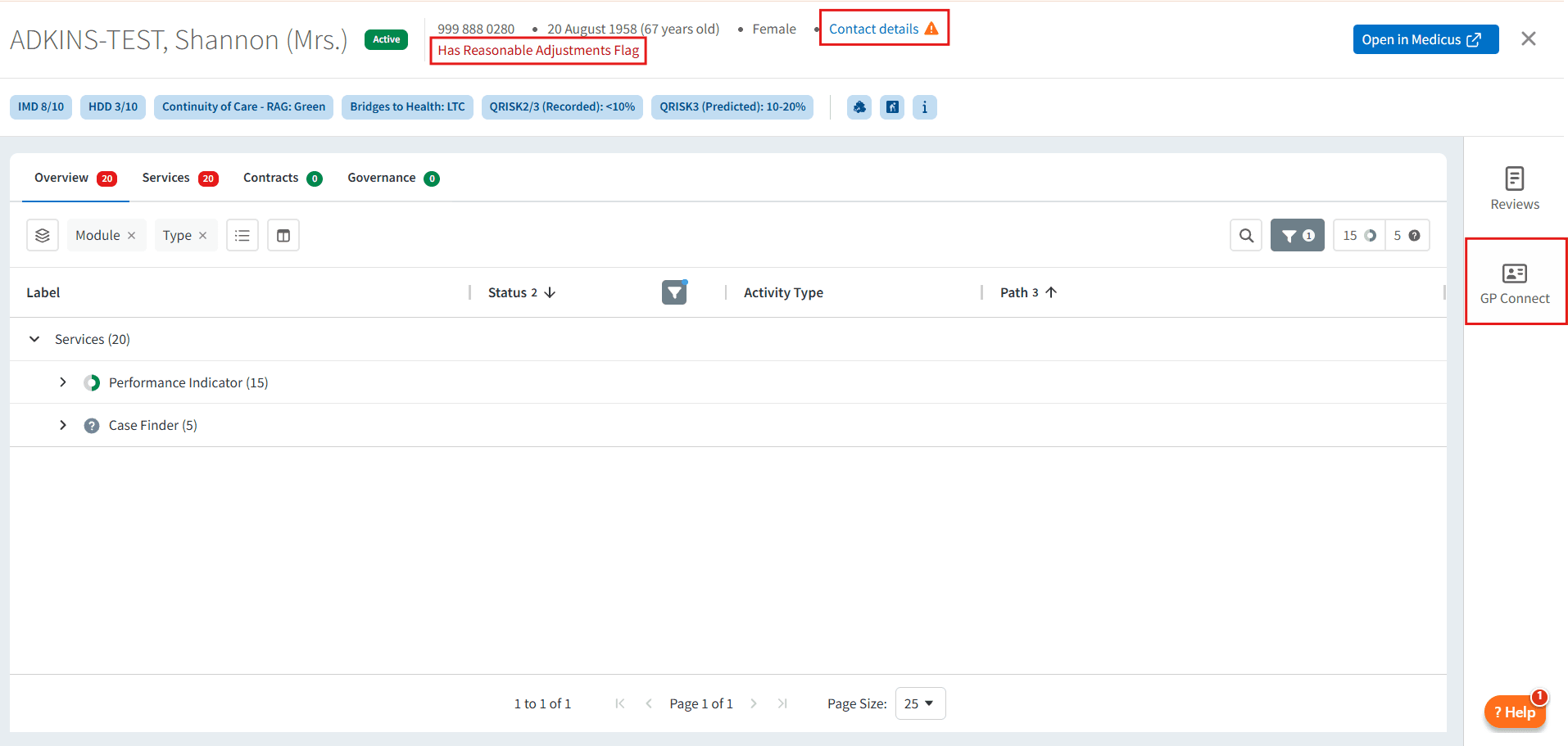
Once Patient View is open, the available national NHS services can be viewed (see above screenshot for location).
⚠️ Please note: The services available may vary depending on your user permissions and the access requirements for each service.
💳 Personal Demographics Service (PDS)
The Personal Demographics Service (PDS) is the NHS national database for patient demographic information. It includes information such as the patient's name, address, date of birth, contact details, registered GP and nominated pharmacy.
View PDS Information
Within Patient View, select Contact details to view the patient's PDS information.

PDS can help you to:
Verify patient's identity and demographic information
Use the most up-to-date contact details when communicating with patients
Identify differences between the patient's national demographic information and their local clinical record
Access & Restrictions
To access PDS information:
You must have access to patient-level data in Ardens Manager
Some patient records may be unavailable because they have been marked as restricted on the NHS Spine. For further information about PDS restriction flags, access the NHS website
🖇️GP Connect
GP Connect provides authorised health and care professionals with secure, read-only access to information from a patient's GP record to support direct patient care.
View GP Connect Information
Within Patient View, select GP Connect from the left-hand navigation.
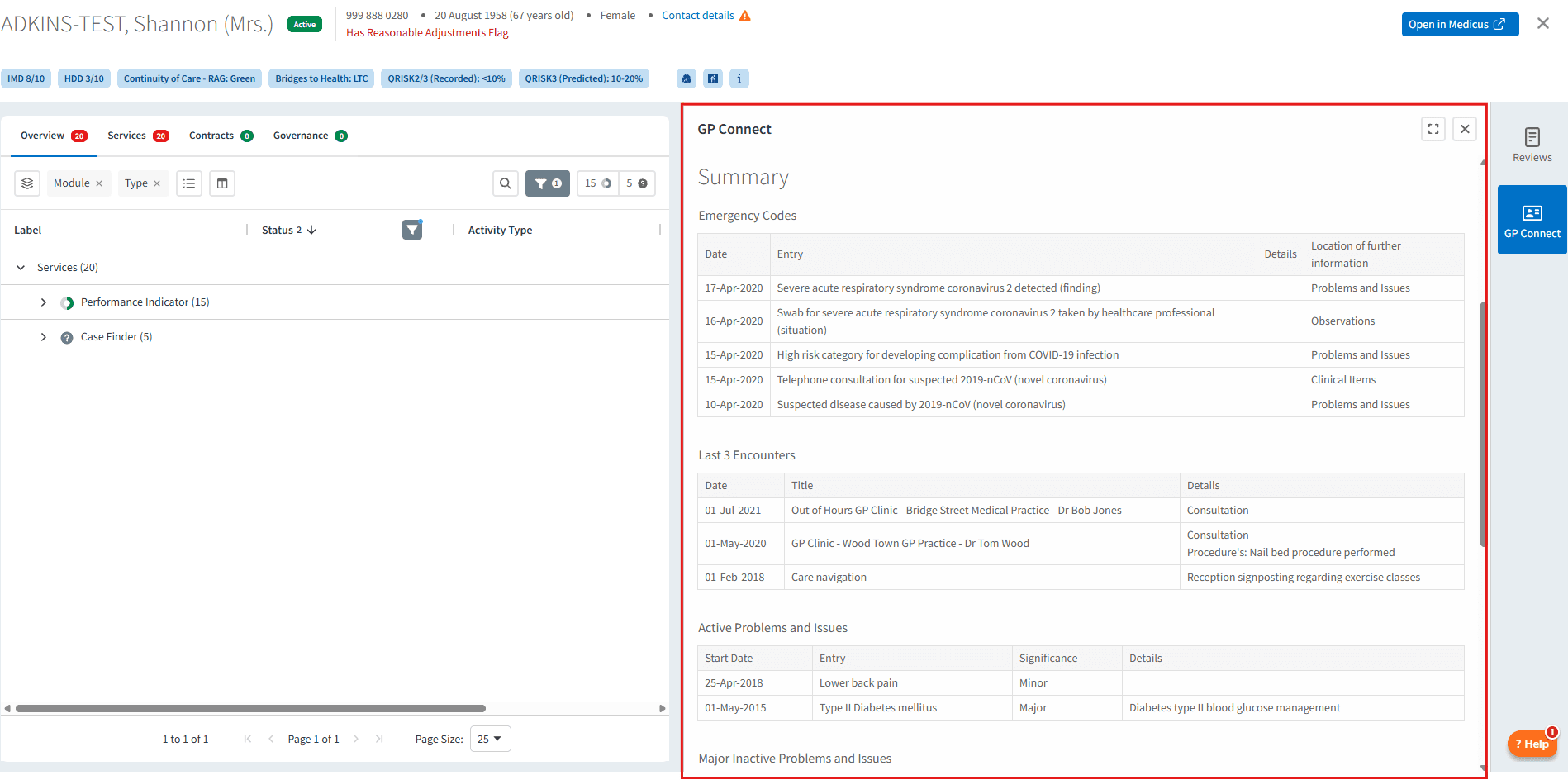
The information available through GP Connect may include:
Medications
Allergies
Problems
Observations
Additional structured clinical information
GP Connect can help you to:
Access relevant clinical information without leaving Ardens Manager
Support safer clinical decision-making using up-to-date information
Reduce the need to switch between multiple clinical systems
⚠️Please note: GP Connect provides read-only access. You cannot update the patient's GP record from Ardens Manager.
🚩 Patient Flags
Patient Flags display nationally recorded Reasonable Adjustment Digital Flags (RADFs). These flags help healthcare professionals identify reasonable adjustments that may be required to support a patient when accessing healthcare. For further information, access the NHS website.
View Patient Flags
Within Patient View, select Has Reasonable Adjustments Flag to view any nationally recorded reasonable adjustments for the patients that should be considered.

Patient flags can help you to:
Identify reasonable adjustments that should be considered when interacting with a patient
Support accessible communication and personalised care
Access & Restrictions
To access RADFs:
You must have access patient-level data in Ardens Manager
You must have the appropriate B codes associated with your smartcard.
View B codes required
To see the existence of a Reasonable Adjustments Digital Flag, your CIS profile must include one of the following:
B0264 - Access SCR Application (Perform Patient Trace)
B0257 - View non-ETP Clinical Data within CSA
B0380 – Perform Detailed Health Records
To view the Reasonable Adjustments (limited content) recorded within the Reasonable Adjustments Digital Flag, your CIS profile must include one of the following:
B0264 - Access SCR Application (Perform Patient Trace)
B0257 - View non-ETP Clinical Data within CSA
B0380 – Perform Detailed Health Records
To view the Underlying Conditions & Impairments (full content) recorded within the Reasonable Adjustments Digital Flag, your CIS profile must include one of the following:
B0257 - View non-ETP Clinical Data within CSA
B0380 – Perform Detailed Health Records
🆘Troubleshooting
For troubleshooting common issues, try these tips:
If you can’t open Patient View at all → check patient-level access has been enabled and that you are logged in with your NHS Smartcard.
If Patient View opens but a service is unavailable → check the service-specific permission requirements below.
If one patient does not return data → the record may be restricted/sensitive on the NHS Spine, or the national service may not have data available for that patient.
If Patient Flags says access denied → review the required B codes / RBAC activities or contact your local IT / RA team.
❓FAQs
Why can't I see some of the national services?
The national NHS services are only available when viewing a patient within Patient View and require access to patient-level data. Some services have additional access requirements.
For example, Patient Flags (Reasonable Adjustment Digital Flags) require the appropriate B codes to be associated with your smartcard. See our Reasonable Adjustments Digital Flag (RADF) support article for further information.
Why can't I view information for a particular patient?
Information may not be available for some patients. For example, patients recorded as sensitive on the NHS Spine will not return information from PDS, Patient Flags or GP Connect.
Information may also be unavailable if the required data is not available or your access permissions do not allow you to view it.
Will GP Connect allow me to update the patient's GP record?
No. GP Connect currently provides read-only access within Ardens Manager.
🏫 Additional Support
Book training for your GP Practice, PCN or ICB
Contact our Support Team for support in real time
Access the Reasonable Adjustment Flag (RADF) support article for detailed information on the digital flags