
ℹ️ Introduction
This article explains how to view the Reasonable Adjustments Digital Flag (RADF) within Ardens Manager and understand the access requirements needed to display this information. By the end of this article, you will be able to identify whether a patient has a RADF recorded, understand the information displayed, and troubleshoot common access-related messages.
Background
The NHS England Reasonable Adjustments Digital Flag (RADF) supports organisations in meeting their obligations under the Equality Act 2010 by enabling reasonable adjustment information to be recorded and shared consistently across health and care settings.
The RADF is a nationally managed record held centrally on the NHS central repository and governed by the DAPB4019 information standard.
In December 2025, a new Information Standards Notice (ISN) introduced a requirement for providers of NHS and health and social care services in England receiving public funding to achieve compliance with the standard by 30 September 2026.
How Ardens Can Help
Ardens Manager allows authorised users to view the Reasonable Adjustments Digital Flag directly within the Patient View, helping teams identify and understand patient adjustment requirements without needing to access separate national systems.
Using this functionality, organisations can:
Improve visibility of reasonable adjustment requirements across teams
Support safer and more accessible patient care
View nationally recorded reasonable adjustments in real time
Access adjustment information directly alongside other patient-level operational data
Depending on the user’s access permissions and the patient record available on the NHS Spine, users will be able to:
Identify whether a Reasonable Adjustments Digital Flag exists
View recorded reasonable adjustments
View associated impairments and underlying conditions where permitted
🔍 View the RADF
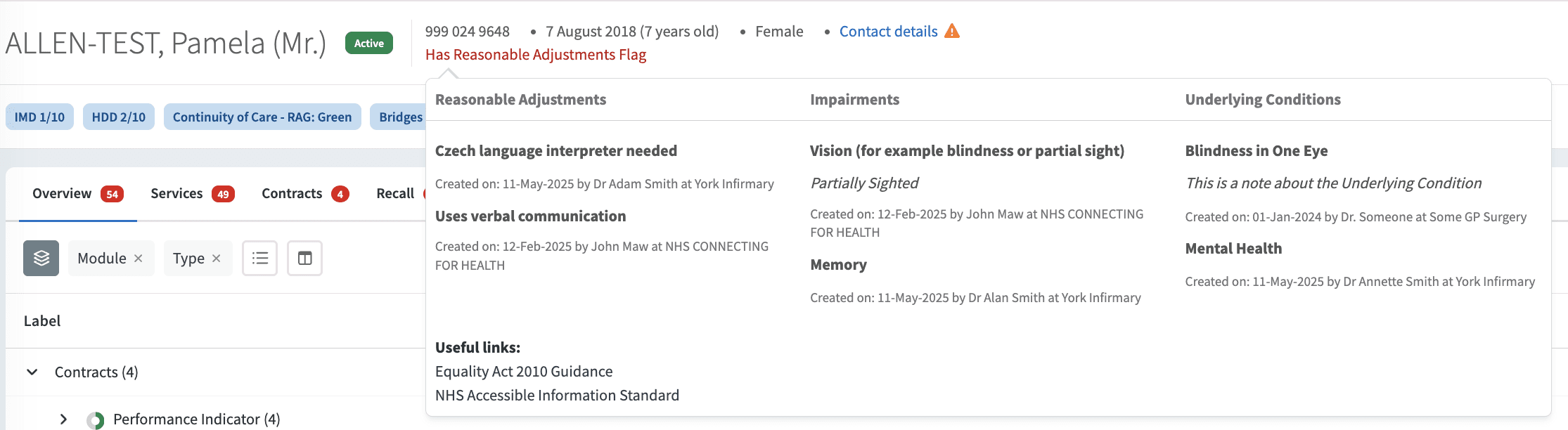
The Reasonable Adjustments Digital Flag is displayed within the Patient View in Ardens Manager.
When opening a patient record, users will see one of the following status messages depending on:
Whether a flag exists for the patient
The user’s access permissions
NHS Spine availability

Status
| Meaning
|
Reasonable Adjustments Flag Unavailable | The RADF cannot currently be displayed for the patient. This may occur where the patient record has a sensitive flag within the Personal Demographics Service (PDS), or for another reason/error. |
Has Reasonable Adjustments Flag | A Reasonable Adjustments Digital Flag is recorded for the patient |
No Reasonable Adjustments Flag | No Reasonable Adjustments Digital Flag is recorded for the patient |
Access Denied – Reasonable Adjustments Flag | Your access permissions do not currently allow visibility of the flag |
Selecting the status message will display the contents of the Reasonable Adjustments Digital Flag where access permissions allow.
The flag may contain:
Reasonable Adjustments
Impairments
Underlying Conditions
🔐User Access Requirements
In addition to standard patient-level access permissions within Ardens Manager, further permission checks are conducted through the NHS Care Identity Service (CIS), in line with NHS England requirements.
View the Existence of a Flag
To view whether a Reasonable Adjustments Digital Flag exists for a patient, the user’s CIS profile must include one of the following RBAC activities:
B0264 – Access SCR Application (Perform Patient Trace)
B0257 – View non-ETP Clinical Data within CSA
B0380 – Perform Detailed Health Records
View Reasonable Adjustments
To view recorded reasonable adjustments (limited content) within the flag, the user’s CIS profile must include one of the following:
B0264 – Access SCR Application (Perform Patient Trace)
B0257 – View non-ETP Clinical Data within CSA
B0380 – Perform Detailed Health Records
View Underlying Conditions and Impairments
To view impairments and underlying conditions (full content) recorded within the flag, the user’s CIS profile must include one of the following:
B0257 – View non-ETP Clinical Data within CSA
B0380 – Perform Detailed Health Records
⚠️ Please note: If these RBAC activities are missing or incorrect, contact your local IT team or Registration Authority (RA) agent to request access updates. For further guidance on smartcard access and permissions, refer to the Account Security & Login support article.
🆘Troubleshooting
Users may occasionally see messages relating to permissions or data availability when attempting to access the Reasonable Adjustments Digital Flag.
Access Denied – Reasonable Adjustments Flag
This message indicates that the user does not currently have the required CIS permissions to view the existence of the flag. Review the RBAC requirements listed above and contact your local IT team or RA agent if access changes are required.
Reasonable Adjustments Flag Unavailable
This message indicates that the flag cannot currently be displayed for the patient.
This may occur because:
The patient record is has a sensitive flag within the Personal Demographics Service (PDS)
The NHS central repository is temporarily unavailable
Another issue/error has occurred
❓FAQs
How do I add or amend the Reasonable Adjustments Digital Flag for a patient?
The Reasonable Adjustments Digital Flag is managed through the National Care Record Service portal. Further guidance is available from NHS England.
What does “Access Denied – Reasonable Adjustments Flag” mean?
This message indicates that your NHS Care Identity Service (CIS) profile does not contain the RBAC activities required to view the flag.
Why can I not see this information within the Electronic Patient Record (EPR)?
The data displayed within Ardens Manager is retrieved in real time from the NHS England central repository. Availability within Electronic Patient Record systems depends on supplier onboarding and implementation status.
For more information on which software suppliers are onboarded, please refer to the NHS England supplier interest list.
Can all users view impairments and underlying conditions?
No. Additional RBAC permissions are required to display impairments and underlying conditions recorded within the flag.
What should I do if I believe I should have access?
Contact your local IT team or Registration Authority (RA) agent to review your Care Identity Service permissions and RBAC activities.
Where can I access further FAQs?
For additional guidance and implementation FAQs, please refer to the NHS England FAQs.
🏫 Additional Support
To further your understanding of the Ardens Manager platform:
Book training for your GP Practice, PCN or ICB
Complete the Getting Started with Ardens Manager academy module
Contact our Support Team for support in real time