
We’re updating our Knowledge Base
We’re currently transitioning Ardens Clinical support articles to this new Knowledge Base. Content will be added progressively, so you may find limited articles available at this stage.
In the meantime, you can access our full support resources on our existing sites:
We’ll continue to expand this site, so please check back regularly.
ℹ️ Introduction
This article explains how Ardens resources can support your practice in managing the routine childhood immunisation programme. By the end of this article, you will understand how to identify eligible patients, manage recalls, record vaccinations, and monitor outstanding immunisations.
Background
The childhood vaccination/immunisation schedule is one of the most effective ways to protect children from serious infectious diseases and reduce the spread of preventable illnesses. This article covers the routine childhood schedule.
The schedule is updated regularly to reflect changes in clinical guidance and vaccine recommendations.
The following groups are eligible:
8 weeks | 6-in-1 (DTaP/IPV/Hib/HepB), MenB, Rotavirus |
12 weeks | 6-in-1 (second dose), MenB (second dose), Rotavirus (second dose) |
16 weeks | 6-in-1 (third dose), Pneumococcal (PCV) |
12 months (on or after 1st birthday) | MMRV, MenB booster, PCV booster |
18 months (born on or after 1st July 24) | 6-in-1 booster, MMRV (second dose) |
3 years 4 months (born on or before 31st Dec 24) | Preschool booster (dTaP/IPV) and MMRV (second dose) |
12-13 years (school year 8) | HPV vaccine |
14 years (school year 9) | Td/IPV booster and MenACWY |
Source - Changes to the routine childhood schedule letter - GOV.UK
How Ardens Can Help
Ardens resources help practices manage childhood vaccinations by supporting teams to:
Identify children who are due or overdue vaccinations
Monitor vaccination milestones
Manage invitation workflows
Record vaccinations consistently
Review incomplete vaccination courses
Monitor safeguarding and follow-up activity
🗓️ Plan
Before sending out any invites, we recommend reviewing the following reports. These will help you to identify your eligible patients, review safeguarding concerns, and monitor patients approaching vaccination milestones.
Cohorts
Use these reports to identify all patients aged 4 weeks to 4 years, regardless of their childhood vaccination status, including those who are fully vaccinated, partially vaccinated, unvaccinated, or have declined vaccination.
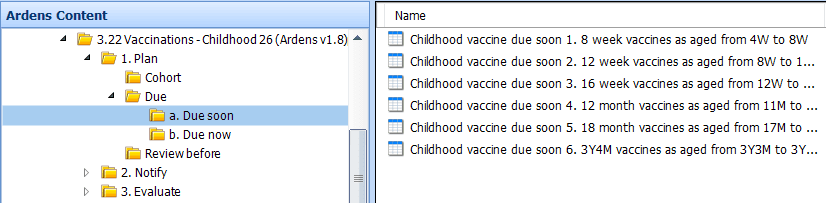
Due
Use these reports to identify patients who have not yet received the vaccinations due at their current milestone. They support practices to proactively identify eligible patients and ensure vaccinations are offered promptly and in line with the routine immunisation schedule.
Due soon: patients are due within the next 4 weeks. Patients will only display here if the previous vaccination has been recorded, to ensure the schedule is followed correctly
Due now: patients who are due for their next vaccination now
⚠️ Please note:
These reports provide an overview of patients due soon for childhood vaccinations. They should not be used for sending invites, which is done via the 'Invitations' folders
Patients will only be displayed in these reports if the previous vaccination has been recorded, ensuring the schedule is followed correctly
Once the vaccine is recorded in the patient's record, they will be removed from the report
Patients will automatically be moved from 'Due soon' to 'Due now' when applicable
Review before
Before sending invitations, we recommend reviewing the following reports as part of your safeguarding processes.
These reports identify children under 4 years of age who have had a vaccination decline recorded within the last 12 months and have not yet completed the vaccinations due at their current milestone. Reviewing these reports allows practices to confirm that decline codes have been recorded appropriately, check whether families still wish to decline vaccination, and identify any vaccinations that may have been given elsewhere but have not yet been recorded in the patient's record.
⚠️ Please note: Children will be automatically excluded from these reports if they have already received all vaccinations due for their current milestone or have an appropriate exception code recorded (for example, an adverse reaction).


✉️ Notify
Invites
The Invitation reports are designed to help practices communicate with a patient’s parent or guardian, inviting them to book vaccinations at the appropriate age.
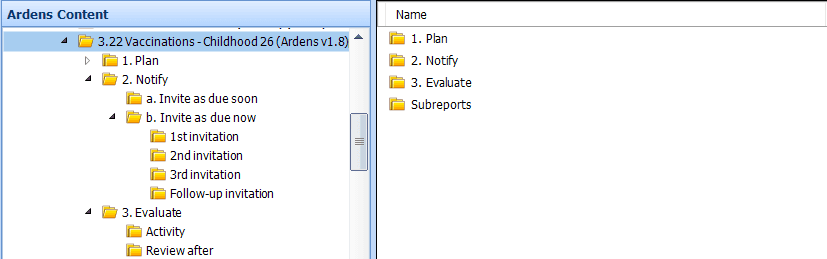
Invite reports are grouped into the following folders:
Invite as due soon: patients who have not yet received a vaccination that is due within the next 4 weeks (up to the day before it is scheduled). Practices can use these reports to proactively invite patients ahead of schedule.
Invite as due now: patients whose next vaccination is now due, according to the schedule for their age or milestone. These reports are broken down further by 1st, 2nd and 3rd invites.
⚠️ Please note:
Once the appropriate invite code is recorded in the patient record, the patient will no longer display in the reports.
For patients due now, if no vaccine has been recorded within 2 weeks of the 1st invite being sent, they will automatically move into the 2nd invite. Same logic applies for 2nd to 3rd invites.
No specific SNOMED invite codes exist for 18-month vaccinations yet; generic codes are used until the official codes are available.
Patients appear in the Invitation report only if all previous vaccinations are complete. Those with incomplete courses appear in the ‘Review After’ folder.
Invite Codes
8 Week
First primary immunisation invitation first letter (867671000000101)
First primary immunisation invitation second letter (867691000000102)
First primary immunisation invitation third letter (867711000000100)
12 Week
Second primary immunisation invitation first letter (867731000000108)
Second primary immunisation invitation second letter (867751000000101)
Second primary immunisation invitation third letter (867771000000105)
16 Week
Third primary immunisation invitation first letter (867791000000109)
Third primary immunisation invitation second letter (867811000000105)
Third primary immunisation invitation third letter (867831000000102)
12 Month
12-13 month immunisation invitation first letter (867971000000108)
12-13 month immunisation invitation second letter (868011000000101)
12-13 month immunisation invitation third letter (868031000000109)
18 Month
Child immunisation invitation first short message service text message (867491000000104)
Child immunisation invitation second short message service text message (867511000000107)
Child immunisation invitation third short message service text message (867471000000103)
3 Year 4 Month
Pre-school booster immunisation invitation first letter (868111000000100)
Pre-school booster immunisation invitation second letter (868131000000108)
Pre-school booster immunisation invitation third letter (868161000000103)
The Follow-up Invitation reports show patients who were invited for a vaccination at least 12 months ago but haven't had it yet. Practices can use these reports to identify and chase up any outstanding childhood vaccinations. Patients stay on the report until they've had the vaccination or turn 4 years old.
Invite Report Flow
Patients move through the invitation reports based on the invite codes recorded in their record and whether a vaccination has been given.
Age | What happens |
1st invite | Patient leaves the 1st invite report once the code is recorded. |
2nd invite | If no vaccination is recorded within 2 weeks, the patient moves to the 2nd invite report. |
3rd invite | If no vaccination is recorded within 2 weeks of the 2nd invite, the patient moves to the 3rd invite report. |
Vaccinated | If the vaccination is recorded at any stage, the patient is removed from the invite reports for that milestone. |
Follow-up invitation | Used for patients who were invited 12 or more months ago and still have no vaccination recorded. |

The reports can be exported as a CSV file for further filtering and third-party platform to send text messages. Access this support article for additional information on how to do this.
💉 Deliver
Administer
To support vaccine delivery and ensure accurate coding, templates are available to enable consistent, efficient documentation.
Use the Vaccinations Launcher (Ardens New) (access this support article for instructions on using the Template Launchers). Alternatively, open a consultation and select Run Template and search for the Childhood Vaccinations Template.
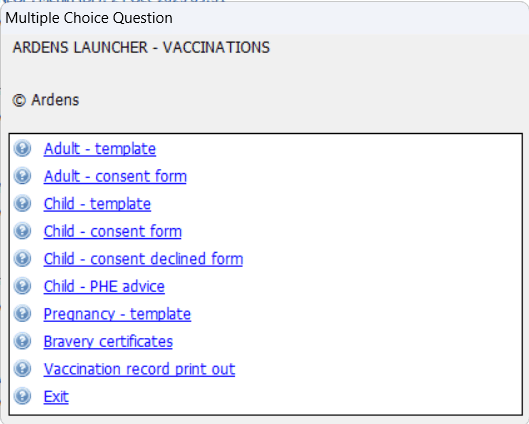
Select the Child-template option.
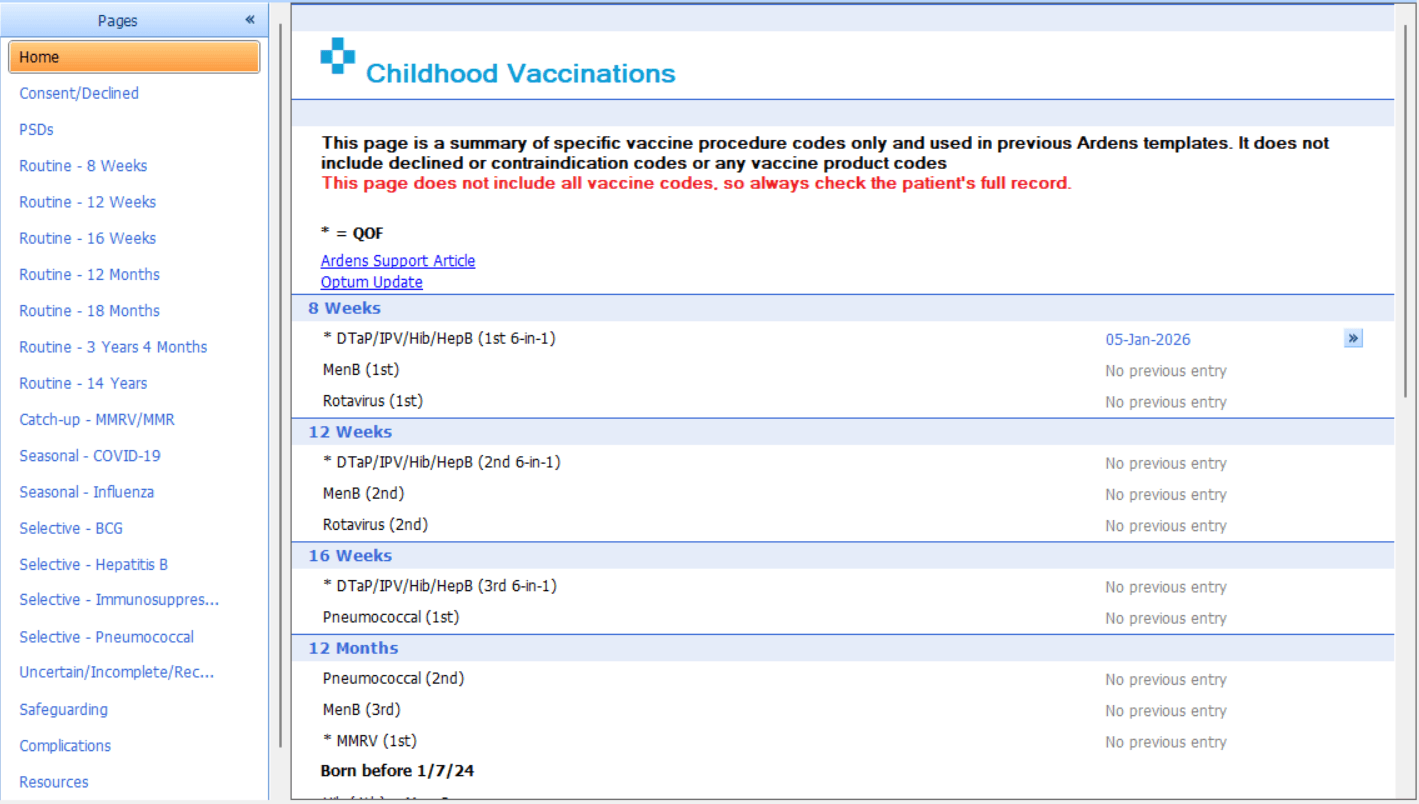
When launching the template, the first page will summarise the vaccine codes that exist on the patient's record.
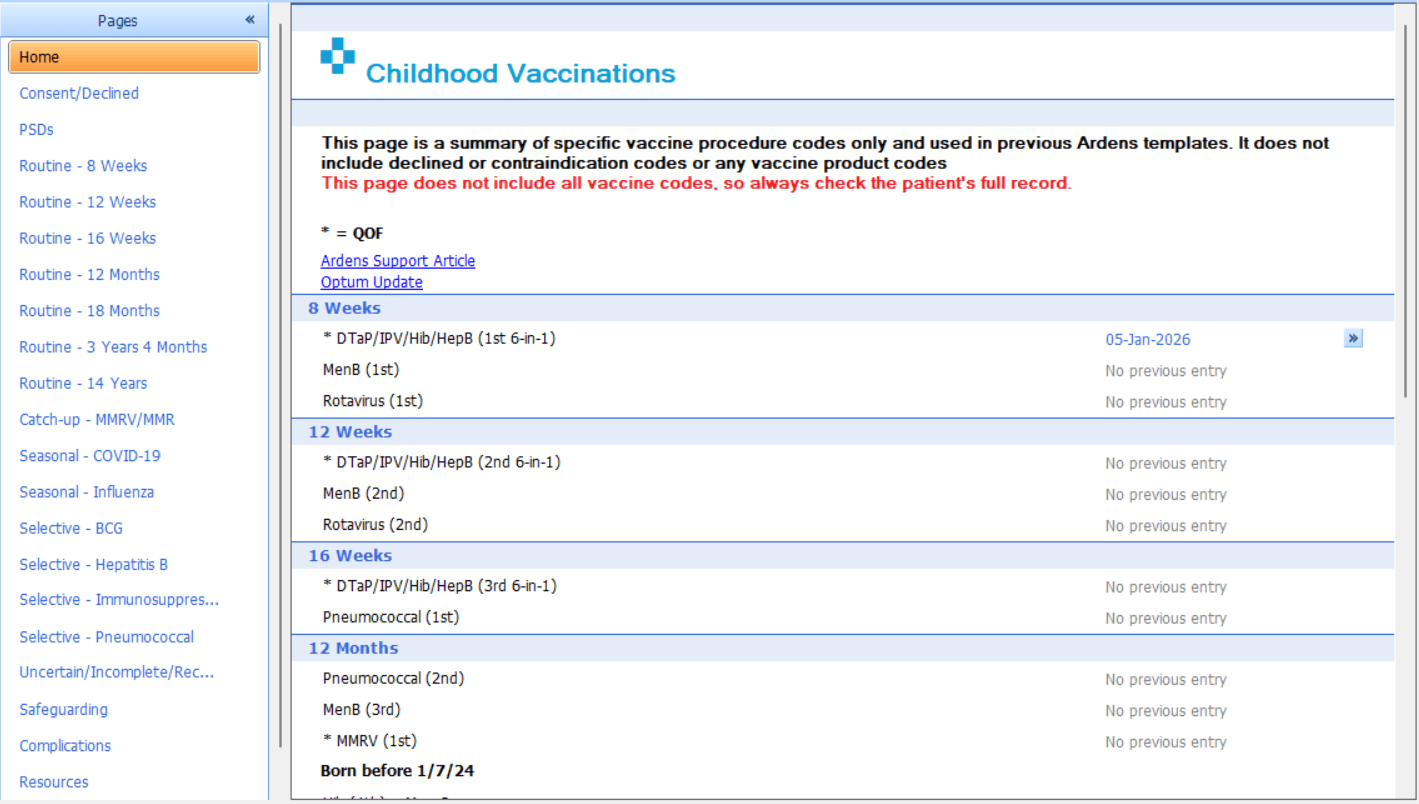
Select the relevant age page based on where the patient is on the schedule and record the consent and advice.
The Administer section will allow you to record details of the vaccine given, including expiry date and manufacturer.
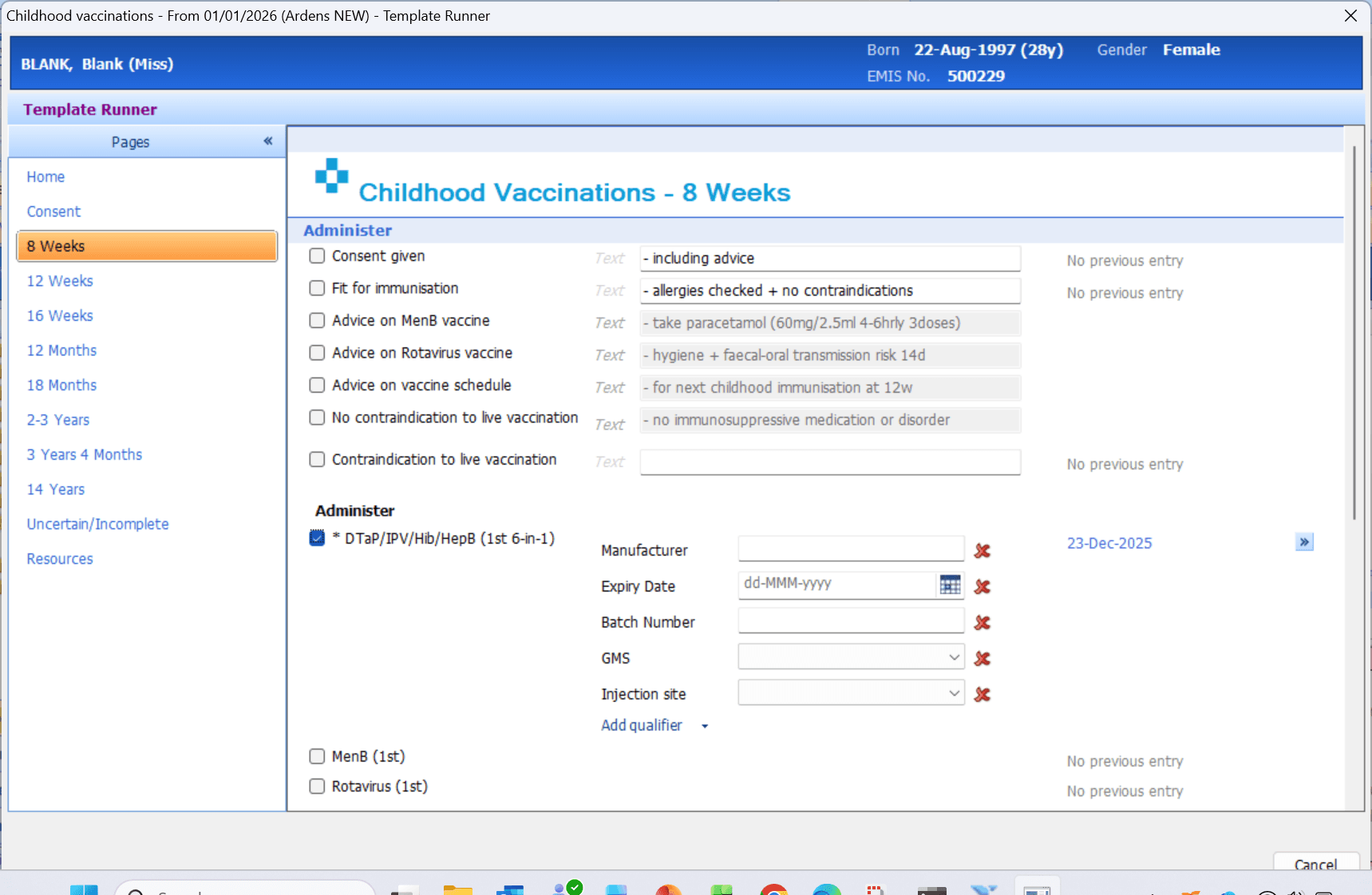
Save the template once complete.
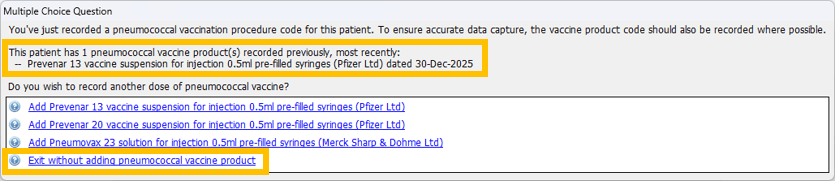
You may be alerted by Optum to record additional vaccines. Either select the relevant vaccine if required or 'Exit without adding.....'.
📈 Evaluate
Activity
The reports in this folder enable monitoring of uptake, broken down by activity in the last week and the last month.
Review
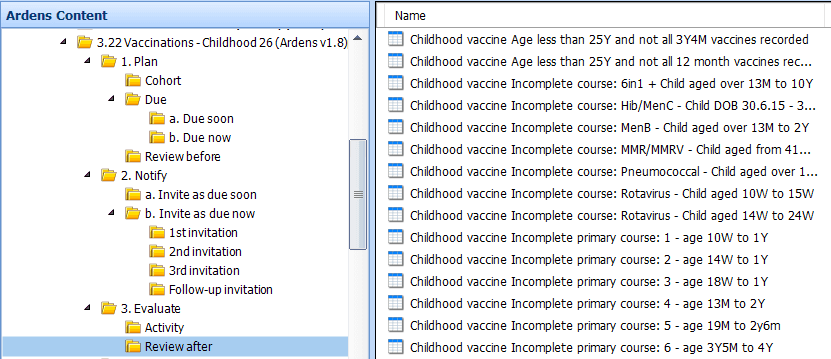
The reports in this folder identify patients whose vaccination due date has passed but who do not have the vaccine recorded. They highlight children who are now overdue, enabling a clinical review to determine the next steps.
They include:
Older children and young adults with long-standing gaps in their childhood vaccination history. Enabling clinical review, catch-up vaccinations, and updating to the national schedule.
Incomplete courses tracking patients at each stage of the schedule.
Patients who have not received a specific vaccine course.
⚠️ Please note: A child can still appear against an earlier milestone when that stage of the schedule remains incomplete. For example, an older child may still need an earlier childhood vaccine, so age alone does not always mean they will disappear from that part of the workflow.
Insights
For Ardens Manager subscribers, the Vaccinations dashboard provides a clear visual overview of the vaccination uptake.
This helps you prioritise and target specific patient populations more effectively.

Activity

Review
❓FAQs
Why is a patient not appearing in the Due reports?
Patients only appear in the Due reports if the previous vaccinations in the schedule have been recorded correctly. If an earlier milestone is incomplete, they may appear in a review or incomplete-course workflow instead.
Why is a patient still showing in a childhood immunisation report after vaccination?
This usually means the vaccination has not been recorded with the expected code, was recorded too early to count for the routine schedule, or an earlier vaccination in the course is still missing from the record.
Why are some children excluded from the Invitation reports?
Patients only appear in the invitation reports when they are ready for the next step in the routine pathway. If earlier vaccinations are incomplete, they may be managed through the Review after reports instead.
When do patients move from 1st to 2nd and 3rd invites?
Once a 1st invite code is recorded, the patient leaves that report. If no vaccination is recorded within 2 weeks, they move to the 2nd invite report. The same logic applies from 2nd invite to 3rd invite.
What happens after the 3rd invite?
Patients do not move straight into Follow-up invitation after the 3rd invite. The Follow-up invitation reports are for patients who were invited 12 or more months ago and still do not have a vaccination recorded.
🏫Additional Support
To further your understanding of the Ardens resources:
Book training for your GP Practice, PCN or ICB
Contact our Support Team for support in real time
Watch the recent Childhood Immunisation Webinars - EMIS / SystmOne