
We’re updating our Knowledge Base
We’re currently transitioning Ardens Clinical support articles to this new Knowledge Base. Content will be added progressively, so you may find limited articles available at this stage.
In the meantime, you can access our full support resources on our existing sites:
We’ll continue to expand this site, so please check back regularly.
ℹ️ Introduction
This article explains how to use the Ardens resources to identify, record, review and manage Reasonable Adjustments within your clinical system. It also explains how this work supports the NHS England Reasonable Adjustment Digital Flag (RADF) process. By the end of this article, you will understand how to use the Ardens templates, reports and patient alerts to support the process and help ensure patients receive appropriate adjustments to their care.
Watch our EMIS overview video
Watch our SystmOne overview video
Background
Reasonable Adjustments help reduce barriers that prevent people with disabilities from accessing healthcare. Consistently recording patients' adjustment needs can help healthcare providers understand and meet those needs and, where appropriate, support the sharing of information through the NHS Reasonable Adjustment Digital Flag (RADF).
How Ardens Can Help
Ardens provides resources to support each stage of the Reasonable Adjustments workflow:
Identify: reports to help find patients who may benefit from a Reasonable Adjustment review
Record: templates to document the Equality Act threshold, Reasonable Adjustment needs and related SNOMED coding
Review: alerts and reports to check that adjustment information is visible, complete and up to date
Manage: reports to support follow-up, annual review and data quality checks
How to Access


🔎Identify
The first step is to identify patients who may benefit from a Reasonable Adjustment review. Screening reports can help practices find patients with conditions or circumstances that may indicate they could require adjustments to access healthcare.
Screening Reports
Ardens provides screening reports to help identify patients with, for example, a learning disability, autism or dementia who may require further consideration of Reasonable Adjustments.
⚠️Please note: Ardens includes screening reports for common cohorts, but practices should also consider other patients who may need adjustments, including those with sensory, mobility, communication, memory or mental health-related needs.


📝 Record
Once a patient's needs have been identified, record their Reasonable Adjustment information using the appropriate Ardens template. This allows the practice to document the patient's needs and supports the appropriate coding required for the RADF process.
Templates
Reasonable Adjustment information can be recorded during a range of relevant consultations and reviews, including:
Communication Accessibility
Learning Disability Reviews
Autism Reviews
Dementia Reviews
New Patient checks
Use the Reasonable Adjustments section of the relevant Ardens template to record the patient’s needs in a structured way. This helps practices document whether the patient meets the Equality Act threshold, record the specific Reasonable Adjustment needed, and support consistent coding for reporting and review.
Depending on the patient’s needs, you may also record more specific adjustment information so that practice staff and other services can better understand how to support the patient.
When completing the template, pay particular attention to the key Reasonable Adjustment fields. These fields help distinguish between:
Whether the patient meets the Equality Act threshold
What Reasonable Adjustment is needed
Whether a specific SNOMED concept is available for that adjustment
Whether a more general or bespoke code is needed, where no specific option applies
Recording these items clearly is important because the reports and alerts rely on this coding to identify patients, highlight incomplete records and support future reviews.
The following code is a key part of the RADF process:
Impairment with substantial and long-term adverse effect on normal day-to-day activity (Equality Act 2010) - 1326341000000105
⚠️Please note:
Recording a Reasonable Adjustment in the patient record is separate from how that information may be shared nationally.
For the NHS Reasonable Adjustment Digital Flag (RADF), the national approach is now implied sharing with opt-out, rather than explicit consent.
If a patient does not want their Reasonable Adjustment information shared through RADF, record the appropriate declined sharing / declined consent code.
Practices should make sure the patient record clearly reflects the patient’s current wishes and review this if circumstances change.
Some patients’ needs may not fit neatly into a predefined Reasonable Adjustment option. In these cases, a broader or bespoke code may be appropriate. Within Ardens, this coding can also affect how patients appear on Reasonable Adjustment reports and registers, so it is important to record the most accurate option available and review it regularly.

👨⚕️Review and Manage
Once recorded, Reasonable Adjustment information should be easy for practice staff to see and review when needed. Ardens supports this through patient alerts and follow-up reports.
Patient Alerts
The alerts are triggered when relevant Reasonable Adjustment coding has been recorded in the patient record. This helps make important communication, accessibility or support needs more visible during future contact with the patient.
Depending on the clinical system, the alert may be displayed in the:
Patient demographic area
Patient Home screen
Consultation/patient alert area
Hover over the alert to view further information about the recorded Reasonable Adjustment.
These alerts can help clinical and administrative staff consider a patient's communication, accessibility, or other support needs when providing care.

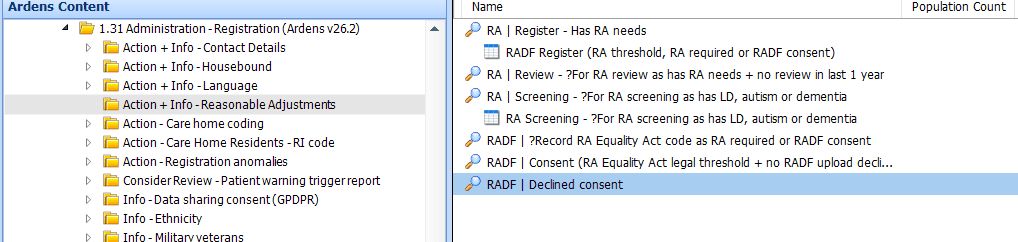
Additional Reports
Reports are available to help practices review data quality, identify incomplete coding and monitor whether patients with recorded Reasonable Adjustments may need follow-up.
The reports include:
RA Register: patients with recorded Reasonable Adjustment information, including those with an Equality Act threshold, a recorded Reasonable Adjustment need or RADF-related coding
RA Review: patients with recorded Reasonable Adjustment needs who may require review or follow-up
RADF ?Record: patients where some, but not all, of the key RADF-related SNOMED codes have been recorded
RADF Consent Declined: patients who have a code recorded to show that RADF sharing has been declined
⚠️ Please note: Practices should review Reasonable Adjustment records regularly to ensure that coding is complete, that adjustment needs remain current, and that patients who need follow-up are identified promptly.
Referral Information
Reasonable Adjustment needs should also be considered when making referrals. Where appropriate, include relevant information so the receiving organisation can understand the patient’s needs and make suitable arrangements.
The level of detail shared should always be appropriate, relevant and in line with current guidance.
⚠️Please note: NHS England guidance regarding the sharing of Reasonable Adjustment information within referral correspondence continues to evolve. Ardens will update its resources as national guidance changes.
❓FAQs
How do you update or remove a Reasonable Adjustment?
Review the patient’s current needs and update the Reasonable Adjustment coding using the relevant Ardens template. If an adjustment is no longer needed, record the appropriate code to reflect this clearly so the patient record and related reports remain accurate.
Who in the practice records a Reasonable Adjustment?
This will vary by practice workflow. In many cases, Reasonable Adjustments may be recorded by clinicians, care coordinators, reception teams or other staff involved in direct patient support. What matters most is that the information is recorded accurately, reviewed when needed, and made visible to colleagues who may need to act on it.
How does a Reasonable Adjustment appear in referrals or other documents?
This depends on the clinical system, the document type and local/national guidance in place at the time. Practices should check whether relevant information is being included appropriately.
How does this relate to the Accessible Information Standard?
The Accessible Information Standard and Reasonable Adjustments are closely related, as both aim to reduce barriers and improve access to care. In practice, some patients may need support that overlaps both areas, such as communication needs, format preferences or support with attending appointments. Practices should consider the full range of a patient’s needs when recording and reviewing information.
🏫 Additional Support
Book training for your GP Practice, PCN or ICB
Contact our Support Team for support in real time
Learn about the Ardens Manager Reasonable Adjustment Flag