
ℹ️ Introduction
This article explains how to use Ardens Manager to identify and action time-sensitive QOF work. By the end of this article, you will be able to prioritise patients with upcoming or overdue deadlines and take timely action to avoid missed QOF achievement.
Background
Some QOF indicators must be completed within a specific timeframe to count towards achievement. This may include annual reviews, monitoring requirements, or follow-up activity that must be recorded within defined periods.
If these timeframes are missed:
The activity may not count towards QOF achievement
Opportunities to gain points may be lost
Additional work may be required to recover performance
Managing time-sensitive work proactively is essential to ensure deadlines are met and performance is maintained throughout the QOF year.
How Ardens Can Help
Ardens Manager includes a dedicated Time-Sensitive category within the QOF Dashboard, designed to highlight patients with activity that is due soon or overdue.
These reports allow you to:
Identify patients approaching key deadlines
Highlight overdue activity that may impact achievement
Prioritise workload based on urgency
Support proactive recall and planning
✅Included in Ardens Manager National Content package: Interested in finding out more or requesting a trial? Contact accounts@ardens.org.uk
📍 Access the Reports
Login to Ardens Manager
Select Contracts from the left-hand panel
Select QOF 2026-27
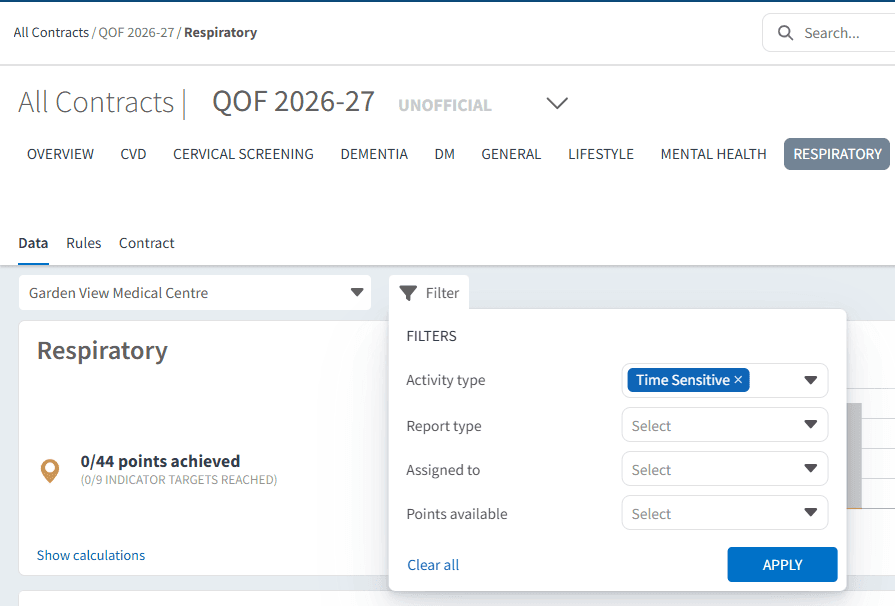
Navigate to the Time-Sensitive category for the relevant indicators using the dashboard Filter.
🔎 Identify Time-Sensitive Work
The Time-Sensitive reports highlight patients with activity that must be completed within a defined timeframe.
Use this section to:
Identify patients with upcoming deadlines
Highlight patients who are overdue
Understand which indicators are time-bound
Focus on work that may soon impact achievement
This helps ensure no critical activity is missed.
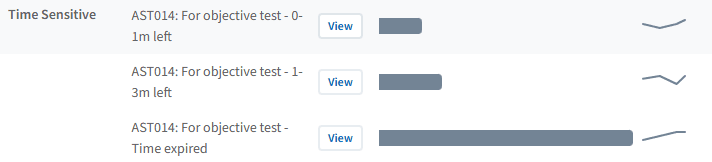
⚠️ Please note: It is recommended to review patients within the Time Expired category, as this may indicate missing or incomplete coding. Where evidence exists, ensure activity is recorded correctly to contribute towards QOF achievement.
Prioritise Urgent Patients
Not all outstanding work carries the same urgency. Time-sensitive reports help you focus on patients who require immediate action.
Use this to:
Prioritise patients approaching deadline thresholds
Focus on indicators where timing directly impacts achievement
Plan workload based on urgency rather than volume
This ensures limited capacity is used where it will have the greatest impact.
Take Action Using Patient Lists
Once time-sensitive patients are identified, you can take action directly from the patient lists.
Use this to:
Identify patients requiring urgent review
Support targeted recall and appointment planning
Prioritise high-risk or high-impact patients
To view patient lists:
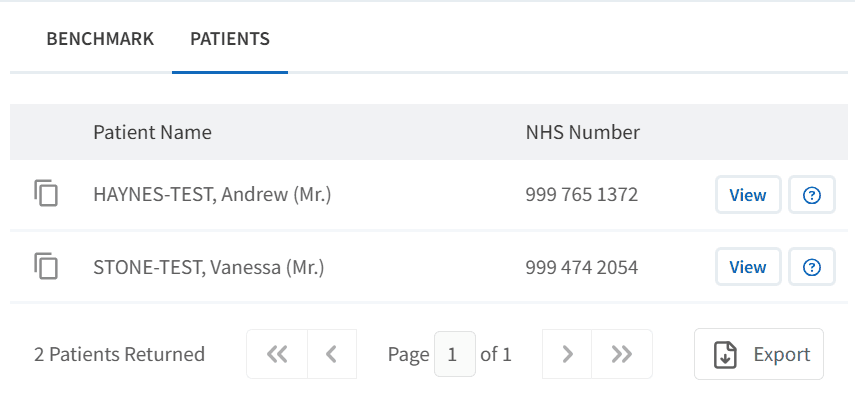
Click View next to the relevant report
Select the PATIENTS tab
Apply filters if required (e.g. Show remaining only)
Export or review patients as needed
📈 Monitor and Prevent Backlog
Regular review of time-sensitive work helps prevent last-minute pressure and missed opportunities.
Use this section to:
Monitor progress throughout the QOF year
Identify increasing backlog early
Adjust recall and clinic capacity
Ensure deadlines are consistently met
❓ FAQs
What is time-sensitive work?
Time-sensitive work refers to QOF activity that must be completed within a specific timeframe to count towards achievement.
What happens if I miss a deadline?
If activity is not completed within the required timeframe, it may not count towards QOF achievement, even if completed later.
How often should I review time-sensitive reports?
Regular review is recommended, particularly during periods of high activity or approaching deadlines.
How do I identify urgent patients?
Use the Time-Sensitive reports to identify patients who are overdue or approaching deadlines, and prioritise these for action.
🏫 Additional Support
To further your understanding of the Ardens Manager platform:
Book training for your GP Practice, PCN or ICB.
Complete the QOF academy modules.
Explore additional Ardens Manager articles to support QOF delivery.
Contact our Support Team for support in real time.