
ℹ️ Introduction
This article explains how to use the Appointments Dashboard in Ardens Manager to review appointment activity, understand demand, and support improvements in access and service delivery. By the end of this article, you will be able to interpret appointment data and use it to inform operational and strategic decisions.
Background
Appointment data is a key indicator of how primary care services are being accessed and delivered. Understanding this data is essential to ensure patients receive timely care while making best use of available capacity.
Practices and PCNs face ongoing challenges including:
Increasing demand for appointments
Variation in how appointments are delivered
Workforce pressures
Balancing face-to-face and remote access
Without clear visibility of appointment activity, it can be difficult to identify inefficiencies, unmet demand, or opportunities to improve access.
How Ardens Can Help
Ardens Manager provides a comprehensive Appointments Dashboard, bringing together data from your clinical system to support analysis of activity, access, and workforce utilisation.
The dashboard allows you to:
Monitor overall appointment activity and trends
Analyse appointment types and delivery methods
Understand who is delivering care
Identify variation across practices or services
Support planning to improve access and efficiency
✅Included in Ardens Manager National Content package: Interested in finding out more or requesting a trial? Contact accounts@ardens.org.uk
📍Access the Dashboard
Login to Ardens Manager
Select Services from the left-hand panel
Select Appointments
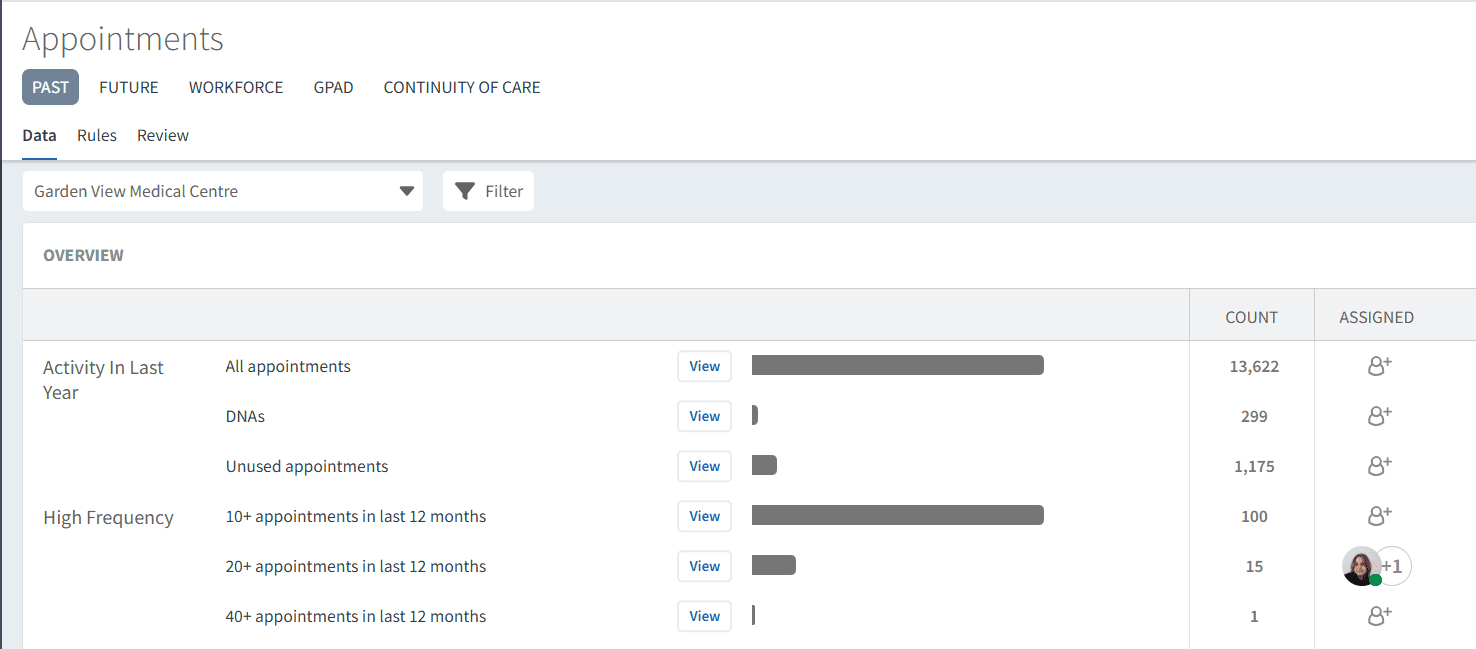
🔎 Monitor Appointment Activity
The dashboard provides a high-level summary of appointment activity across your organisation.
Use this section to:
Review total number of appointments over time
Identify peaks in demand (e.g. seasonal variation or weekly trends)
Monitor changes in activity levels
Understand overall workload
This helps highlight whether demand is increasing and where pressures may exist.
Open a report to access the Single Report Page, where you can apply a Timeline filter to review activity for a specific reporting period. Choose from quick-select options such as This Month, Last Month, This Year, Last Year, Last 12 Months, or define a custom date range to focus your analysis.
This is useful for reviewing activity for a selected month, the last 12 months or a custom reporting period, such as Extended Access reporting.
Appointment Types & Delivery
Understanding how appointments are delivered is key to improving access.
Use this section to:
Review breakdown of appointment types (face-to-face, telephone, online)
Identify trends in remote vs in-person consultations
Assess whether delivery models align with patient need
Identify opportunities to optimise appointment mix

Review Workforce Utilisation
Appointments can be analysed by staff role to understand how workload is distributed.
Use this to:
Review activity by GPs, nurses, and ARRS roles
Identify whether workload is appropriately distributed
Highlight opportunities to utilise multidisciplinary teams
Support workforce planning and capacity management

Identify Variation
Variation in appointment activity can highlight differences in access and delivery.
Use this to:
Compare appointment levels across practices or services
Identify areas of higher demand or pressure
Highlight variation in appointment types or workforce use
Support targeted improvement
🔎 Report Breakdown
From the dashboard view, reports display headline figures (e.g. total appointments or % of appointment types).
To explore further detail:
Click View next to a report
Select the relevant tab such as Demographics, Staff or Timeline to explore the data from different perspective.

This allows you to:
Understand what is driving activity
Analyse detailed breakdowns (e.g. by appointment type or staff role)
Identify patterns within the data
The TREND chart can also be used to monitor changes over time.

The Trend and Timeline views have been updated to make it easier to explore appointment activity over time.
For appointment reports, you can also analyse data by Appointment Status. Select Show status to display appointment statuses within the report breakdowns, allowing you to compare Completed, Unused, Booked, Did Not Attend, Blocked, and Cancelled appointments alongside other breakdown categories, such as staff or risk. Where available, appointment status can also be applied as a filter.

📈 Use Insights for Improvement
Appointment data can be used to:
Improve access and availability
Adjust appointment types and delivery models
Align workforce with demand
Support operational and strategic planning
Identify unused appointment capacity and Did Not Attend (DNA) trends to support appointment planning
❓FAQs
What data is included in the Appointments Dashboard?
Appointment activity, types, workforce utilisation, and trends from your clinical system.
Can I compare across organisations?
Yes, where access is enabled, data can be viewed across practices or PCNs.
🏫 Additional Support
To further your understanding of the Ardens Manager platform:
Book training for your GP Practice, PCN or ICB
Complete the Appointments academy module
Contact our Support Team for support in real time