
We’re updating our Knowledge Base
We’re currently transitioning Ardens Clinical support articles to this new Knowledge Base. Content will be added progressively, so you may find limited articles available at this stage.
In the meantime, you can access our full support resources on our existing sites:
We’ll continue to expand this site, so please check back regularly.
ℹ️Introduction
This article explains how to access and use Ardens HMP Prison Templates in SystmOne to support the structured recording of prison-specific assessments, reviews and clinical encounters. By the end of this article, you will know where to find the HMP resources, how to add them to your F12 Launcher, and which templates are available to support different areas of prison healthcare.
Background
Healthcare professionals working in prisons may need to record assessments and interventions relating to areas such as prisoner injury, restraint, self-harm, intoxication and ACCT reviews.
The Ardens HMP Prison Templates provide resources to support consistent and structured recording of this information. They include relevant clinical codes, free-text fields, assessment tools and links to other Ardens resources.
The templates should be used alongside local policies, procedures and clinical judgement.
How Ardens can help
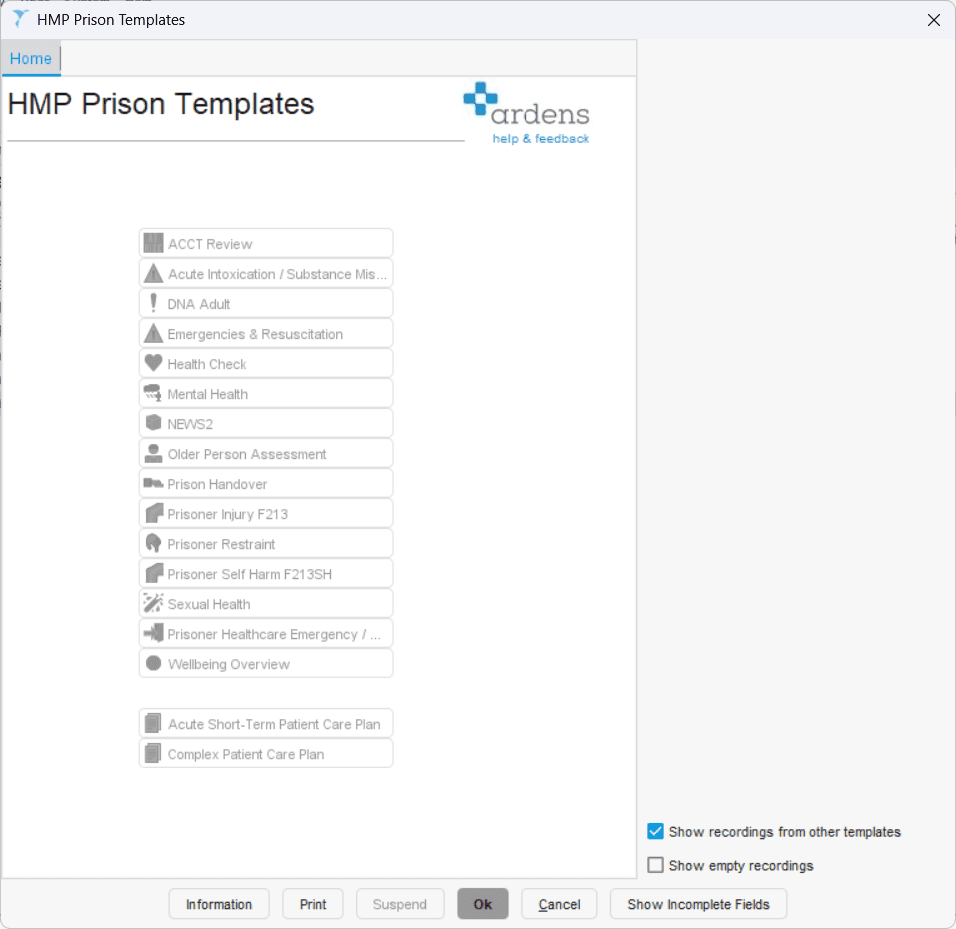
The HMP Prison Templates launcher acts as a central access point for prison-specific templates and other Ardens resources that may be useful in a prison healthcare setting.
The launcher provides access to resources including:
ACCT Review
Acute Intoxication/Substance Misuse
HMP Prison NHS Health Check
HMP Mental Health
Prison Handover
Prisoner Injury F213
Prisoner Restraint
Prisoner Self-Harm F213SH
HMP Healthcare Emergency/Unscheduled Care
Wellbeing Overview
Other relevant clinical templates, including DNA Adult, Emergencies and Resuscitation, NEWS2 and Sexual Health
Acute Short-Term Patient Care Plan
Complex Patient Care Plan
How to Access
Click Auto-Consultations
Select ardens OTHER PROFESSIONALS > HMP Prison Templates
Select the required template
If you use these resources regularly, add the launcher or individual templates to F12 for quicker access (access this support article for instructions on using the F12)
If you cannot find a template, try searching for it in the SystmOne search bar bottom left-hand corner.
📝Record Prison-Specific Care
The HMP Prison Templates can support a range of prison healthcare workflows. Select the template relevant to the assessment, review or clinical encounter you are recording.
Risk, Safeguarding and Mental Health
Use these templates when recording mental health concerns, risk-related reviews, safeguarding considerations, or self-harm-related care.
ACCT Review – use this to record an ACCT review, including attendance, family involvement, MDT information, risks, management plan, prisoner watch arrangements, referrals and next review date.
HMP Mental Health – use this to record a prisoner’s mental health care, including mental health history, risk of harm, safeguarding, capacity, substance misuse, and input from prison mental health or substance misuse teams.
Prisoner Self-Harm F213SH – use this to record a self-harm incident and associated F213SH information, including history, examination, vital signs, body map, management, medication, patient information and referrals.
Incident and Urgent Care
Use these templates for acute events, same-day clinical issues, restraint-related documentation, or emergency prison healthcare activity.
Acute Intoxication/Substance Misuse – use this to record the assessment and management of suspected drug or alcohol intoxication, including observations, investigations and management.
Prisoner Injury F213 – use this to record injuries, including cause, type of injury, history, examination findings, vital signs, body map, management and referrals.
Prisoner Restraint – use this to record the restraint event and the post-restraint assessment, including safeguarding considerations, who was present, clinical assessment and ongoing management.
HMP Healthcare Emergency/Unscheduled Care – use this to record that a prison healthcare emergency response has taken place and to access linked emergency-related resources.
Handover and Wellbeing
Use these templates to support continuity of care, communication between staff, and broader wellbeing review.
Prison Handover – use this to record who attended the handover, the prisoner’s problems, the reason for handover and the agreed plan.
Wellbeing Overview – use this to complete a structured wellbeing assessment covering mental health, physical health, relationships, substance use, resettlement, risk of reoffending and referral needs.
Health Checks and Care Plans
Use these resources for preventive care, planned review, and ongoing care documentation.
HMP Prison NHS Health Check – use this to complete an NHS Health Check for an eligible prisoner, including assessment, lifestyle factors, tests, CVD risk and summary.
Acute Short-Term Patient Care Plan – use this care plan document to support short-term ongoing care.
Complex Patient Care Plan – use this care plan document to support more complex ongoing care needs.
➡️ Other Clinical Templates
The HMP Prison Templates also includes links to wider Ardens clinical templates that may be useful in a prison healthcare setting, even where they are not prison-specific templates.
For example:
DNA Adult
Emergencies and Resuscitation
NEWS2
Sexual Health
📋Care plans
The HMP Prison Templates launcher also provides access to the following care plan documents:
Acute Short-Term Patient Care Plan
Complex Patient Care Plan
Selecting a care plan opens a Microsoft Word document. Relevant information recorded in SystmOne is automatically populated into the document, which can then be reviewed and amended as required.
❓FAQs
Should I use the HMP Prison Templates for every consultation?
No. Routine consultations and long term condition reviews can be recorded using the usual Ardens clinical templates. The HMP Prison Templates provide additional resources for assessments and processes specific to the prison setting.
Can I add an individual HMP Prison Templates to my F12 Launcher?
Yes. Individual templates can be added to the F12 Launcher, allowing users to create shortcuts to the templates most relevant to their role.
Do I have to use the main HMP Prison Template?
No. The main template provides a convenient way to access all the available resources, but individual templates can also be launched separately or added to F12.
🏫 Additional Support
Book training for your Prison
Contact our Support Team for support in real time