
We’re updating our Knowledge Base
We’re currently transitioning Ardens Clinical support articles to this new Knowledge Base. Content will be added progressively, so you may find limited articles available at this stage.
In the meantime, you can access our full support resources on our existing sites:
We’ll continue to expand this site, so please check back regularly.
ℹ️ Introduction
This article explains how to use the Ardens Death Documentation resources to record and manage the key processes that follow a patient’s death. By the end of the article, you will understand how to record and verify a death, support Medical Examiner or coroner referrals, record certification and notifications, and complete an after-death review.
Background
Following a patient’s death, information may need to be recorded and acted upon by different members of the practice team. A structured process helps practices record relevant information consistently and supports referrals, certification, notifications and subsequent review.
Practices should follow their locally agreed processes and the relevant national guidance when determining the actions required following a death.
How Ardens Can Help
Ardens provides resources to support the different stages of the death documentation process, including:
Documents and letters to support Medical Examiner referrals and notifications
Prompts to guide staff through relevant actions
Searches and reports to support auditing and after-death review
Resources and links to further guidance for healthcare professionals, patients and their representatives
How to Access


📝 Complete Documentation
The Ardens Death Documentation template supports the different stages of the process following a patient’s death. You do not need to complete every page or field. Complete the sections relevant to the patient, your role and the current stage of the process.
The template can be reopened and updated as further information becomes available.
Record
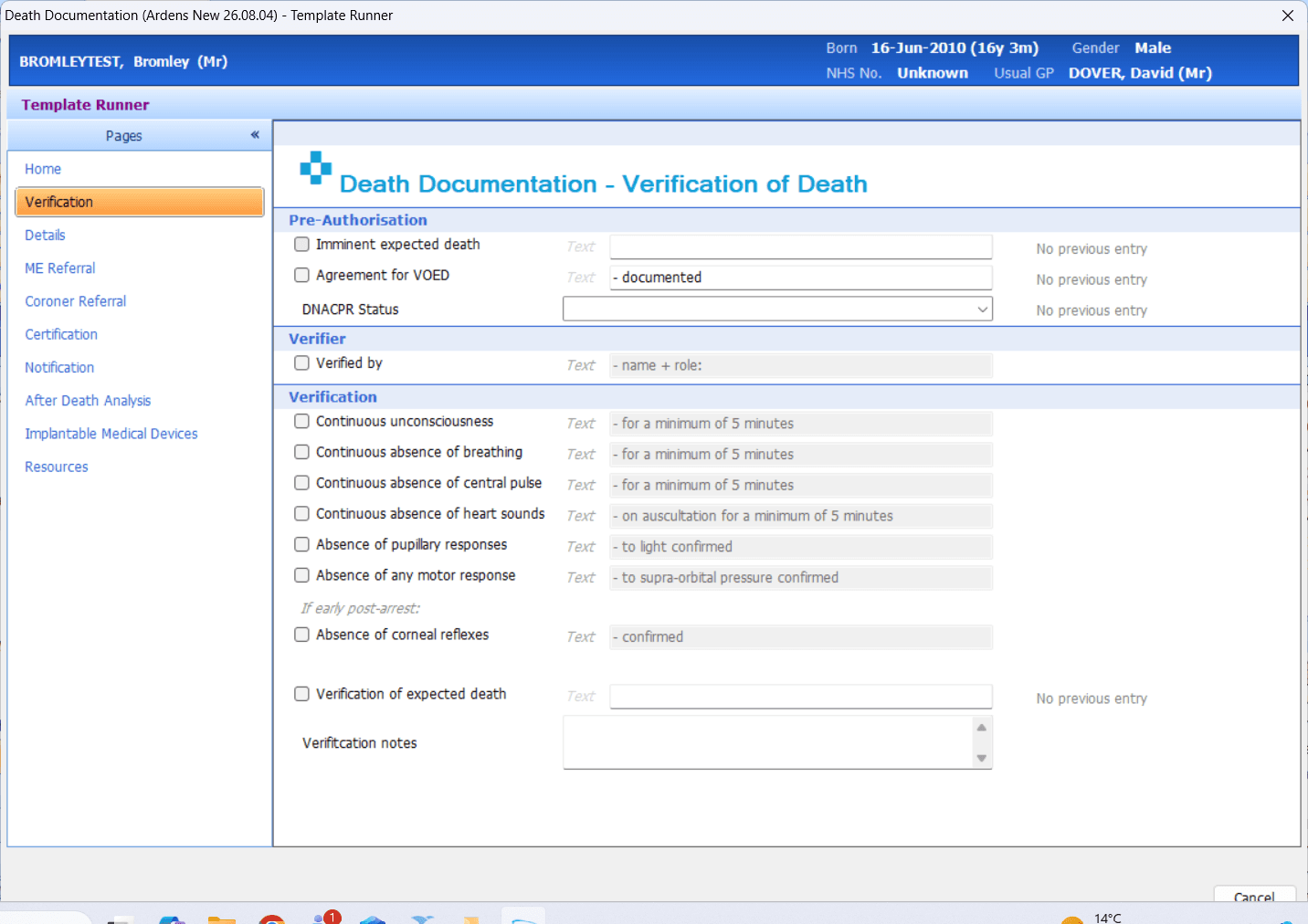
Verification
Start by recording the circumstances of the death and any verification completed.
Use the Verification page to record:
Any relevant pre-authorisation information
Whether there was an imminent expected death
Whether an agreement for verification of expected death was documented
The patient’s DNACPR status
The name and role of the person who verified the death
The findings used to confirm verification
Whether the death was expected
Any additional verification notes
Details
Use the Details page to record information including
Date, time and place of death
Whether the death was expected
Who informed the practice
Next-of-kin details and whether they have been informed
Who nursed the patient during their final illness
The people present and any concerns raised at the time of death
The patient’s previous occupation
The current location of the deceased
Funeral arrangements and funeral director details
The known status of any medical devices or implants
Any specific faith requirements
Whether the doctor has been informed
Bereavement counselling or support
The Action section provides links to the appropriate Medical Examiner or coroner referral page.
Refer
The appropriate referral pathway will depend on the circumstances of the death and local processes. The template supports recording information for both Medical Examiner and coroner referrals.
Medical Examiner Referral
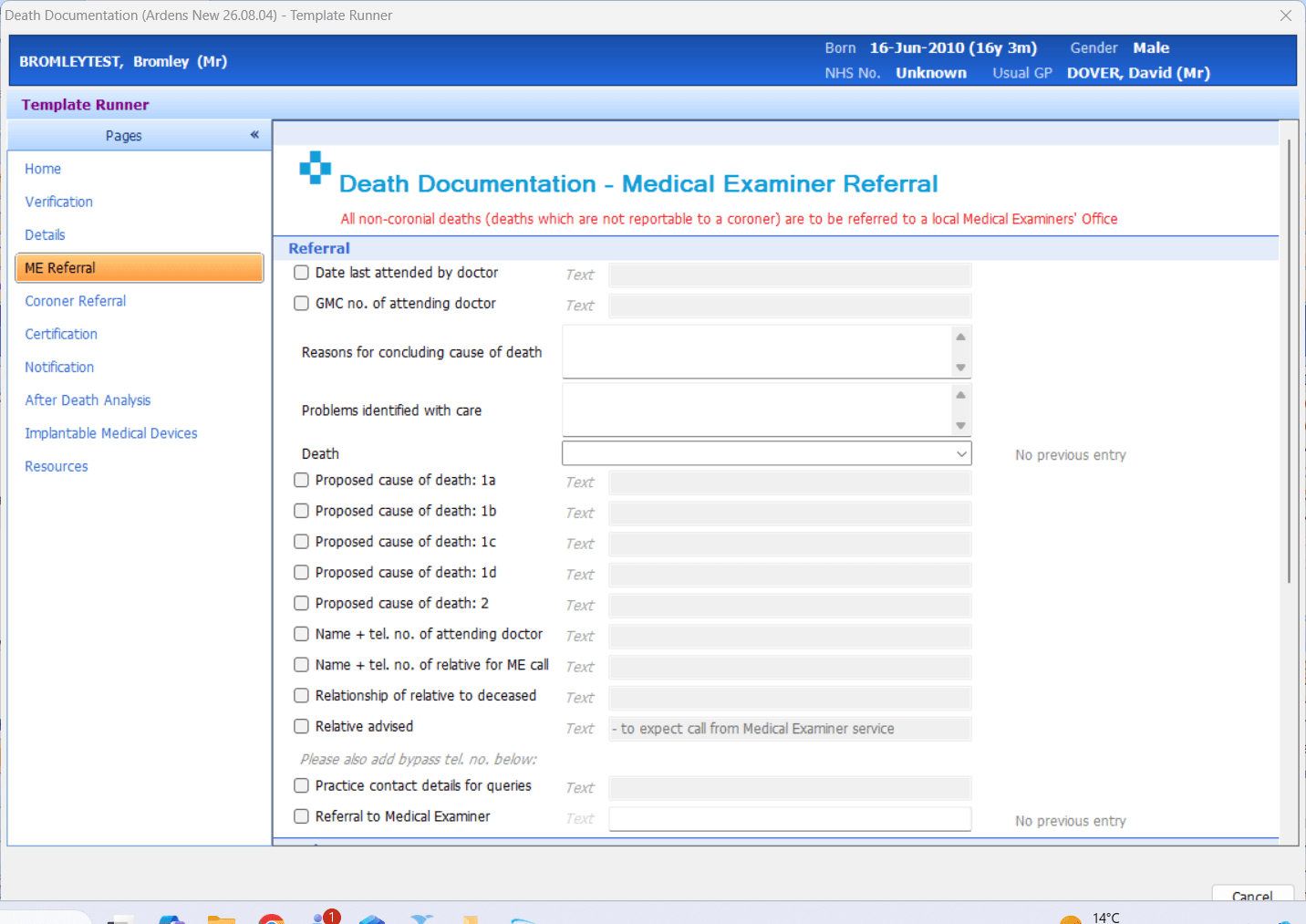
Use the ME Referral page to record the information required when referring a non-coronial death to the local Medical Examiner office.
The page includes:
Date the patient was last attended by a doctor
GMC number of the attending doctor
Reasons for concluding the proposed cause of death
Any problems identified with the patient’s care
Proposed cause of death for the medical certificate
Contact details for the attending doctor, practice and relative
Relationship of the relative to the deceased
Confirmation that the relative has been advised to expect contact from the Medical Examiner service
Confirmation that the referral has been made
The outcome of the Medical Examiner review can also be recorded, including whether:
The proposed MCCD has been accepted
Amendments to the MCCD have been advised
Referral to the coroner is required
The Medical Examiner has referred the death to the coroner
⚠️Please note: Some areas may use a localised Medical Examiner or coroner form linked through local communications templates rather than the standard national form. If so, follow the locally agreed version for your area.
Coroner Referral
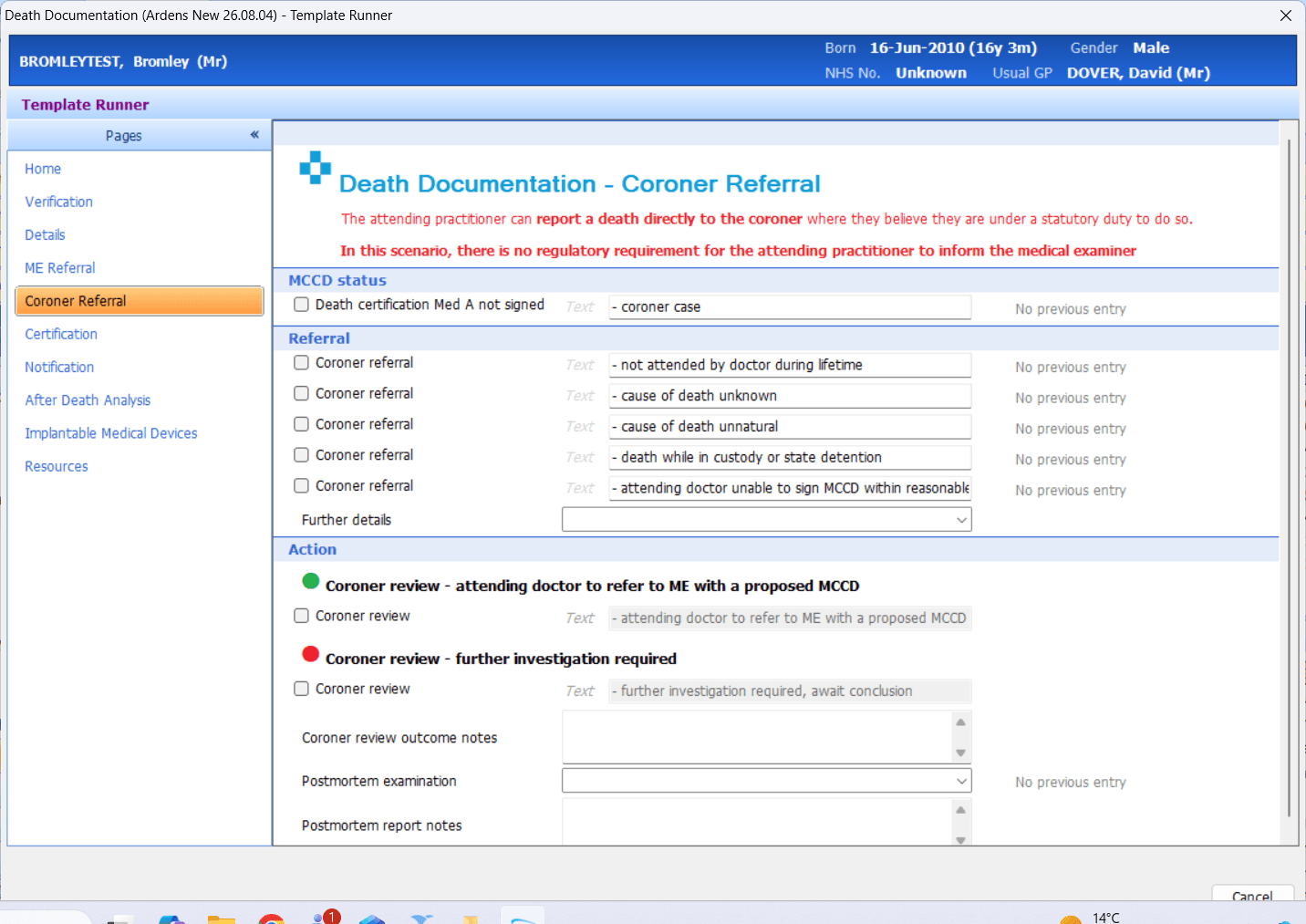
Use the Coroner Referral page where the death meets the relevant criteria for notification to the coroner.
The page includes:
The reason for notifying the coroner
Further information relevant to the referral
The outcome of the coroner’s review
Whether the attending doctor should refer the death to the Medical Examiner with a proposed MCCD
Whether further investigation is required
Post-mortem examination and report details.
Certification
Following the outcome of the Medical Examiner or coroner process, use the template to record the Certification page to record relevant certification information.
The page includes:
Confirmation that the Medical Examiner has given permission for the attending doctor to complete the MCCD.
The cause of death in sections 1a to 1d and 2.
Completion of the MCCD.
Burial or cremation preferences.
The presence and details of any medical devices or implants.
Submission of the MCCD to the Medical Examiner for final sign-off.



Review
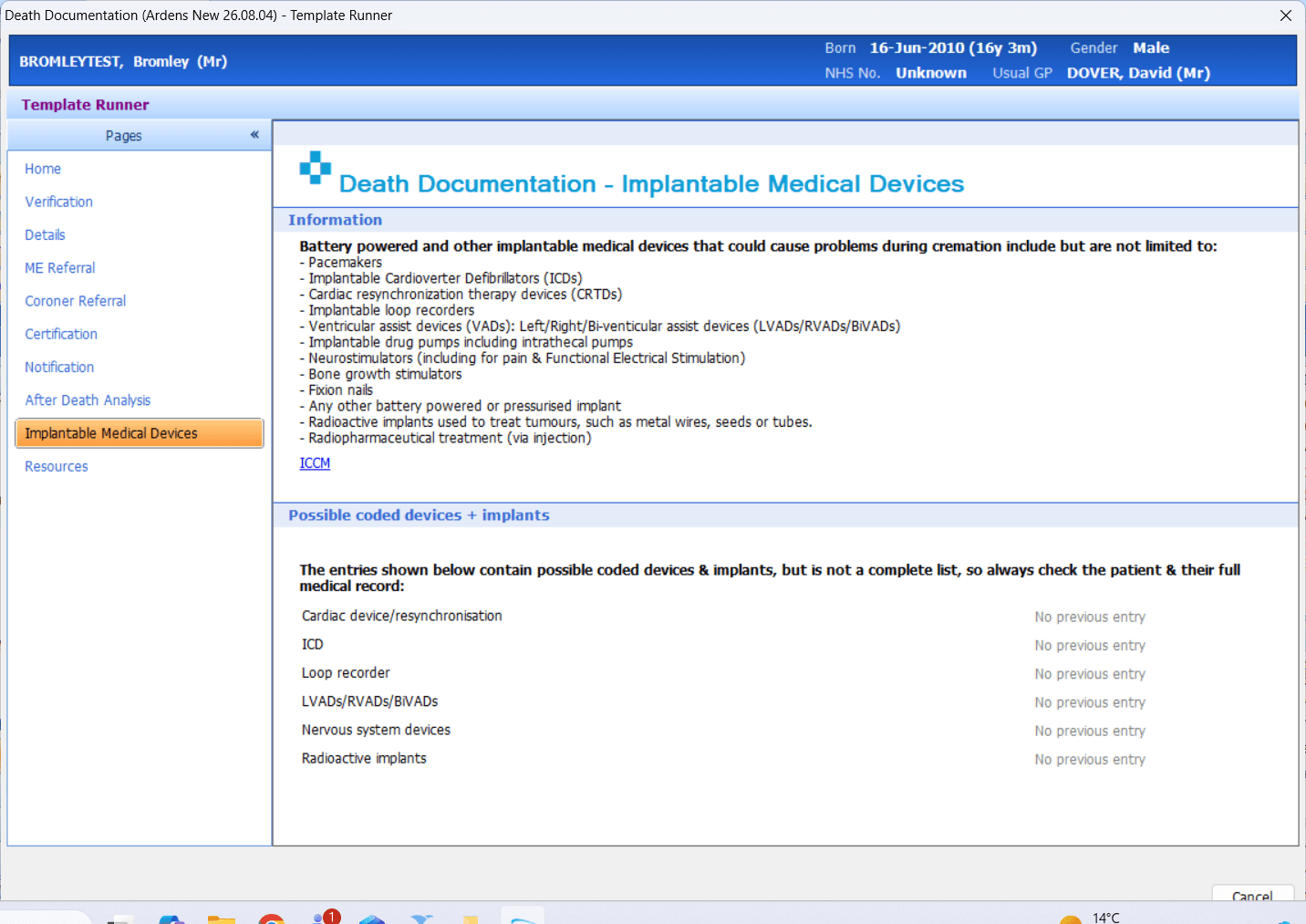
The Implantable Medical Devices page displays possible coded devices and implants recorded in the patient record.
The information displayed may not represent a complete list. Always check the patient and their full medical record for details of any devices or implants.
Notify
Use the Notification page to record which teams and organisations have been notified of the patient’s death and any related administrative actions completed.
Relevant notifications may include:
GP practice staff
Community teams
District nurses
Hospices
Hospitals
Pharmacies
LeDeR, where appropriate
School nursing or health visiting teams for patients aged under 16
Any other relevant people or organisations
The page can also be used to record actions such as cancelling referrals or diabetic screening.
Resources
The Resources page provides links to:
Information for patients and their representatives about what to do after someone dies.
Bereavement information and support
Guidance for healthcare professionals
National guidance and legislation
LeDeR information
Relevant clinical reference material


📊 Audit Deaths
After a patient’s death, practices can use the Ardens resources to support after-death review and monitor recent deaths across the practice. The available template pages, searches and reports help identify deaths requiring review, record key findings and support ongoing learning and follow-up.
After-Death Review
Use the After Death Analysis page to review and record information about the patient’s end-of-life care following their death.
This includes:
Date and time of death
Whether the death was expected
The actual and preferred place of death
Whether the preferred place of death was achieved
Discussions with the patient’s next of kin, friends or carers
Bereavement counselling or support
Whether a condolence letter was sent
Completion of a GSF After Death Analysis
Completion of a LeDeR notification, where appropriate
Any additional after-death analysis notes
This can support practice learning and provide a consistent record of discussions, reviews and further actions completed following the patient’s death.

Reports
The Ardens Death Documentation reports support practices with reviewing recent activity and identifying patient records that may require further action.
The results are based on coded information recorded in the patient record, including information added using the Death Documentation template.

❓FAQs
Does completing the Death Documentation template automatically mark the patient as deceased?
No. The template helps record death-related information and actions, but the patient’s registration / deceased status must still be updated through the appropriate clinical system workflow. Practices should also check that any scheduled communications, recalls or referrals are dealt with according to local process.
Do I need to complete every page or field in the Death Documentation template?
No. Complete the areas relevant to the patient, your role and the current stage of the process.
The template acts as a helpful prompt for information and actions that may need to be considered, but not every field will be relevant in every case.
Does ticking that a service has been notified automatically send a notification?
No. Recording that a service has been notified documents the action in the patient record; it does not automatically contact that service. Use the relevant letter, task or communication option where available, or follow your locally agreed notification process.
How do I know whether to refer the death to the Medical Examiner or coroner?
The template provides prompts and links to support both pathways, but it does not make the referral decision. The attending clinician should follow the relevant statutory guidance and any locally agreed pathways when deciding whether notification to the coroner is required.
What should I do if my local area uses a different referral form or process?
Follow the pathway agreed by your ICB, Medical Examiner office or local coroner service. Locally commissioned forms and processes should be used where required.
Does the Implantable Medical Devices page show every device recorded for the patient?
Not necessarily. The page displays possible coded devices and implants but may not contain a complete list. Always check the patient and their full medical record for information about devices or implants.
🏫 Additional Support
Book training for your GP Practice, PCN or ICB
Contact our Support Team for support in real time