
ℹ️ Introduction
This article explains how to use the Safeguarding Dashboard to support the monitoring of adult safeguarding. By the end, you will be able to report on safeguarding activity, track trends, and support proactive care management.
Background
Adult safeguarding involves protecting individuals at risk of abuse or neglect and ensuring appropriate actions are taken in line with statutory guidance such as the NHS England and Care Quality Commission requirements.
GP Practices are expected to:
Maintain accurate safeguarding registers
Monitor activity and trends
Demonstrate oversight during inspections
How Ardens Can Help
Ardens Manager provides a Safeguarding Dashboard that allows you to:
View adult safeguarding activity (e.g. concerns, referrals, DoLS)
Monitor trends over time
Identify patients on safeguarding registers
Support reporting for governance and inspections
✅Included in Ardens Manager National Content package: Interested in finding out more or requesting a trial? Contact accounts@ardens.org.uk
📍Access the Dashboard
Log into Ardens Manager.
Select the Services module from the left sidebar.
Open the Safeguarding dashboard.
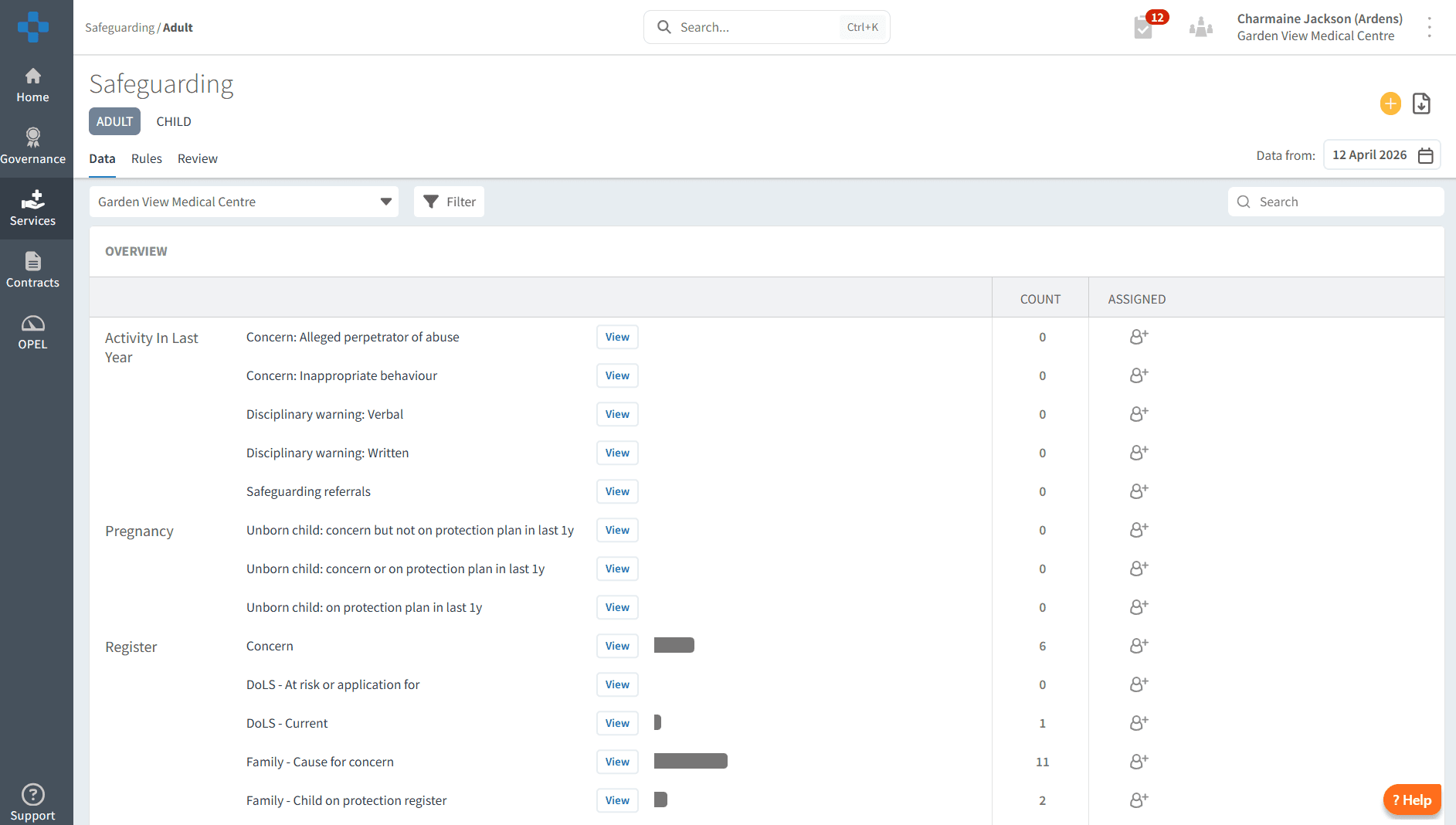
👨👩👧👦 Registers
Registers provide a structured way to monitor patients with safeguarding concerns and ensure appropriate follow-up.
The registers include:
Concerns
DoLS (Deprivation of Liberty Safeguards) – current or at risk
Family-related safeguarding concerns
The registers can support MDT discussions, reporting, and compliance.
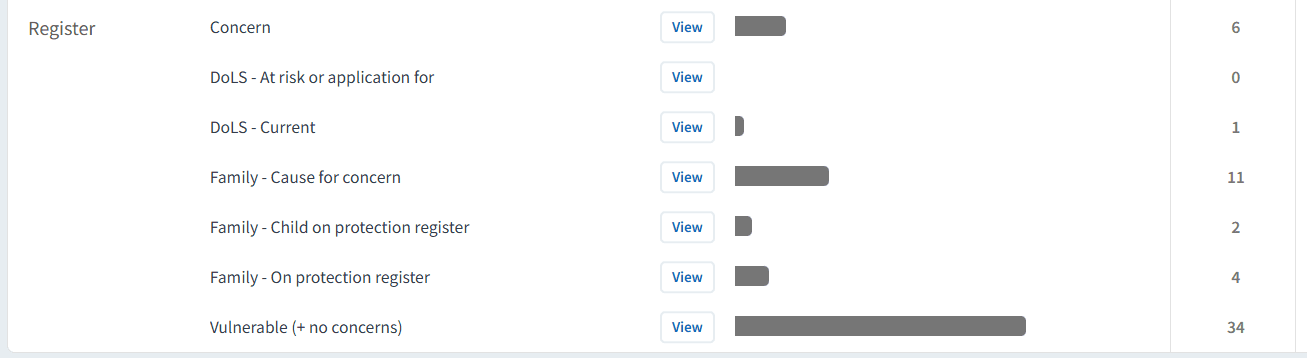
To view details of the patients on the registers, click on the View button to the right of the reports. Then select the PATIENTS tab.

The same screen can also be used to further analyse safeguarding data by trends, demographics, long-term conditions, and risk factors, helping you identify patterns and target interventions more effectively.
🔎 Review
The Overview section provides comprehensive information on safeguarding activity, allowing you to monitor trends, identify risks, and ensure appropriate follow-up.
Activity in Last 12 Months
This area offers a retrospective view of safeguarding activity recorded over the past year, helping you understand patterns and changes over time.
You can use this to:
Monitor the volume and type of safeguarding concerns (e.g. abuse, inappropriate behaviour)
Review safeguarding referrals and disciplinary indicators
Identify increases or trends in activity
Support audits, reporting, and safeguarding meetings
Selecting View next to each report allows you to drill down into patient-level data to review individual cases and confirm appropriate actions have been taken.
Pregnancy
This area focuses on safeguarding concerns relating to unborn children, supporting early identification and intervention.
You can use this to:
Identify patients with safeguarding concerns during pregnancy
Monitor those currently or previously on a protection plan
Support collaborative working with maternity and community teams
Ensure timely review and appropriate care planning
Click View next to each reports to access detailed patient lists, enabling further review and action where required.
⚠️ Case Finders
The Case Finders section supports proactive safeguarding by identifying patients who may be at risk but are not currently recorded on safeguarding registers. This enables early intervention and helps ensure no patients are missed.
You can use this to:
Identify patients with potential safeguarding concerns that have not yet been coded
Highlight individuals with risk factors such as vulnerability, long-term conditions, or social concerns
Support opportunistic reviews during consultations
Ensure appropriate coding and inclusion on safeguarding registers where required
Selecting View on any case finder report will allow you to drill down into a patient-level list. From here, you can review individual records, assess whether safeguarding concerns are present, and take appropriate action.
Using case finders alongside registers and review reports helps create a proactive safeguarding approach, ensuring both known and potential risks are effectively managed.
❓ FAQs
Why are my safeguarding registers empty?
This may indicate missing or inconsistent coding in the clinical system.
How often should registers be reviewed?
Registers should be reviewed regularly, typically monthly or as part of safeguarding meetings.
Can I export patient lists?
Yes, all drill-down views can be exported for reporting or MDT use.
What is the purpose of case finders?
They help identify patients who may have safeguarding needs but are not yet formally recorded.
🏫 Additional Support
To further your understanding of the Ardens Manager platform:
Book training for your GP Practice, PCN or ICB.
Contact our Support Team for support in real time.