
ℹ️ Introduction
This article explains how to use Ardens Manager to identify patients who may be missing from QOF disease registers. By the end of this article, you will be able to improve register accuracy, identify potential coding gaps, and maximise QOF achievement.
Background
QOF disease registers are used to determine both performance and payment. Patients must have an appropriate diagnosis code recorded to be included on a register.
In some cases, patients do not have a coded diagnosis recorded but may have:
Have clinical activity consistent with a condition
Be prescribed relevant medication
Have abnormal test results
This can result in:
Patients being excluded from QOF registers
Completed work not contributing to achievement
Reduced prevalence and lower income
Identifying and correcting these gaps is an important part of QOF delivery.
How Ardens Can Help
Ardens Manager provides Case Finder reports within the QOF Dashboard to help identify patients who may meet the criteria for a condition but do not have a corresponding diagnosis code recorded.
These reports use a combination of clinical indicators to highlight patients who may require review such as:
Medication history
Test results
Related clinical activity
Using Case Finders helps practices to:
Improve register accuracy
Increase prevalence
Ensure completed work is recognised
Maximise QOF achievement and income
✅Included in Ardens Manager National Content package: Interested in finding out more or requesting a trial? Contact accounts@ardens.org.uk
📍 Access Case Finder Reports
Login to Ardens Manager
Select Contracts from the left-hand panel
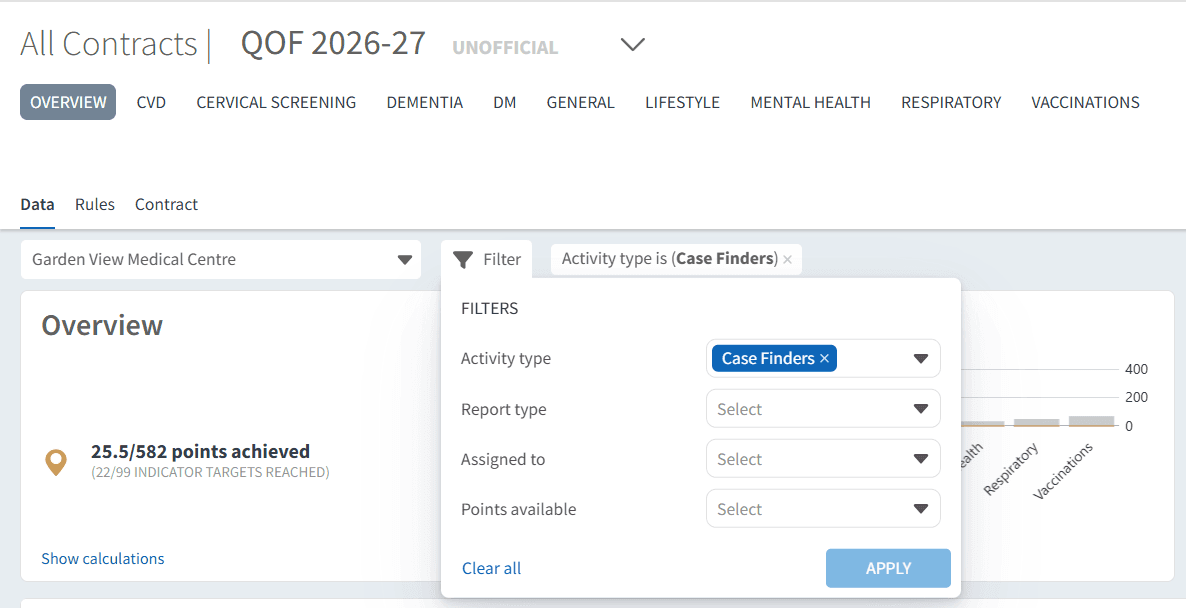
Select QOF 2026-27
Navigate to the Case Finders category using the dashboard Filter
👤 Identify Missing Patients
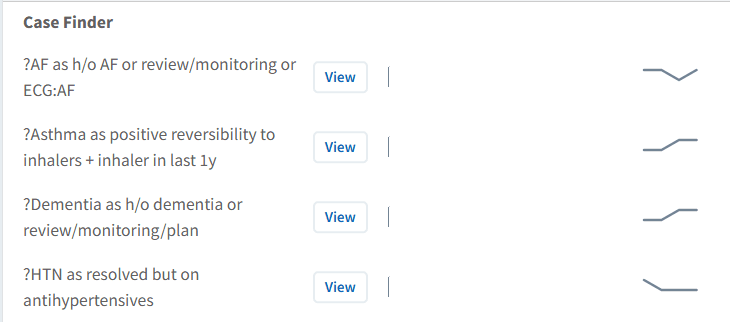
Case Finder reports highlight patients who may have evidence of a condition but are not currently included on the relevant QOF register.
Use this section to:
Identify patients with potential missing diagnoses
Highlight gaps between clinical activity and coding
Focus on high-impact conditions
These reports provide a starting point for further clinical review.
Review and Validate Patients
Patients identified in Case Finder reports should be clinically reviewed to confirm whether a diagnosis is appropriate.
Use this to:
Review patient history and supporting evidence
Confirm whether diagnostic criteria are met
Ensure safe and appropriate coding decisions
⚠️ Please note: Not all patients identified will require a diagnosis to be added.
Take Action Using Patient Lists
Once patients have been identified, you can use patient lists to support review and follow-up.
To view patient lists:
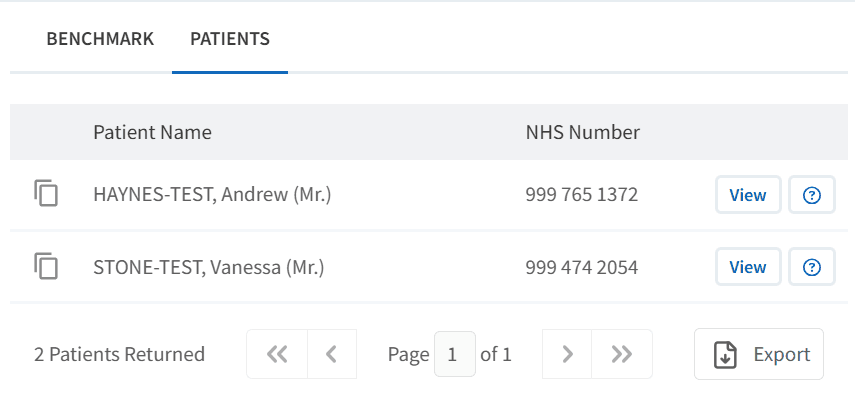
Click View next to the relevant report
Select the PATIENTS tab
Apply filters if required
Export or review patients as needed
These lists can be used to plan reviews or assign work across the team.
Update Patient Records
Following review, the appropriate action should be taken:
Add a diagnosis where clinical evidence supports this
Do not add a diagnosis if criteria are not met
Correct coding where existing codes are incomplete or inaccurate
Accurate coding ensures patients are correctly included in QOF reporting and recall processes.
📈 Impact on QOF Achievement
Improving register accuracy can have a significant impact on QOF performance. This includes:
Increasing disease prevalence
Increasing the value of QOF points
Ensuring completed activity contributes to achievement
Supporting long-term income improvement
❓ FAQs
Why are patients missing from QOF registers?
This is usually due to missing or incorrect diagnosis coding in the patient record.
Will all patients identified need a diagnosis added?
No, all patients should be clinically reviewed to confirm whether a diagnosis is appropriate.
Does increasing prevalence improve income?
Yes, increasing register size can increase the overall value of QOF achievement.
When should Case Finders be used?
They can be used throughout the year but are particularly valuable when reviewing performance or preparing for year-end.
🏫 Additional Support
To further your understanding of the Ardens Manager platform:
Book training for your GP Practice, PCN or ICB
Complete the QOF academy module
Contact our Support Team for support in real time