
ℹ️ Introduction
This article explains how to use Ardens Manager to monitor high-risk prescribing. By the end of this article, you will be able to identify patients prescribed high-risk medications, understand prescribing patterns, and take action to improve patient safety.
Background
High-risk prescribing refers to medications that carry an increased risk of harm if not appropriately managed. This may be due to:
Potential for dependency (e.g. opioids, benzodiazepines)
Increased risk of adverse effects
Requirements for careful monitoring
Limited evidence for long-term use
Managing high-risk prescribing can be challenging due to variation in prescribing habits, patient complexity, and the need for ongoing review.
Identifying and reviewing these patients supports:
Improved medication safety
Reduced risk of adverse events
More appropriate prescribing
Better patient outcomes
How Ardens Can Help
Ardens Manager provides dedicated reports within the Prescribing dashboard to support monitoring of high-risk prescribing.
The dashboard allows you to:
Identify patients prescribed high-risk medications
Monitor prescribing trends over time
Analyse variation across clinicians and organisations
Review patient-level data to support clinical decisions
Support structured medication reviews
This enables a proactive approach to improving prescribing safety and reducing variation.
✅Included in Ardens Manager National Content package: Interested in finding out more or requesting a trial? Contact accounts@ardens.org.uk
📍Access the Dashboard
Login to Ardens Manager
Select Services
Select Prescribing
Navigate to the Activity tab

🔎 Identify High-Risk Prescribing
This section highlights patients prescribed medications that may require closer review. These may include:
Opioids
Benzodiazepines
Other high-risk or dependency-forming medications
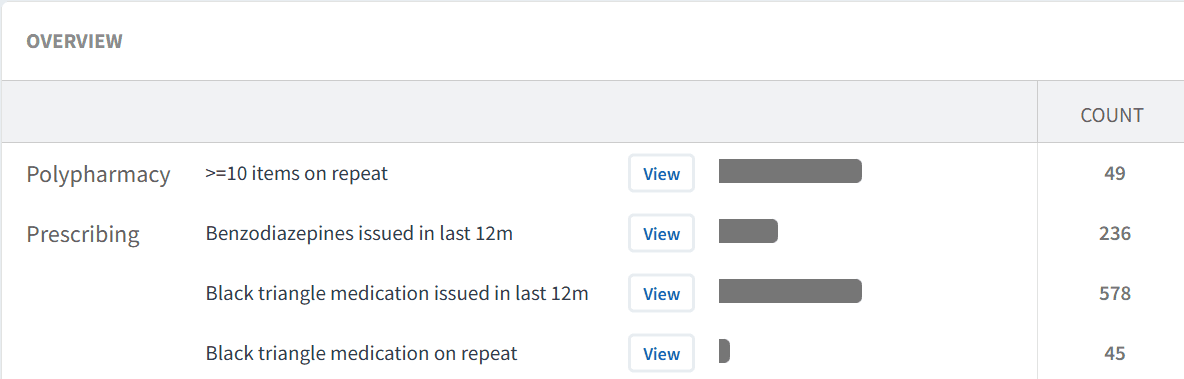
Use this section to:
Identify patients on high-risk medications
Understand the scale of prescribing across your organisation
Highlight areas requiring review
📊 Understand Patterns
Before taking action, it is important to understand how medications are being prescribed.
Use this to:
Review prescribing trends over time using the TREND chart
Analyse variation by clinician or role using the STAFF tab
Understand patient characteristics using the DEMOGRAPHICS tab
Use the Code Breakdown to further explore prescribing by medication group and dosage.
Identify patterns such as long-term or repeat prescribing
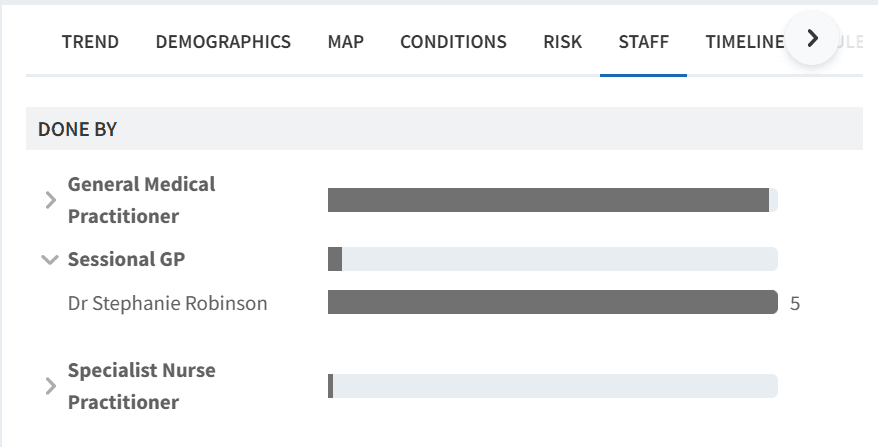
This helps determine whether prescribing is appropriate and consistent.
Code breakdown
Your data can be explored in more detail using the Code Breakdown, which helps prioritise work by grouping medications and highlighting prescribing volume.
To access this:
Click View next to a relevant report
Click on the BENCHMARK tab
Toggle View Codes

The code breakdown:
Groups medications by type and dose
Uses colour-coding to represent volume and distribution
Allows you to expand drug groups using the chevron icon
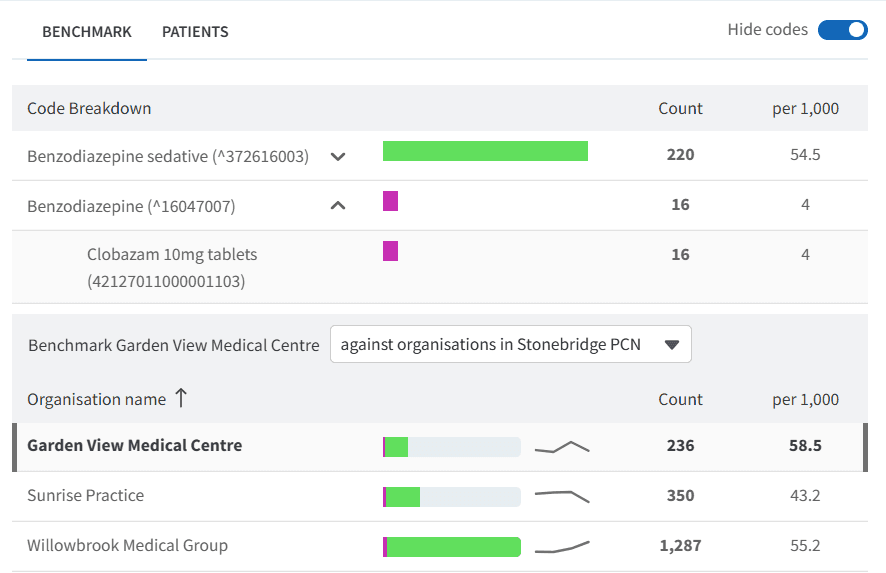
To explore further:
Click on a medication group or colour segment to filter the data
This will update the dashboard view, including demographics and patient lists
Use this to:
Identify which medications are driving high-risk prescribing
Focus reviews on specific drug groups or dosages
Prioritise areas with the highest prescribing volume
👥 Identify Patients for Review
At practice level, you can access the patient list to support follow-up activity.
To access the patient list:
Click View next to the relevant report
Select the PATIENTS tab
Use this to:
Identify patients requiring review
Export patient lists
Support recall and follow-up processes
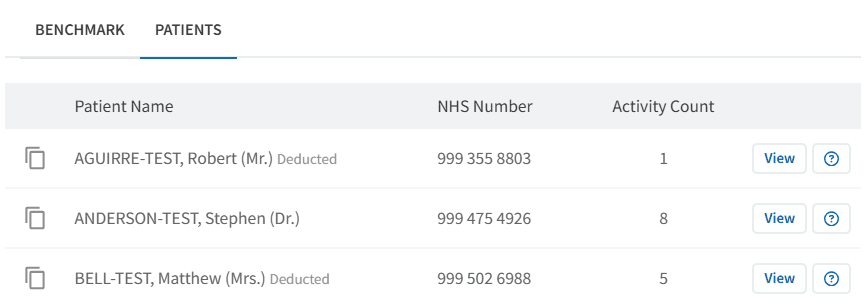
⚠️ Please note: Some reports include an activity count, which shows the number of issues of a medication a patient has had (e.g. benzodiazepines).
Review Patients
To support safe prescribing, patients should be reviewed in more detail.
To access the Patient View:
Click View next to the patient’s NHS number
Within the patient view:
View all Ardens Manager findings for the patient across relevant reports
Highlight what still needs action
Use this as a prompt list, then review clinical details (history, repeat/long-term use, appropriateness) in the clinical system record
To take action:
Click Open in to launch the patient record in the clinical system
Review the clinical record to assess whether the medication remains appropriate and agree next steps (for example monitoring, dose adjustment, reduction, or ongoing review).
Complete a structured medication review where appropriate
This supports safer, more person-centred prescribing.
Take Action
Insights from the dashboard can support a range of interventions, including:
Reviewing long-term use of high-risk medications
Supporting medication reduction or optimisation
Providing patient education and shared decision-making
Referring to appropriate services where needed
The aim is to reduce avoidable risk while maintaining appropriate care.
❓ FAQs
What is considered high-risk prescribing?
Medications that carry increased risk, such as opioids, benzodiazepines, or drugs requiring careful monitoring.
Does high-risk prescribing always need to be reduced?
Not always. Some patients require these medications. Review should focus on ensuring prescribing remains appropriate and safe.
Can I identify which clinicians are prescribing these medications?
Yes, the STAFF tab allows you to analyse prescribing by clinician or role group.
Can I access patient-level data?
Yes, where access has been enabled by your organisation.
How can I prioritise patients for review?
Use the PATIENTS tab alongside available breakdowns (e.g. demographics, trends, or code breakdown) to identify patients for priority review.
🏫 Additional Support
To further your understanding of the Ardens Manager platform:
Book training for your GP Practice, PCN or ICB.
Explore the Ardens Clinical resources to support high-risk prescribing - EMIS practices / SystmOne practices.
Contact our Support Team for support in real time.