
ℹ️ Introduction
This article explains how to use Ardens Manager to monitor patients requiring medication-related reviews and blood tests. By the end of this article, you will be able to track drug monitoring performance, identify patients missing required checks, and take action to improve safety.
Background
Many medications require regular monitoring to ensure they remain safe and effective. This includes drugs such as anticoagulants, ACE inhibitors, and DMARDs. Failure to complete monitoring can:
Increase risk of adverse events
Lead to unsafe prescribing
Impact patient outcomes
Monitoring requirements can be complex, making it difficult to track patients who are overdue.
How Ardens Can Help
Ardens Manager provides dedicated Drug Monitoring reports within the Prescribing dashboard to track patients who have met or missed required monitoring criteria.
The dashboard allows you to:
Identify patients who have completed monitoring
Highlight those missing required checks
Track performance against monitoring standards
Monitor trends over time
Support structured recall and follow-up processes
This enables practices, PCNs, and ICBs to take a proactive approach to medication safety and reduce the risk of missed monitoring.
✅Included in Ardens Manager National Content package: Interested in finding out more or requesting a trial? Contact accounts@ardens.org.uk
📍Access the Dashboard
Login to Ardens Manager
Select Services from the panel on the left
Select Prescribing
Navigate to the Monitoring tab

📊 Monitor Performance
Tracking progress is straightforward using the progress bar next to each report, which shows the percentage completion for the monitoring requirement.
Patient numbers are displayed in two columns:
ACHIEVED – patients who have completed the required monitoring
REMAINING – patients who have not yet met the monitoring criteria
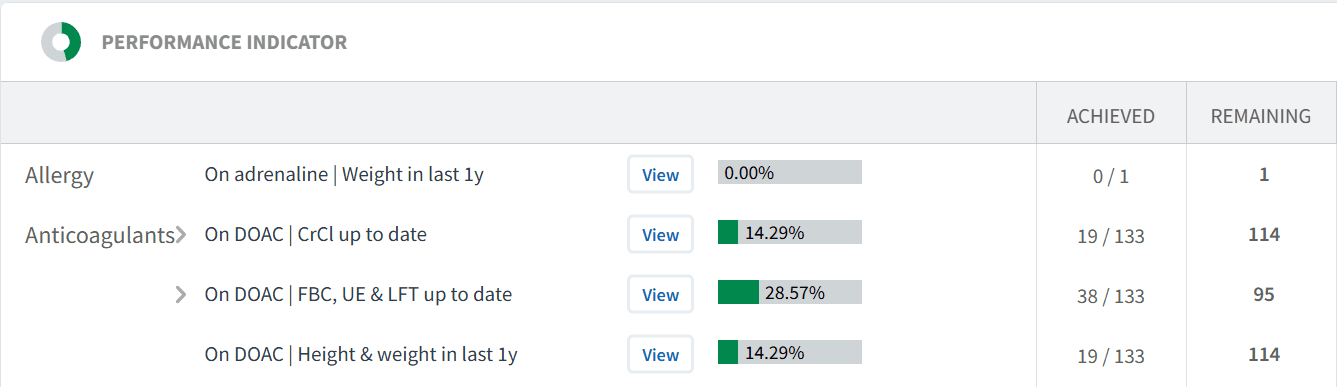
Use this to:
Identify gaps in monitoring
Prioritise follow-up activity
Track improvement
👥 Identify Patients
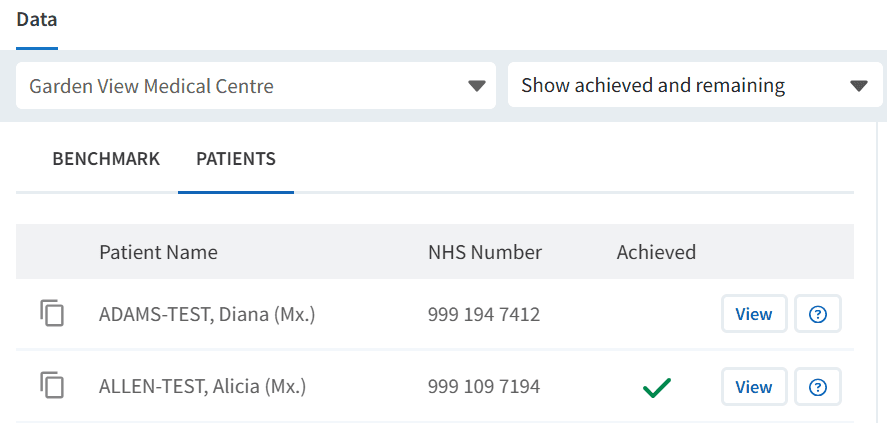
At practice level, you can access the patient list to support follow-up activity.
To access the patient list:
Click View next to the relevant report
Select the PATIENTS tab
Filter the list to Show Remaining Only
Use this to:
Identify patients requiring monitoring
Export patient lists
Support recall and follow-up processes
You may also wish to review outstanding work during patient contact to maximise each interaction.
Review Patients
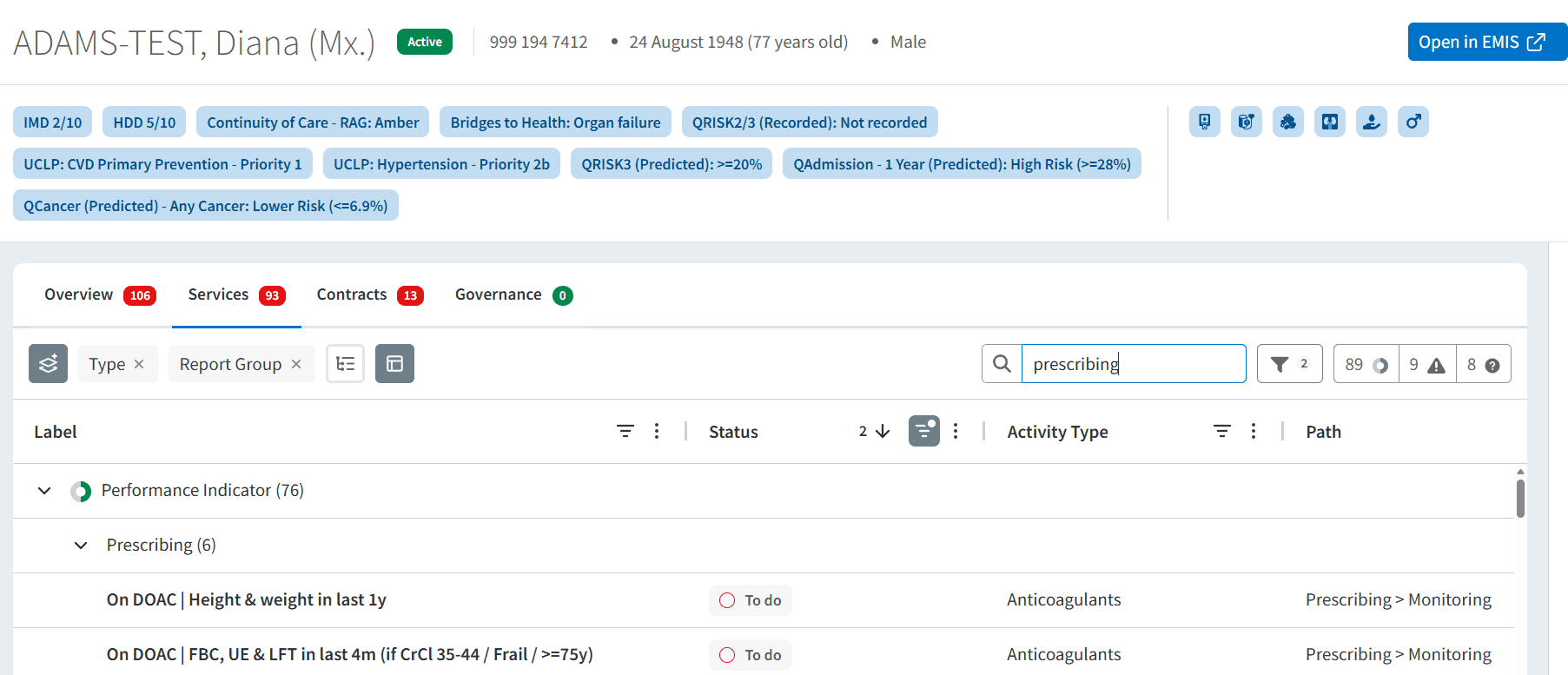
To understand what action is required for each patient, you can use the Patient View. To access this:
Click View next to the patient’s NHS number
Within the patient view:
Review monitoring requirements
Identify outstanding clinical activity
Assess what action is required
This supports a more informed and efficient patient review.
📈 Monitor Progress
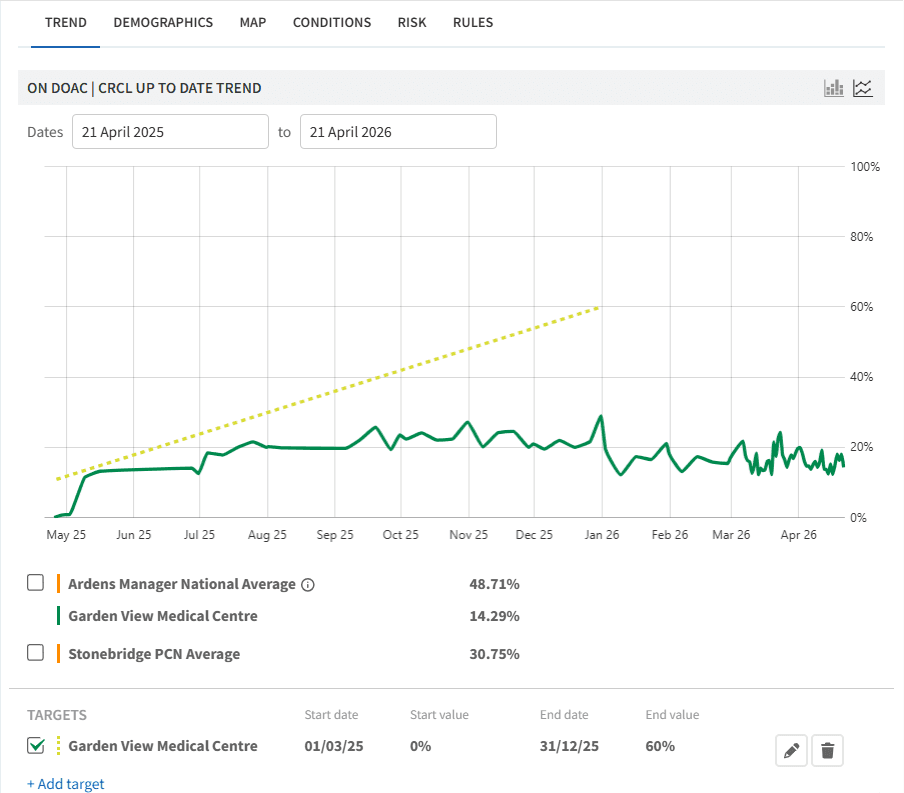
Use the TREND chart to track monitoring performance over time and assess the impact of recall activity.
You can also set local targets to support improvement.
To add a local target:
Select the TREND tab
Click + Add Target
Complete the required fields
Click the save icon
❓ FAQs
What is included in Drug Monitoring reports?
Reports include patients who require specific monitoring based on medication type, such as blood tests or clinical reviews.
Why might a patient appear as “remaining”?
This may be because required monitoring has not been completed, is overdue, or has not been coded correctly in the clinical system.
Can I export patient lists?
Yes, patient lists can be exported for use in recall systems or clinical workflows.
How can I prioritise which patients to contact?
Filter the patient list using Show Remaining Only, then use the available breakdown options (such as conditions, demographics, and risk) to identify patients for priority review and target follow-up more effectively.
🏫 Additional Support
To further your understanding of the Ardens Manager platform:
Book training for your GP Practice, PCN or ICB.
Explore the Ardens Clinical resources to support drug monitoring - EMIS practices / SystmOne practices.
Contact our Support Team for support in real time.