
ℹ️ Introduction
This article explains how to use Ardens Manager to identify opportunities for cost-effective prescribing. By the end of this article, you will be able to review prescribing variation, identify potential savings, and support more efficient use of resources.
Background
Ensuring prescribing is cost-effective is essential to maximise NHS resources while maintaining high-quality patient care.
Variation in prescribing can occur due to:
Differences in medication choice
Use of branded versus generic drugs
Prescribing habits across clinicians or practices
Identifying and addressing variation supports:
More consistent prescribing
Improved use of NHS resources
Alignment with local and national guidance
How Ardens Can Help
Ardens Manager provides dedicated reports within the Prescribing dashboard to identify opportunities for cost-effective prescribing.
The dashboard allows you to:
Identify variation in prescribing
Highlight switching opportunities
Compare prescribing across organisations
Monitor trends over time
Support medicines optimisation initiatives
This enables organisations to make informed decisions about prescribing efficiency.
✅Included in Ardens Manager National Content package: Interested in finding out more or requesting a trial? Contact accounts@ardens.org.uk
📍 Access the Dashboard
Login to Ardens Manager
Select Services
Select Prescribing
Navigate to the Cost Effectiveness tab

🔎 Identify Opportunities
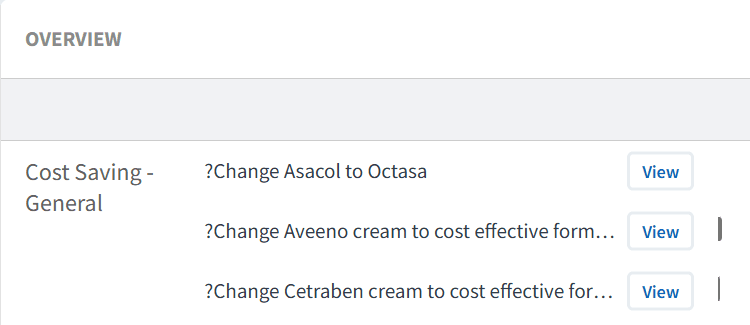
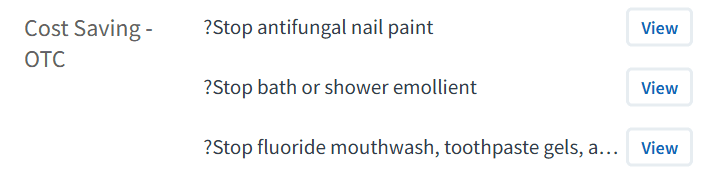
Reports highlight areas where prescribing may be optimised.
This may include:
Use of higher-cost medications where alternatives exist
Variation in prescribing across practices
Opportunities for switching to more cost-effective options
Use this to:
Identify areas of potential savings
Highlight variation across your organisation
Support prioritisation of optimisation work
Understand Variation
Understanding variation is key before taking action.
Use this to:
Analyse prescribing trends using the TREND chart
Compare practices using the BENCHMARK tab
Identify differences in prescribing patterns
Highlight outliers
This supports targeted and informed decision-making.
Code breakdown
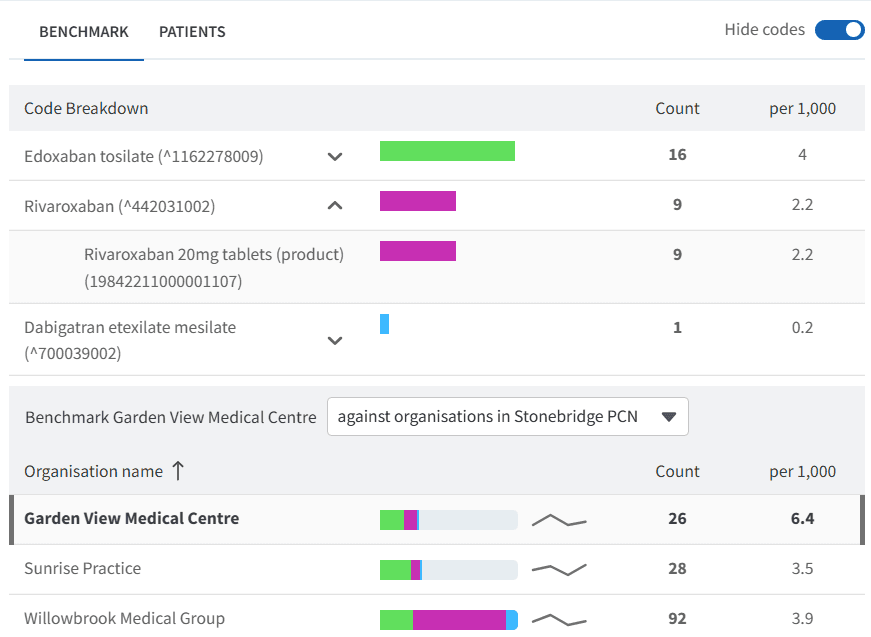
Your data can be explored in more detail using the Code Breakdown, which helps prioritise work by grouping medications and highlighting prescribing volume.
To access this:
Click View next to a relevant report
Click on the BENCHMARK tab
Toggle View Codes

The code breakdown:
Groups medications by type and dose
Uses colour-coding to represent volume and distribution
Allows you to expand drug groups using the chevron icon
To explore further:
Click on a medication group or colour segment to filter the data
This will update the dashboard view, including demographics and patient lists
Use this to:
Focus reviews on specific drug groups or dosages
Prioritise areas with the highest prescribing volume
👥 Identify Patients
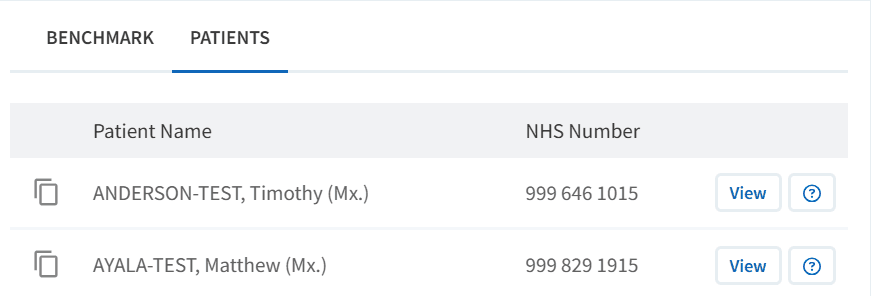
At practice level, you can access the patient list to support follow-up activity.
To access the patient list:
Click View next to the relevant report
Select the PATIENTS tab
Use this to:
Identify patients requiring review
Export patient lists
Support recall and follow-up processes
Review and Optimise
Before making any changes, patients should be reviewed appropriately.
To access Patient View:
Click View next to the patient’s NHS number
Within the patient view:
View all Ardens Manager findings for the patient across relevant reports
Highlight what still needs action
Use this as a prompt list, then review clinical details (history, repeat/long-term use, appropriateness) in the clinical system record
To take action:
Click Open in to review the full clinical record
Assess suitability of alternatives
Consider patient preference and clinical need
Complete any required medication changes
❓ FAQs
What is meant by cost-effective prescribing?
Prescribing that delivers the best clinical outcomes while making efficient use of NHS resources.
Does cost-effective prescribing mean switching all medications?
No. Any changes should be clinically appropriate and based on individual patient need.
Can I compare practices?
Yes, the BENCHMARK tab allows comparison across organisations.
Can I access patient-level data?
Yes, where enabled by your organisation.
How should opportunities be actioned?
Use patient lists and prescribing insights to support structured medication reviews and appropriate switching.
🏫 Additional Support
To further your understanding of the Ardens Manager platform:
Book training for your GP Practice, PCN or ICB.
Contact our Support Team for support in real time.