
ℹ️Introduction
This article explains how to use the Population Dashboard in Ardens Manager to identify patients who do not currently have a named GP recorded. By the end of this article, you will be able to review named GP allocation activity, identify patients requiring updates, monitor trends over time and support continuity of care processes within your organisation.
Background
GP practices in England are required to allocate a named, accountable GP to registered patients. While patients can still access appointments with any appropriate clinician, maintaining accurate named GP records supports continuity of care, patient safety and registration quality.
Patients may appear without a named GP for a variety of reasons, including:
Newly registered patients awaiting allocation
Workforce changes within the practice
Registration processing delays
Data quality issues
Clinical system configuration changes
Regular monitoring can help practices identify gaps early and ensure patient records remain up to date.
This article forms part of the wider Population Dashboard guidance and focuses specifically on monitoring named GP allocation activity.
How Ardens Can Help
Within the Population Dashboard, Ardens Manager provides reporting designed to help practices identify patients without a recorded named GP.
This includes:
Reporting for patients without a named GP
Trend analysis over time
Patient-level drilldown
Demographic filtering
Visual reporting to support data quality monitoring
This allows organisations to proactively identify missing allocations and maintain accurate registration records.
✅Included in Ardens Manager National Content package: Interested in finding out more or requesting a trial? Contact accounts@ardens.org.uk
📍Access the Dashboard
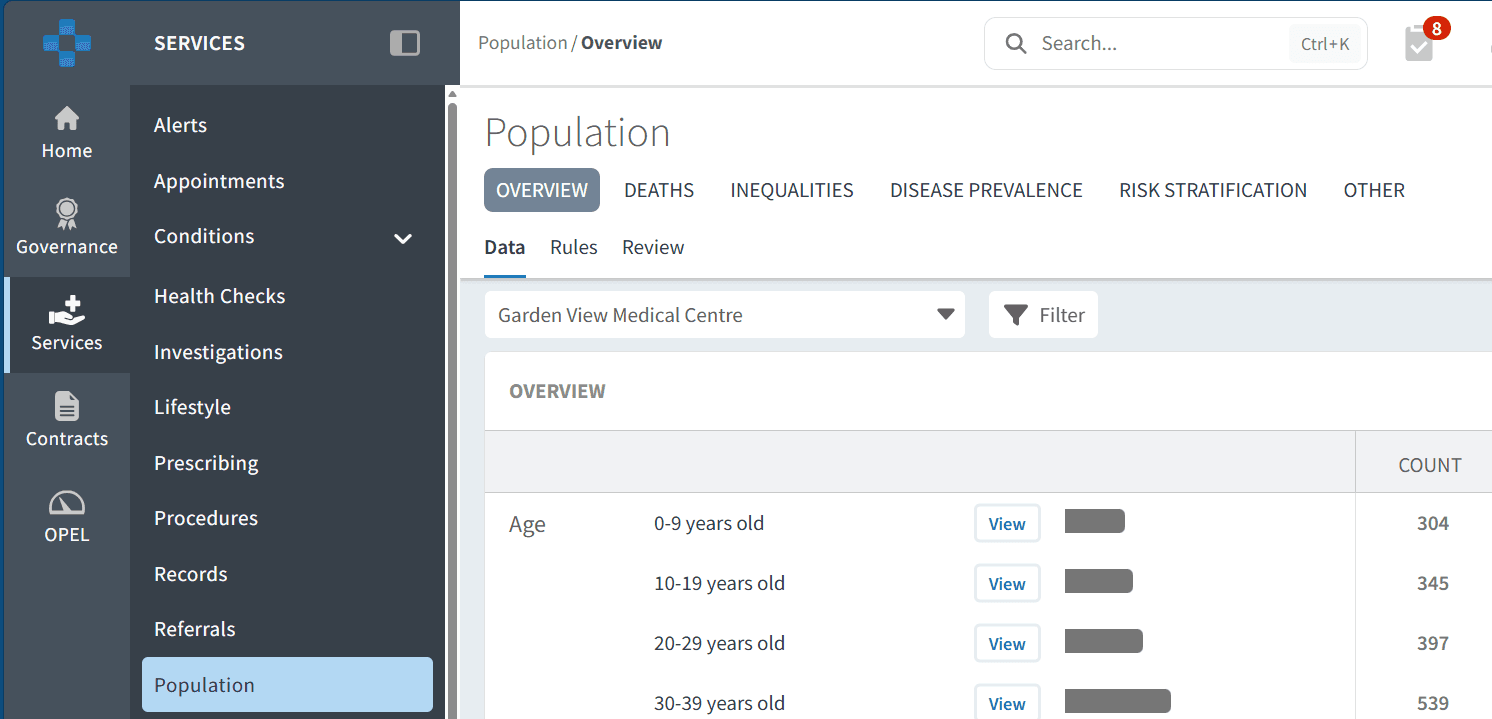
Login to Ardens Manager.
Select Services from the left-hand panel.
Select Population.
🔎 Monitor Named GP Allocation
To review named GP allocation
Open the Overview tab
Navigate to the Performance Indicator section
Here you will find reports displaying the percentage of patients who have a named GP allocated and have been informed of their allocation. Towards the right you can view the achievement percentage, the number of patients within the cohort and the number of patients remaining.

This section allows you to:
Identify patients requiring allocation
Monitor changes over time
Understand the level of outstanding allocation activity
👥 Identify Patients
Patients without a Named GP
To access the patient list:
Click View next to the relevant report
Select the PATIENTS tab
Filter the list to Show Remaining Only
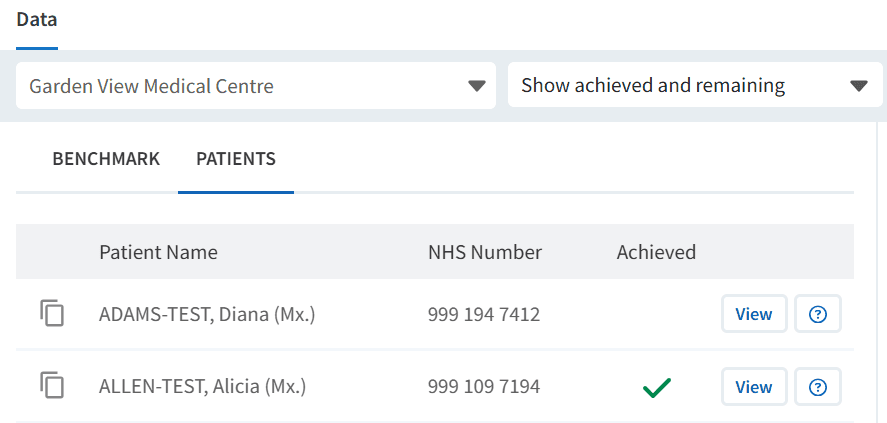
Use this to:
Export patient lists
Allocate missing named GPs
Support recall and follow-up processes
Validate records following staffing changes
Target Patient Groups
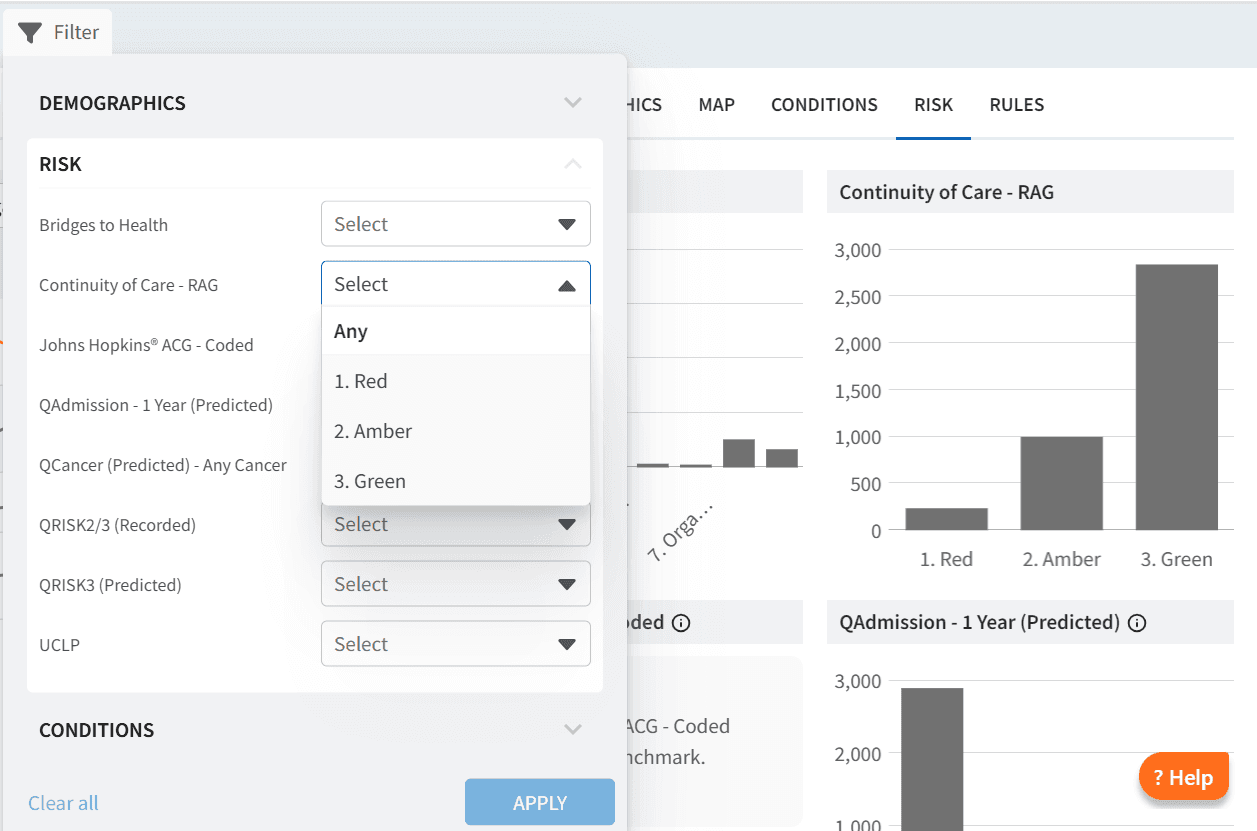
You may want to prioritise specific patient groups for named GP allocation first. This could include patients within the Continuity of Care Red category who may benefit most from a named GP allocation.
This can be achieved by applying filters using demographics, conditions or risk.
To apply filters:
Click View next to the relevant report
Select the RISK tab
Open the Filter
Choose filter category (for example Continuity of Care RAG)
Select the desired criteria (for example Red)
Click APPLY
❓ FAQs
Why are some patients showing without a named GP?
Patients may appear if registration processes are incomplete, following workforce changes or if a named GP has not yet been allocated.
Can I review historical trends?
Yes. Trend charts allow you to review historical activity using custom date ranges.
Can I analyse specific patient groups?
Yes. Filters and demographic views allow practices to analyse different patient cohorts.
🏫 Additional Support
To further your understanding of the Ardens Manager platform:
Book training for your GP Practice, PCN or ICB.
Contact our Support Team for support in real time.