
ℹ️ Introduction
This article explains how to use Ardens Manager to monitor and improve performance against Investment and Impact Fund (IIF) indicators. By the end of this article, you will be able to track progress, identify variation across practices, and prioritise activity to maximise achievement across your PCN.
Background
The Investment and Impact Fund (IIF) forms part of the Network Contract Directed Enhanced Service (DES) and incentivises Primary Care Networks (PCNs) to deliver improvements across key clinical and operational areas.
IIF indicators are typically measured at PCN level and require coordinated working across multiple practices. Managing performance can be challenging due to:
Variation between practices
Multiple indicators across different domains
The need for consistent recording and delivery
A clear view of performance is essential to ensure opportunities for improvement are identified and acted upon.
How Ardens Can Help
Ardens Manager provides a dedicated IIF section within the Network Contract DES Dashboard, allowing you to monitor performance across all indicators at Practice, PCN, Place, or ICB level.
The dashboard allows you to:
Track progress against IIF indicators
Identify variation between practices within your PCN
Monitor achievement against thresholds
Understand the impact of outstanding work
✅Included in Ardens Manager National Content package: Interested in finding out more or requesting a trial? Contact accounts@ardens.org.uk
📍 Access IIF Dashboard
Login to Ardens Manager
Select Contracts from the left-hand panel
Select Network Contract DES ‘26-27
Navigate to the IIF section

📊 Monitor Performance
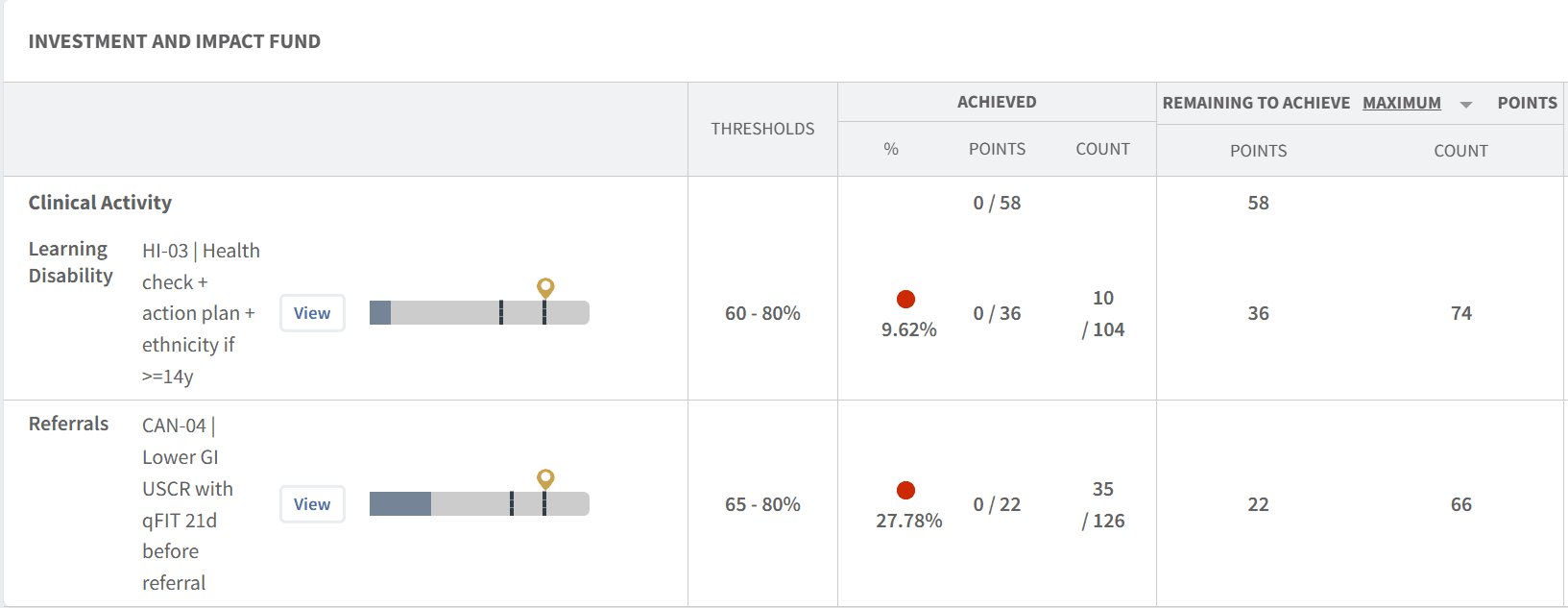
The dashboard provides a clear overview of IIF achievement across your PCN.
Use this section to:
Track progress against indicator thresholds
Understand overall PCN performance
Identify whether indicators are on track
Visual indicators such as traffic light indicators and progress bars help quickly interpret performance:
Red: Below minimum threshold
Amber: Progressing towards maximum threshold
Green: Maximum threshold achieved
Identify Variation
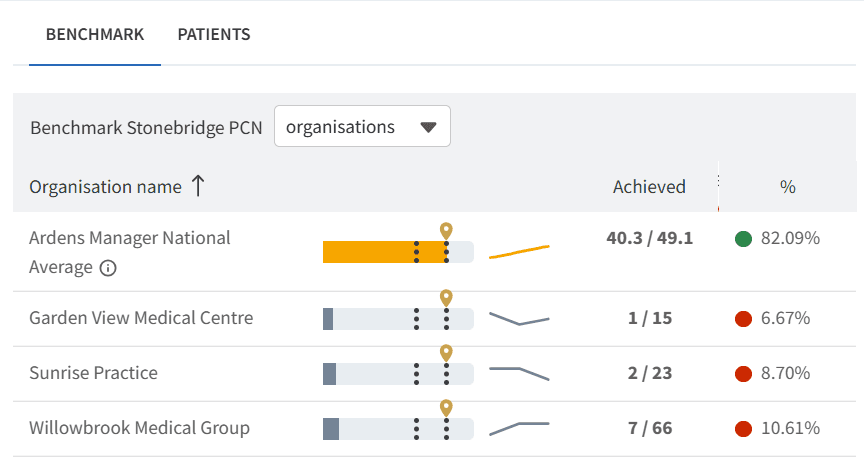
Variation between practices is a key driver of overall PCN performance.
Use this to:
Compare performance across practices
Identify practices requiring additional support
Highlight areas of best practice
Support targeted improvement across the network
Benchmarking tools allow you to understand where variation exists and take action accordingly.
Patient-Level Data
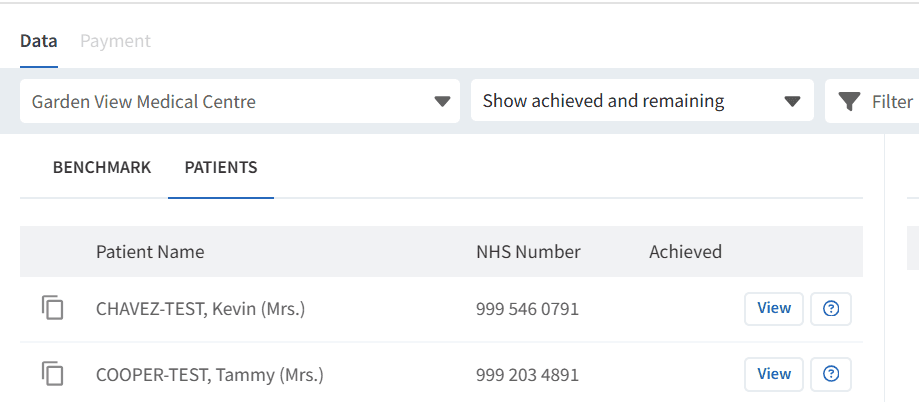
For some indicators, patient-level data is available to support targeted action.
Use this to:
Identify patients requiring intervention
Support practices in completing outstanding work
Validate performance data
To view patient lists:
Click View next to the relevant indicator
Select the PATIENTS tab
Apply filters as required
Monitor & Adjust
Performance should be reviewed regularly to ensure indicators remain on track.
Use this to:
Monitor trends over time
Track improvements following interventions
Adjust priorities based on performance
Align activity across practices
💰 Understand Financial Impact
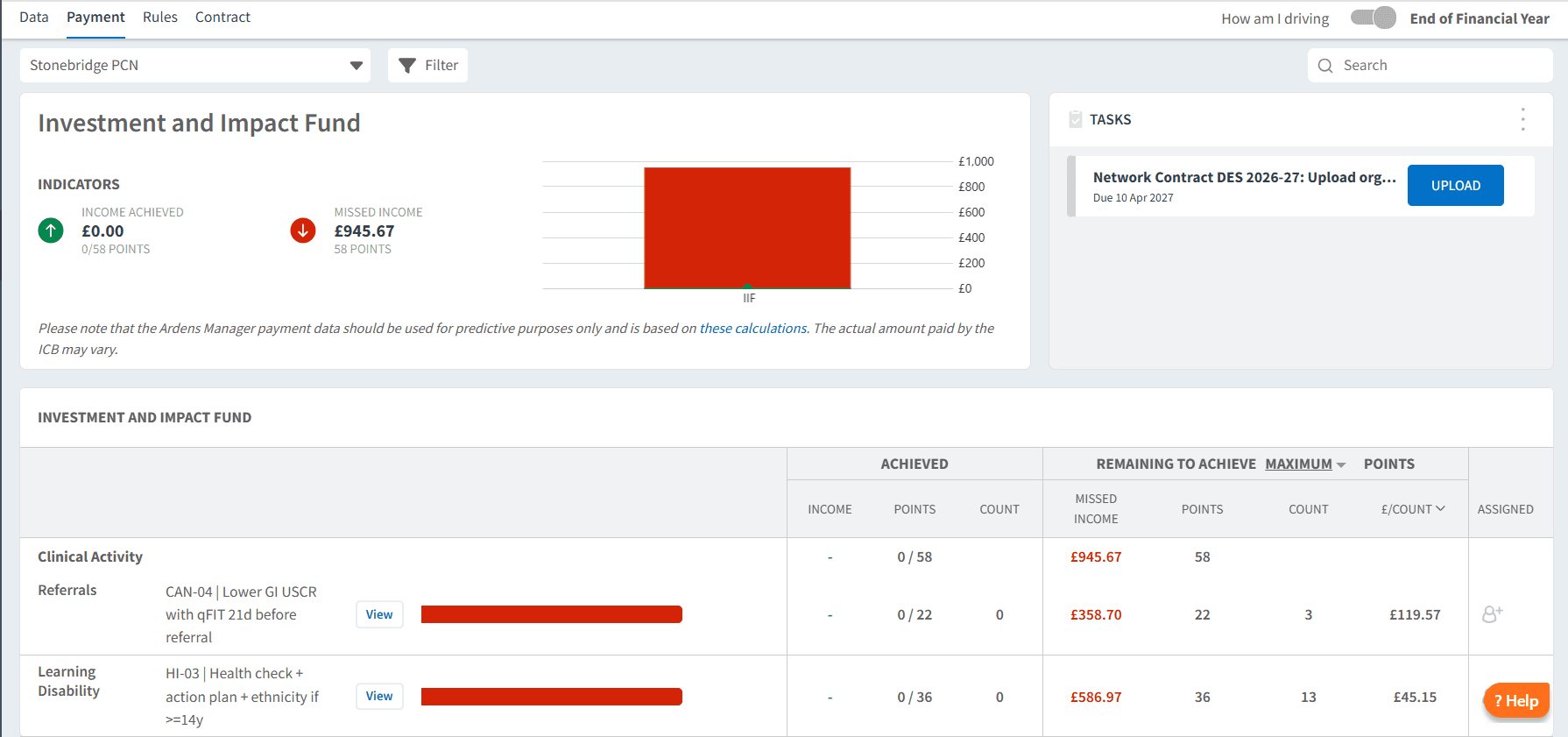
The IIF contributes to overall DES income, making it important to understand the value of outstanding work.
Use the PAYMENT tab to:
View achievement in financial terms
Understand the value of remaining activity
Prioritise indicators with the greatest financial impact
This supports informed decision-making across the PCN.
❓ FAQs
What is IIF?
The Investment and Impact Fund is part of the Network Contract DES and includes indicators designed to improve quality and outcomes across PCNs.
Why does performance vary between practices?
Variation may be due to differences in coding, patient demographics, or service delivery approaches.
Can I view performance at different organisational levels?
Yes, data can be viewed at Practice, PCN, Place, or ICB level depending on access.
How often is IIF data updated?
Data is typically updated daily once automatic uploads are enabled.
🏫 Additional Support
To further your understanding of the Ardens Manager platform:
Book training for your GP Practice, PCN or ICB
Complete the Network Contract DES academy module
Contact our Support Team for support in real time