
ℹ️ Introduction
National Data Sets in Ardens Manager provide access to a range of published datasets from NHS England and other national sources. This article explains how to access and use National Data Set dashboards, including how to navigate reports and use drilldown and breakdown functionality.
By the end of this article, you will be able to access National Data Set dashboards, navigate reports and dashboard tabs and explore breakdowns to analyse underlying data.
Background
National Data Sets are routinely published datasets produced by NHS England and other national organisations. They provide standardised information to support national reporting, benchmarking and performance monitoring.
Within Ardens Manager, these datasets are presented in a consistent dashboard format to allow users to explore and analyse the data in a structured way.
Each dataset may differ in content, but all National Data Set dashboards follow the same core principles:
Report-based data presentation
Drilldown using View functionality
Breakdown options where available
Consistent filtering and analysis tools
How Ardens Can Help
Ardens Manager brings National Data Sets together into structured dashboards so users can easily access and explore published national data.
Across all National Data Set dashboards, Ardens Manager provides:
Standardised dashboard layout and navigation
Tab-based structure for organising content
Report lists with View functionality for detailed exploration
Drilldown into underlying data where available
Breakdown options to explore contributing elements of a report
Rules and definitions to support interpretation
This ensures national datasets can be explored consistently, regardless of subject area.
✅Included in Ardens Manager National Content package: Interested in finding out more or requesting a trial? Contact accounts@ardens.org.uk
📍Access National Data Sets
Login to Ardens Manager
Select Services from the panel on the left
Select National Data Sets
Select the relevant National Data Set using the tabs across the top of the dashboard.
🔎 Explore Report Breakdown
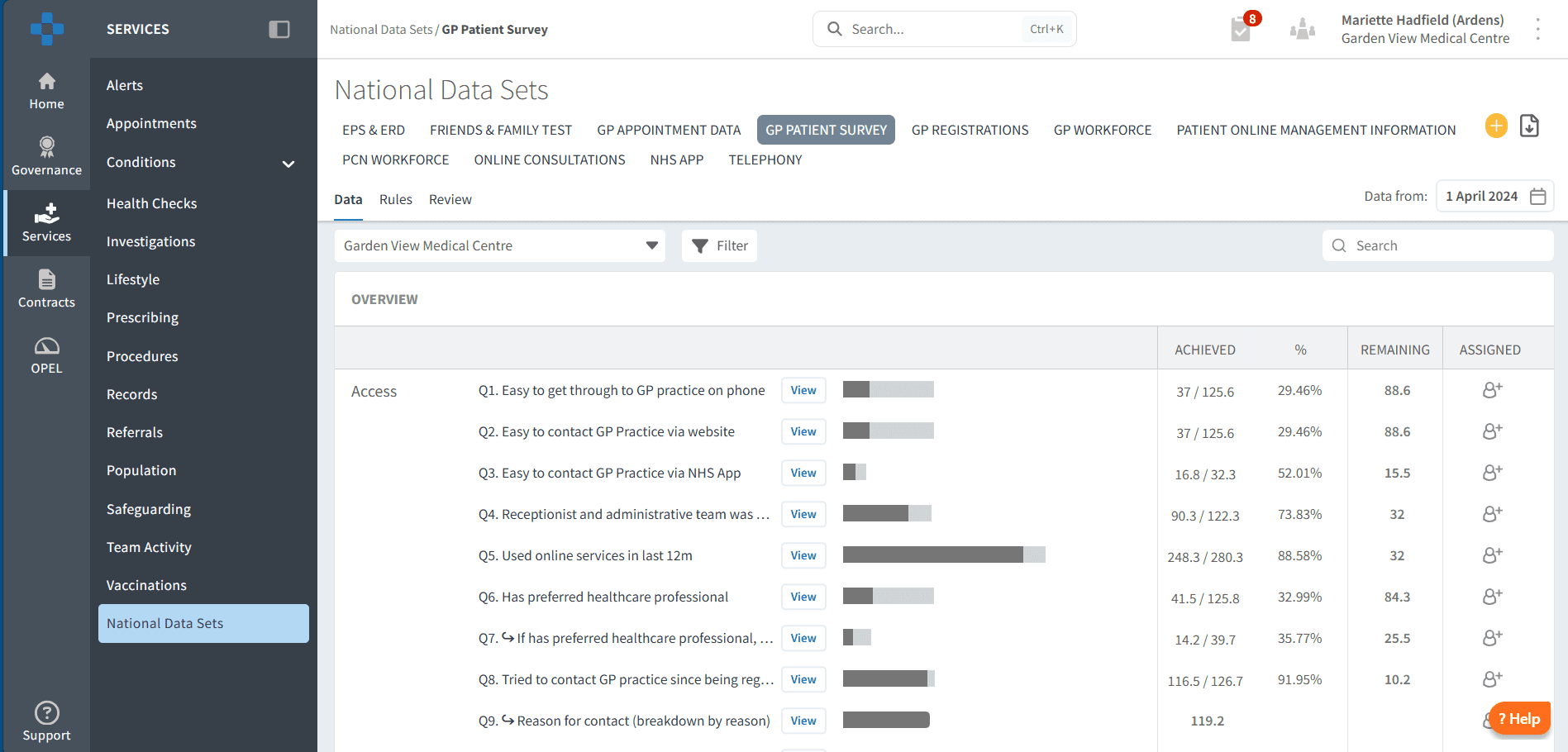
From the dashboard view, each report is shown as a headline figure with a summary indicator (for example, overall scores or combined responses across a question).
These headline figures provide a high-level overview, but further detail is available within each report.
To explore the underlying data in more detail:
Select View next to the relevant report to open the full breakdown
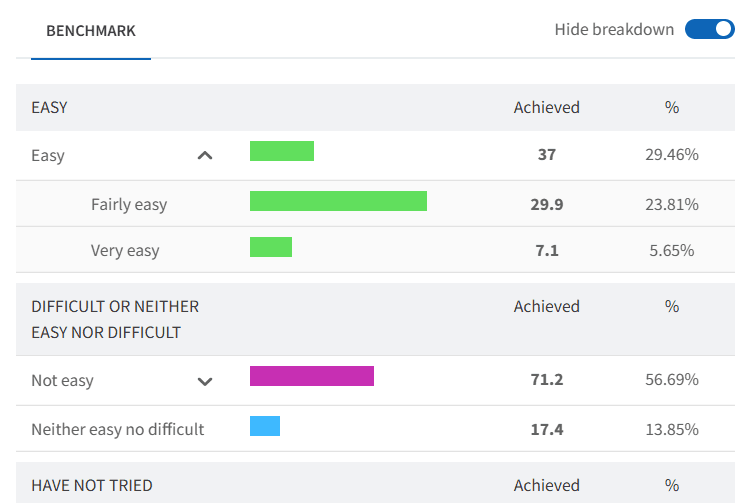
Select Benchmark to compare your data across your PCN or data sharing group.
Select Code Breakdown (where available) to view how responses are distributed across categories
For example, a question such as “How easy is it to get through to the GP practice on the phone?” may appear as a single overall score at dashboard level. Using Code Breakdown, you can then see the distribution of responses behind that figure, such as:
Very easy
Fairly easy
Not easy
Very difficult
This allows you to move from a high-level summary into a more detailed understanding of how responses are distributed across categories.
🔔Service Updates
Online Consultations - April 2026
NHS England received partial submissions for April 2026 from eConsult, iPlato and Klinik. As a result, data for practices using these systems may be incomplete within the Online Consultations National Data Set for this reporting period.
Users should take this into consideration when reviewing, benchmarking or comparing April 2026 data.
❓ FAQs
How often is National Data updated?
This depends on the dataset. Most are updated monthly or quarterly following NHS England publication schedules. Occasionally, national publication issues or partial supplier submissions may affect data completeness for a reporting period.
Can I use National Data Sets for payment reporting?
No. These datasets are for monitoring, benchmarking and analysis rather than payment calculations.
Why might data not match my clinical system?
National Data Sets are based on published national extracts and may use different definitions, timeframes or inclusion rules compared to clinical system reporting.
If I update our appointment slots types now, will our previous months' extracts also be updated?
No. National datasets such as GPAD are extracted and published on a scheduled basis. Once the data has been extracted for a reporting period, historical extracts are not typically refreshed following local changes.
🏫 Additional Support
To further your understanding of the Ardens Manager platform:
Book training for your GP Practice, PCN or ICB.
Contact our Support Team for support in real time.