
ℹ️ Introduction
This article explains how to use Ardens Manager to identify and manage frequent attenders. By the end of this article, you will be able to identify patients with high appointment usage, understand underlying need, and take a more proactive, person-centred approach to care.
Background
Frequent attenders are patients who access primary care services more often than expected. While this may reflect genuine clinical need, it can also indicate:
Unmet physical or mental health needs
Complex or multiple long-term conditions
Social or behavioural factors
Fragmented or reactive care
Frequent attendance can place significant pressure on appointment capacity and may lead to poorer patient experience if underlying needs are not addressed.
Identifying and reviewing these patients allows practices and PCNs to:
Improve continuity of care
Provide more proactive support
Reduce avoidable appointments
Improve overall service efficiency
How Ardens Can Help
Ardens Manager provides reporting within the Appointments Dashboard to identify patients with high levels of appointment usage and support more proactive management of frequent attenders.
The dashboard allows you to:
Identify frequent attenders based on activity thresholds
Understand patterns of service use across time, staff, and appointment type
Review patient-level detail to support clinical decision-making
Analyse variation across practices (where applicable)
Monitor the impact of interventions over time
This supports a more structured and proactive approach to managing demand and improving patient care.
✅Included in Ardens Manager National Content package: Interested in finding out more or requesting a trial? Contact accounts@ardens.org.uk
📍Access the Reports
Login to Ardens Manager
Select Services on the left-hand panel
Select Appointments
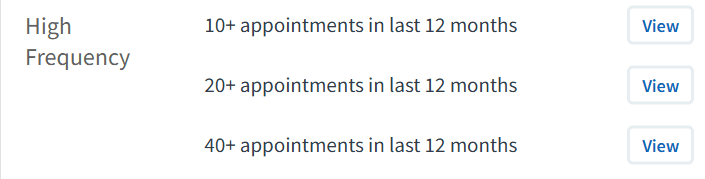
Navigate to Frequent Attender reports
🔎Identify Frequent Attenders
Reports highlight patients with high numbers of appointments over a defined period (e.g. 20+ or 40+ appointments in 12 months).
Use this section to:
Identify patients with the highest levels of service use
Understand overall scale of frequent attendance
Prioritise patients for review
You can adjust filters where available to refine your cohort.
Understand Patterns
Before taking action, it is important to understand how patients are using services.
Use this to:
Review number of appointments over time
Identify which clinicians or staff groups patients are seeing
Analyse appointment types (e.g. face-to-face, telephone)
Identify repeated or short-interval bookings
This helps determine whether care is coordinated or reactive.
Review Patients
To understand what support a patient may need, open the Patient View.
To access this:
Click View next to the patient’s NHS number
Within the patient view:
Review appointment history and service use
Identify patterns of care and clinical activity
Assess whether care is consistent or fragmented
To take action:
Click Open in to launch the patient record in your clinical system
Review the patient record in full
Complete any required clinical or administrative actions
This enables a more holistic, person-centred review of the patient.
Target Interventions
Once patients have been identified and reviewed, targeted interventions can be put in place.
This may include:
Assigning a usual GP or care coordinator
Scheduling planned reviews instead of reactive appointments
Addressing underlying clinical or social needs
Referring to appropriate services (e.g. mental health, social prescribing)
The aim is to move from reactive, frequent attendance to more proactive and coordinated care.
🏥Work at Practice & PCN Level
Frequent attender data can also be used at a wider level.
Use this to:
Identify trends across practices
Understand variation in frequent attendance
Share best practice across the PCN
Support population health management approaches
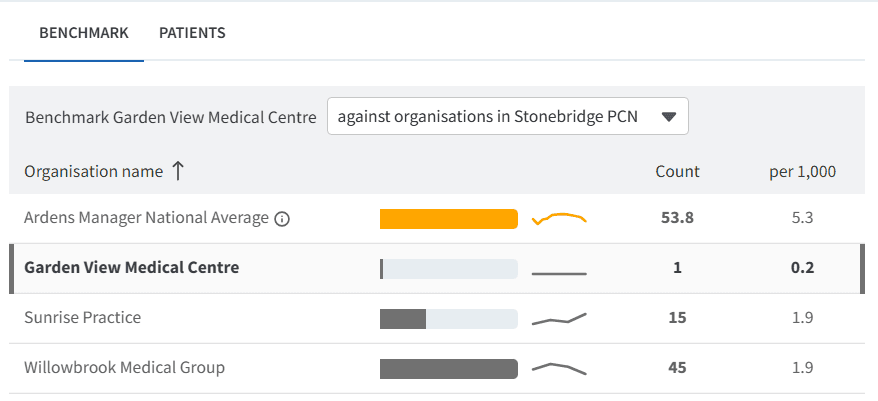
Use the Benchmark table to understand variation across practices and access further insights.
To access this:
Click View next to the relevant report
Select he BENCHMARK tab
Click on a practice to isolate their data
📈Monitor Interventions
After implementing changes, it is important to monitor outcomes.
Use this to:
Track changes in appointment usage over time
Identify reductions in frequent attendance
Review whether patient outcomes have improved
Adjust interventions where needed
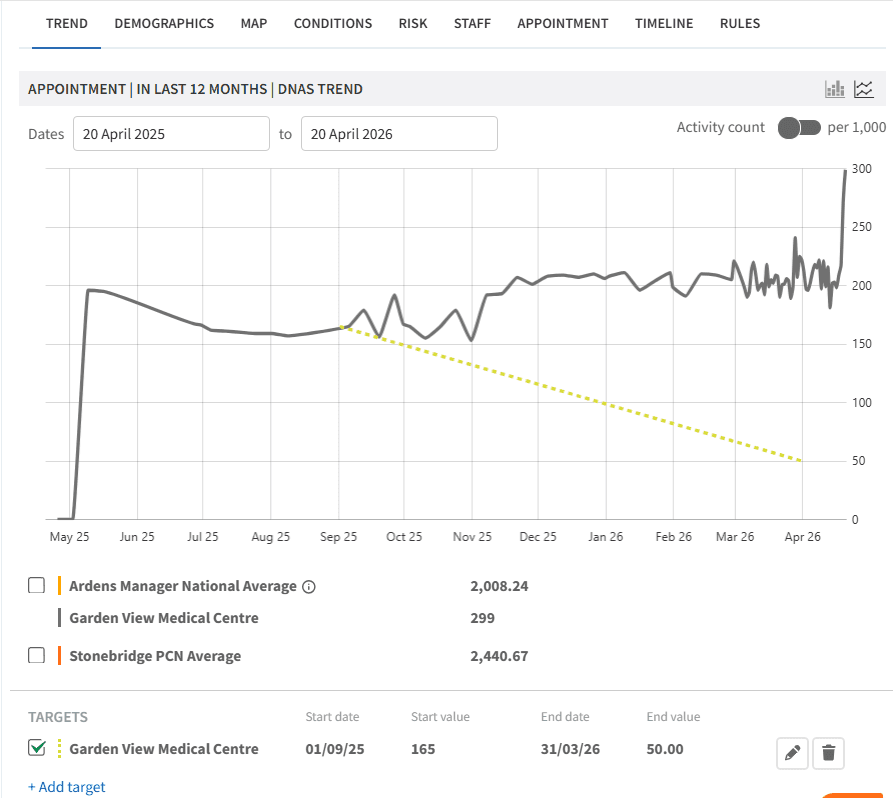
Use the TREND chart to track appointment activity over time and evaluate the impact of any changes made.
You can also set local targets to support improvement.
To add a local target:
Select the TREND tab
Click + Add Target
Complete the required fields
Click the save icon
❓FAQs
What defines a frequent attender?
Typically patients with significantly higher appointment usage than average (e.g. 20+ or 40+ appointments per year), depending on local thresholds.
Should all frequent attenders be reviewed?
Prioritisation is recommended, focusing on patients with the highest usage or most complex needs.
Can this be used at PCN level?
Yes, this data can support identification of trends and coordinated approaches across practices.
Does high attendance always indicate a problem?
Not always. It may reflect appropriate clinical need. Patient-level review is essential.
Can frequent attender data be used to support MDT working?
Yes, this data can help identify patients who may benefit from multidisciplinary review or coordinated care planning.
🏫 Additional Support
To further your understanding of the Ardens Manager platform:
Book training for your GP Practice, PCN or ICB
Complete the Appointments academy module
Contact our Support Team for support in real time