
We’re updating our Knowledge Base
We’re currently transitioning Ardens Clinical support articles to this new Knowledge Base. Content will be added progressively, so you may find limited articles available at this stage.
In the meantime, you can access our full support resources on our existing sites:
We’ll continue to expand this site, so please check back regularly.
ℹ️Introduction
This article provides an overview of Ardens Letter Templates within SystmOne. By the end of this guide, you will understand what letter templates are, how they can support your organisation, and where to access them within SystmOne.
Background
Creating patient letters, consent forms, care plans, and information leaflets is a routine part of patient care and practice administration. Manually creating these documents can be time-consuming and may lead to inconsistencies, duplicated effort, or missing information.
Ardens Letter Templates provide a library of standardised, auto-populating documents that can be used within individual patient records or for multiple patients in bulk. Templates automatically pull relevant information from the patient record, helping to save time, improve consistency, and reduce administrative workload.
How Ardens Can Help
Ardens Letter Templates are designed to streamline document creation by automatically integrating information from the patient's record.
Key benefits include:
Reducing administrative workload
Auto-populating patient demographic and clinical information
Including appointment, referral, and user-specific data where appropriate
Incorporating practice details such as address and contact information
Supporting clinical and administrative workflows
Enabling document creation for individual patients or in bulk
📍 Access Letter Templates
Ardens Letter Templates can be accessed from within a patient's record.
Clinical Template: Some templates may include quick action buttons to easily access letter templates
Clinical Tree: Right-click on the Communications and Letters node and select New Letter
📃 Using Letter Templates
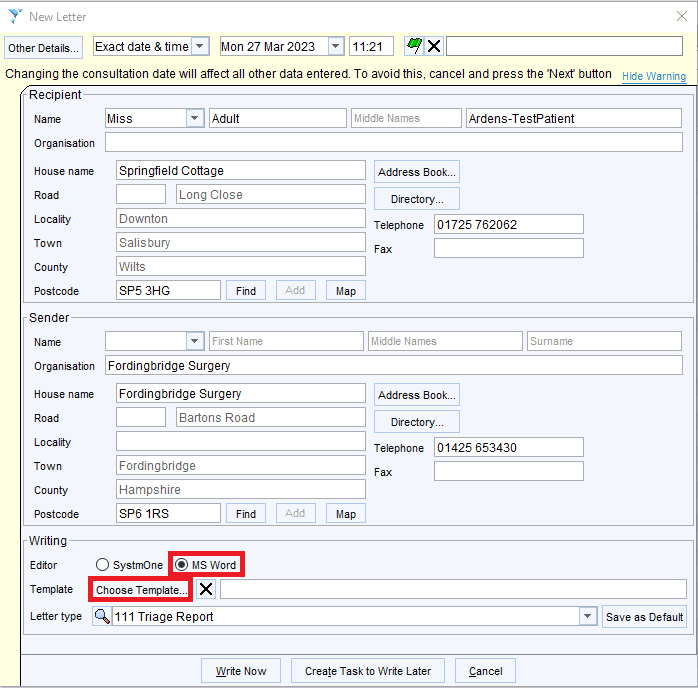
Once you have accessed the New Letter dialogue box, ensure MS Word option is selected and click Choose Template.
From here, select the required Ardens template.
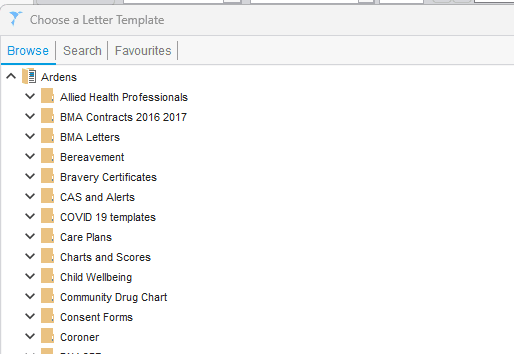
Once you have selected the relevant template, click OK to return to the previous screen, then Write Now to open the template.
⚠️ Please note: Letter templates can be added to your favourites.
❓ FAQs
Do letter templates automatically populate patient information?
Yes. Ardens Letter Templates are designed to automatically pull relevant information from the patient record, reducing the need for manual data entry.
Can letter templates be used for multiple patients?
Yes. Many letter templates can be used individually within a patient record or generated in bulk where appropriate.
Can practice details be automatically included?
Yes. Templates can automatically include practice information such as the practice name, address, and contact details.
🏫 Additional Support
Complete the Getting Started with Ardens SystmOne academy course
Book training for your GP Practice, PCN or ICB
Contact our Support Team for support in real time