We’re updating our Knowledge Base
We’re currently transitioning Ardens Clinical support articles to this new Knowledge Base. Content will be added progressively, so you may find limited articles available at this stage.
In the meantime, you can access our full support resources on our existing sites:
We’ll continue to expand this site, so please check back regularly.
ℹ️ Introduction
This article explains how Ardens Data Quality Alerts work within EMIS Web. By the end of this guide, you will understand how Data Quality Alerts help improve coding accuracy, identify potential recording issues, and support high-quality patient records.
Background
Accurate and consistent clinical coding is essential for patient care, reporting, population health management, and contractual requirements such as QOF and local incentive schemes.
With the wide range of SNOMED codes available, it can be easy to select an incorrect code or miss important information when recording data. These issues can affect patient registers, reporting, searches, recalls, and achievement monitoring.
Ardens Data Quality Alerts help identify these issues at the point of data entry, enabling users to correct them in real time.
How Ardens Can Help
Ardens Data Quality Alerts continuously monitor information being entered into EMIS Web and notify users when a potential coding issue or missing requirement is identified.
Key benefits include:
Improving coding accuracy
Supporting data quality across the organisation
Reducing reporting discrepancies
Supporting QOF and local contract achievement
Helping maintain accurate disease registers
Identifying issues at the point of entry rather than during retrospective audits
Data Quality Alerts are enabled by default and work in real time as data is recorded.
⚠️How the Alerts Work
Data Quality Alerts are triggered automatically when information is entered into a patient's record.
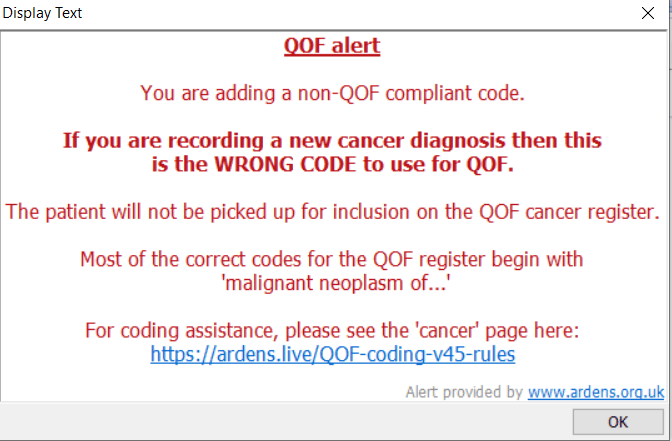
When a potential issue is identified, an alert is displayed explaining:
What the issue is
Why it may affect data quality
Any action that may be required
✅Types of Alerts
Ardens provides a wide range of Data Quality Alerts designed to improve the quality and consistency of patient records.
Examples include:
Incorrect clinical coding
Coding that may not support QOF reporting
Missing monitoring information
Missing register requirements
Recording inconsistencies
Administrative coding issues
Data entry prompts to support accurate recording
Alerts are designed to identify important issues while minimising unnecessary interruptions to users.
🚨Responding to an Alert
When a Data Quality Alert appears:
Review the information displayed.
Consider whether any changes are required.
Update the clinical record if appropriate.
Continue recording information as normal.
In many cases, the alert will suggest the preferred code or action needed to resolve the issue.
❌ Deactivate an Alert
Data Quality Alerts are enabled by default and are designed to identify data quality issues.
While alerts can be managed at practice level, Ardens strongly recommends the alerts remain active to help ensure important information is not missed.
If a practice chooses to deactivate an alert:
Go to the EMIS Ball
Select Configuration > Resource Publisher
Select Shared folders
Locate the Ardens Folder
Open the QOF Protocol folder
Right-click on the relevant alert and select Status > Deactivate
⚠️Please note: Deactivating an alert will disable it for all users within the organisation.
❓FAQs
Who can see Data Quality Alerts?
Data Quality Alerts are available to all users recording information within EMIS Web.
Are Data Quality Alerts enabled automatically?
Yes. Data Quality Alerts are installed as active when Ardens is deployed within EMIS Web.
Can Data Quality Alerts be deactivated?
Data Quality Alerts can be managed at practice level, although Ardens recommends that they remain active to support high-quality data recording.
🏫 Additional Support
Complete the Getting Started with Ardens EMIS academy course
Book training for your GP Practice, PCN or ICB
Contact our Support Team for support in real time