We’re updating our Knowledge Base
We’re currently transitioning Ardens Clinical support articles to this new Knowledge Base. Content will be added progressively, so you may find limited articles available at this stage.
In the meantime, you can access our full support resources on our existing sites:
We’ll continue to expand this site, so please check back regularly.
ℹ️ Introduction
This article provides an overview of Ardens Patient Status Alerts within SystmOne. By the end of this guide, you will understand what Patient Status Alerts are, how they support clinical workflows, and where to find them within a patient record.
Background
When reviewing a patient record, it is important to quickly identify key clinical information, long-term conditions, medication monitoring requirements, and administrative actions. Without clear visual indicators, clinicians and administrative staff may need to search through multiple areas of the record to find relevant information.
Patient Status Alerts provide a visual summary of important information directly within the patient record, helping users quickly identify key patient details and take appropriate action where required.
How Ardens Can Help
Ardens Patient Status Alerts are designed to support safer, more efficient consultations by displaying important clinical and administrative information at a glance.
Key benefits include:
Providing a quick summary of important patient information
Highlighting long-term conditions and disease registers
Identifying medication monitoring requirements
Improving visibility of administrative actions and alerts
Reducing the need to search through the patient record
Supporting proactive patient care
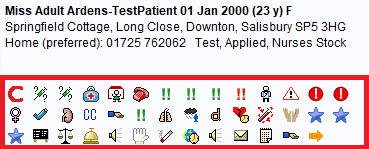
Patient Status Alerts appear as icons beneath the patient's demographic details and can be selected to launch associated templates, protocols, or workflows where applicable.
📍 Access Patient Status Alerts
Patient Status Alerts are displayed automatically within the patient record.
To view the alerts:
Open the patient's record
Locate the patient's demographic details at the top of the screen
Review the Patient Status Alert icons displayed beneath the demographic information
Select an alert where available to access related templates, protocols, or additional information
⚠️ Ardens Patient Status Alerts
When a new patient status alert is published to an organisation group on SystmOne, it is by default published as 'active'. Ardens therefore only produces certain patient status alerts; this is to avoid too many alerts that may cause distraction and performance issues.
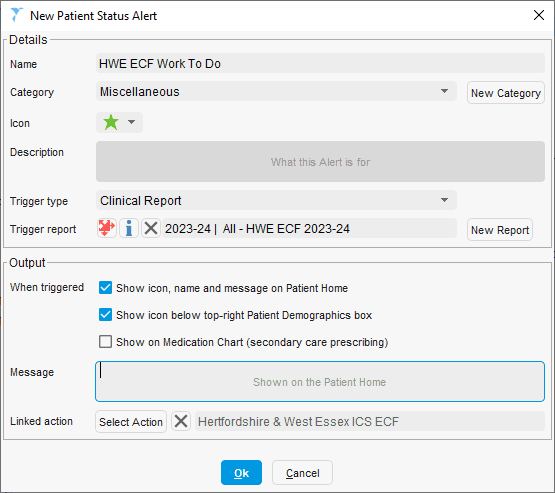
GP practices may wish to have a patient status alert for a specific Ardens report.
To set up an alert:
Go to Setup > Data Output > Patient Status Alert
Click New Patient Status Alert
Complete the New Patient Status Alert screen, including details and output
Click Ok. You can then publish this locally or via an organisation group
❓ FAQs
What are Patient Status Alerts?
Patient Status Alerts are icons displayed beneath the patient's demographic details that provide a quick summary of important clinical and administrative information.
Can different patients have different alerts?
Yes. The alerts displayed are specific to each patient and depend on their clinical history, diagnoses, medications, and recorded codes.
Can I access templates from Patient Status Alerts?
Yes. Some alerts provide direct access to associated templates, protocols, referral forms, or clinical workflows.
🏫 Additional Support
Complete the Getting Started with Ardens SystmOne academy course
Book training for your GP Practice, PCN or ICB
Contact our Support Team for support in real time